Loading
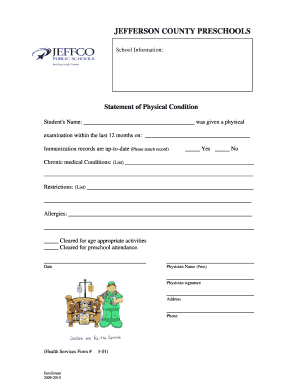
Get Statement Of Physical Condition - Jeffco Public Schools - Wwacademy
How it works
-

Open form follow the instructions
-

Easily sign the form with your finger
-

Send filled & signed form or save
How to fill out the Statement Of Physical Condition - JEFFCO Public Schools - Wwacademy online
Filling out the Statement Of Physical Condition is an essential step in ensuring the health and safety of students at JEFFCO Public Schools. This guide will take you through each component of the form, providing clear instructions on how to complete it effectively.
Follow the steps to accurately complete the form online.
- Click the 'Get Form' button to obtain the form and open it in the editor.
- Begin by entering the student's name in the designated field. This should be the full name of the student who is undergoing the physical examination.
- Next, input the date the physical examination was completed in the specified section. Ensure that this date reflects an examination conducted within the last 12 months.
- Indicate whether the student's immunization records are up-to-date by selecting 'Yes' or 'No.' If the answer is 'No,' please attach the necessary immunization records separately.
- Document any chronic medical conditions by listing them in the space provided. Be specific and detailed to give a clear understanding of the student's health needs.
- In the restrictions section, outline any limitations that the student may have regarding physical activities or participation. This allows staff to accommodate the student's needs appropriately.
- Fill in any allergies that the student has in the proper field to ensure proper care and attention in the school environment.
- Choose the relevant options for clearance by marking the checkboxes for 'Cleared for age appropriate activities' and 'Cleared for preschool attendance' as applicable.
- In the lower portion of the form, input the physician's name in print, followed by their signature to validate the examination.
- Finally, provide the physician's address and phone number in the respective fields to ensure easy communication if necessary.
- After completing all sections of the form, save your changes, and explore options to download, print, or share the form for submission.
Complete your document online to ensure a smooth process for student enrollment and health management.
Call (502) 313-HELP (4357). We are here to help! The JCPS Call Center ensures families and students have access to correct and consistent information as quickly as possible, with a dedicated help line operated year-round and with extended hours when school is open from 6 a.m. to 6 p.m., Monday through Friday.
Industry-leading security and compliance
US Legal Forms protects your data by complying with industry-specific security standards.
-
In businnes since 199725+ years providing professional legal documents.
-
Accredited businessGuarantees that a business meets BBB accreditation standards in the US and Canada.
-
Secured by BraintreeValidated Level 1 PCI DSS compliant payment gateway that accepts most major credit and debit card brands from across the globe.