Loading
Form preview
  • US Legal Forms
  • Form Library
  • More Forms
  • More Uncategorized Forms
  • Meniett Referral Form

Get Meniett Referral Form

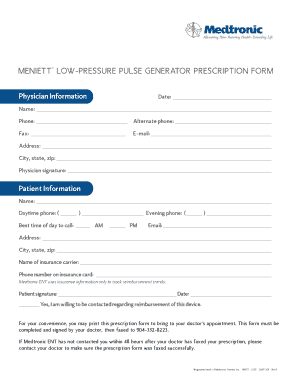
MENIETT LOW-PRESSURE PULSE GENERATOR PRESCRIPTION FORM Physician Information Date: Name: Phone: Alternate phone: Fax: E-mail: Address: City, state, zip: Physician signature: Patient Information Name:.

How it works

  1. Open form

    Open form follow the instructions

  2. Easily sign form

    Easily sign the form with your finger

  3. Share form

    Send filled & signed form or save

How to fill out the Meniett Referral Form online

Filling out the Meniett Referral Form online can streamline the process of obtaining necessary medical devices. This guide provides step-by-step instructions to help you complete the form accurately and efficiently.

Follow the steps to successfully complete the Meniett Referral Form.

  1. Click ‘Get Form’ button to obtain the form and open it in the editor.
  2. Begin by entering the date in the designated field. Make sure to use the correct format to avoid any confusion.
  3. Fill in the physician's name and contact information, including phone, alternate phone, fax, email, and address. Ensure all details are accurate for proper communication.
  4. Next, complete the patient information section. Input the patient's name, daytime phone number, and evening phone number. Indicate the best time to call the patient.
  5. Provide the patient's email address and physical address, including city, state, and zip code. This information is crucial for follow-up communications.
  6. Fill in the insurance carrier's name and the corresponding phone number found on the insurance card. This step assists in tracking reimbursement trends.
  7. The patient must sign and date the form to confirm accuracy and consent. Additionally, indicate if the patient is willing to be contacted regarding reimbursement.
  8. Review all entered information for any errors or omissions. Once confirmed, save changes to ensure no data is lost.
  9. You may choose to download, print, or share the completed form. Ensure it is printed and signed by the physician before faxing it to the specified number.

Complete your Meniett Referral Form online today for a smoother process.

Get form

Experience a faster way to fill out and sign forms on the web. Access the most extensive library of templates available.
Get form

Related content

Medtronic, Inc. - SEC.gov
Our Annual Reports on Form 10-K, Quarterly Reports on Form 10-Q, Current ... Meniett...
Learn more
Division of Neurotology - Amazon AWS
... and perfusion, labyrinthectomy and the Meniett™ device ... This rotation is directed...
Learn more

Related links form

Online Par Q Form 2020 Palm Beach County Community Service Form 2020 Tsp Form Oc 01 10 North Somerset Council Discretionary Housing Payment

Questions & Answers

Get answers to your most pressing questions about US Legal Forms API.

Contact support

But, consistent with The Bluebook, the first citation should make it very clear what is being referenced, such as (Bates Jones000001) or (Bates d123-002), and subsequent consecutive cites should follow the usual practice of Id. followed by the page number, such as (Id. 000017) or (Id. -017).

The original machine described by Bates allowed numbering with a four-digit sequence, ranging from 0000 to 9999. For example, page 852 in a document set would be 0852. Courts and law firms quickly adopted this system.

Then follow these steps to automatically add Bates Numbers to each page in the document set: Open the file. Click Tools. Select Edit PDF. Choose More. Click Bates Numbering and Add. Select Output Options to customize the serial numbers. Click OK.

The Bates prefix is specified with at least one letter and up to six letters and sequential numbering with seven digits, starting 0000001, unless otherwise instructed at or prior to time of job commencement. The Lexbe eDiscovery Platform (LEP) does not allow Bates Stamping without a prefix.

Bates stamping is the process of applying a set of identifying numbers to a document collection of PDFs to label and identify them. You can use DocPreviewer to apply a Bates stamp to documents — even if you don't import them into a case spreadsheet.

To add a Bates Number: Select Edit > Insert > Bates Numbering and select Add from the drop-down list to open the Add Bates Numbers dialog box. Click Add Files. ... Click Output to display the Add Bates Numbers - Output Rules dialog box. ... Click OK in the Add Bates Numbers dialog box to call the Header and Footer dialog box.

A unique numeric or alphanumeric identifier attached to individual documents and pages to make each document and page easily identifiable and retrievable. Bates numbers are used in the legal, medical, and business fields.

Insert cursor into the “Right Footer Text” box and then click on “Insert Bates Number”. Add an alpha prefix and specify the number of digits you want. Click Ok. Adobe's coding will be inserted in the “Right Footer Text” box and you will see a preview of your Bates number.

Get This Form Now!

Use professional pre-built templates to fill in and sign documents online faster. Get access to thousands of forms.
Get form
If you believe that this page should be taken down, please follow our DMCA take down processhere.

Industry-leading security and compliance

US Legal Forms protects your data by complying with industry-specific security standards.
  • In businnes since 1997
    25+ years providing professional legal documents.
  • Accredited business
    Guarantees that a business meets BBB accreditation standards in the US and Canada.
  • Secured by Braintree
    Validated Level 1 PCI DSS compliant payment gateway that accepts most major credit and debit card brands from across the globe.
Get Meniett Referral Form
Get form
  • Adoption
  • Bankruptcy
  • Contractors
  • Divorce
  • Home Sales
  • Employment
  • Identity Theft
  • Incorporation
  • Landlord Tenant
  • Living Trust
  • Name Change
  • Personal Planning
  • Small Business
  • Wills & Estates
  • Packages A-Z
  • Affidavits
  • Bankruptcy
  • Bill of Sale
  • Corporate - LLC
  • Divorce
  • Employment
  • Identity Theft
  • Internet Technology
  • Landlord Tenant
  • Living Wills
  • Name Change
  • Power of Attorney
  • Real Estate
  • Small Estates
  • Wills
  • All Forms
  • Forms A-Z
  • Form Library
  • Legal Hub
  • About Us
  • Help Portal
  • Legal Resources
  • Blog
  • Affiliates
  • Contact Us
  • Delete My Account
  • Site Map
  • Industries
  • Forms in Spanish
  • Localized Forms
  • State-specific Forms
  • Forms Kit
  • Real Estate Handbook
  • All Guides
  • Notarize
  • Incorporation services
  • For Consumers
  • For Small Business
  • For Attorneys
  • USLegal
  • FormsPass
  • pdfFiller
  • signNow
  • altaFlow
  • DocHub
  • Instapage
Form Packages
  • Adoption
  • Bankruptcy
  • Contractors
  • Divorce
  • Home Sales
  • Employment
  • Identity Theft
  • Incorporation
  • Landlord Tenant
  • Living Trust
  • Name Change
  • Personal Planning
  • Small Business
  • Wills & Estates
  • Packages A-Z
Form Categories
  • Affidavits
  • Bankruptcy
  • Bill of Sale
  • Corporate - LLC
  • Divorce
  • Employment
  • Identity Theft
  • Internet Technology
  • Landlord Tenant
  • Living Wills
  • Name Change
  • Power of Attorney
  • Real Estate
  • Small Estates
  • Wills
  • All Forms
  • Forms A-Z
  • Form Library
Customer Service
  • Legal Hub
  • About Us
  • Help Portal
  • Legal Resources
  • Blog
  • Affiliates
  • Contact Us
  • Delete My Account
  • Site Map
  • Industries
  • Forms in Spanish
  • Localized Forms
  • State-specific Forms
  • Forms Kit
Legal Guides
  • Real Estate Handbook
  • All Guides
Prepared for you
  • Notarize
  • Incorporation services
Our Customers
  • For Consumers
  • For Small Business
  • For Attorneys
Our Sites
  • USLegal
  • FormsPass
  • pdfFiller
  • signNow
  • altaFlow
  • DocHub
  • Instapage
Social Media
Call us now toll free:
+1 833 426 79 33
As seen in:
© Copyright 1999-2026 airSlate Legal Forms, Inc. 3720 Flowood Dr, Flowood, Mississippi 39232
  • Your Privacy Choices
  • Terms of Service
  • Privacy Notice
  • Content Takedown Policy
  • Bug Bounty Program