Loading
Form preview
  • US Legal Forms
  • Form Library
  • More Forms
  • More Uncategorized Forms
  • Version: 03 Rma Sheet (return Material Authorization ... - Teltonika - Teltonika

Get Version: 03 Rma Sheet (return Material Authorization ... - Teltonika - Teltonika

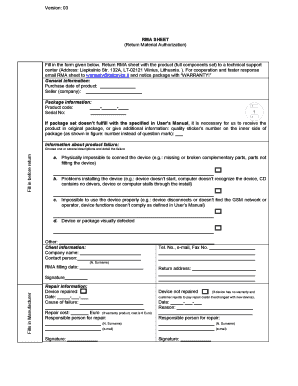
Version: 03 RMA SHEET (Return Material Authorization) Fill in the form given below. Return RMA sheet with the product (full components set) to a technical support center (Address: Liepkalnio Str.

How it works

  1. Open form

    Open form follow the instructions

  2. Easily sign form

    Easily sign the form with your finger

  3. Share form

    Send filled & signed form or save

How to fill out the Version: 03 RMA SHEET (Return Material Authorization) - Teltonika online

This guide provides clear instructions on how to effectively fill out the Version: 03 RMA SHEET for the return of materials to Teltonika. By following the detailed steps, users can ensure a smooth and efficient return process.

Follow the steps to complete the RMA sheet accurately.

  1. Click the ‘Get Form’ button to obtain the form and open it in your preferred editor.
  2. Fill in the purchase date of the product in the designated field.
  3. Provide the seller's company name in the seller section.
  4. In the package information section, enter the product code and serial number as requested.
  5. If the product set does not match the specifications outlined in the User's Manual, indicate the quality sticker’s number on the inner side of the package.
  6. Detail the information about the product failure by choosing one or more descriptions from the provided list (e.g., physical connection issues, installation problems, usage issues, etc.), and elaborate on the specifics of the failure.
  7. Enter your telephone number, email, and fax number in the designated client information fields.
  8. Complete the company name and contact person fields, ensuring to include the full name.
  9. Record the date you are filling out the RMA sheet.
  10. Sign the document where indicated to finalize your submission.
  11. Make sure to save any changes, and choose to download, print, or share the completed form as needed.

Complete the RMA sheet online to initiate your return process efficiently.

Get form

Experience a faster way to fill out and sign forms on the web. Access the most extensive library of templates available.
Get form

Related content

LF-134-CAN-M Low Frequency RFID Reader User Manual
Aug 25, 2015 — 3 Safety instructions . ... 12.2 Return Material Authorization ....
Learn more

Related links form

Form 33 109f6 Memo Revisions To The Application Form - Health Gov On Sd2883 Form Nsnp 200

Questions & Answers

Get answers to your most pressing questions about US Legal Forms API.

Contact support

CLI is a console interface similar to the Linux Terminal program. Use the following credentials to log in: Username: root. Password: router's password.

Open the WebUI configuration screen by visiting http://192.168.1.1 from a web browser. Login to the WebUI using the default username admin and default password admin01 .

A return merchandise authorization (RMA), return authorization (RA) or return goods authorization (RGA) is a part of the process of returning a product to receive a refund, replacement, or repair to which buyer and seller agree during the product's warranty period.

If the reset button is pressed for at least 12 seconds (by default), the device will perform a factory reset and reboot. Signal strength LEDs indicate the elapsed time while holding the reset button. Start of the factory reset will be indicated by flashing of all 5 signal strength LEDs.

1:11 2:08 And type 192.168. 1.1 two once you get to the router login screen enter the username admin. And theMoreAnd type 192.168. 1.1 two once you get to the router login screen enter the username admin. And the password admin01. For first time setup. Three after logging in you'll need to set up a new password.

To enter the router's Web interface (WebUI), type http://192.168.1.1 into the URL field of your Internet browser. After you login, you will be prompted to change your password for security reasons.

The default login information for RUT241 is provided below: Default Address (LAN IP): 192.168. 1.1. Default Username: admin.

The default WiFi SSID name and password is printed on the back of the router. Open the WebUI configuration screen by visiting http://192.168.1.1 from a web browser. Login to the WebUI using the default username admin and default password admin01 .

Get This Form Now!

Use professional pre-built templates to fill in and sign documents online faster. Get access to thousands of forms.
Get form
If you believe that this page should be taken down, please follow our DMCA take down processhere.

Industry-leading security and compliance

US Legal Forms protects your data by complying with industry-specific security standards.
  • In businnes since 1997
    25+ years providing professional legal documents.
  • Accredited business
    Guarantees that a business meets BBB accreditation standards in the US and Canada.
  • Secured by Braintree
    Validated Level 1 PCI DSS compliant payment gateway that accepts most major credit and debit card brands from across the globe.
Get Version: 03 RMA SHEET (Return Material Authorization ... - Teltonika - Teltonika
Get form
  • Adoption
  • Bankruptcy
  • Contractors
  • Divorce
  • Home Sales
  • Employment
  • Identity Theft
  • Incorporation
  • Landlord Tenant
  • Living Trust
  • Name Change
  • Personal Planning
  • Small Business
  • Wills & Estates
  • Packages A-Z
  • Affidavits
  • Bankruptcy
  • Bill of Sale
  • Corporate - LLC
  • Divorce
  • Employment
  • Identity Theft
  • Internet Technology
  • Landlord Tenant
  • Living Wills
  • Name Change
  • Power of Attorney
  • Real Estate
  • Small Estates
  • Wills
  • All Forms
  • Forms A-Z
  • Form Library
  • Legal Hub
  • About Us
  • Help Portal
  • Legal Resources
  • Blog
  • Affiliates
  • Contact Us
  • Delete My Account
  • Site Map
  • Industries
  • Forms in Spanish
  • Localized Forms
  • State-specific Forms
  • Forms Kit
  • Real Estate Handbook
  • All Guides
  • Notarize
  • Incorporation services
  • For Consumers
  • For Small Business
  • For Attorneys
  • USLegal
  • FormsPass
  • pdfFiller
  • signNow
  • altaFlow
  • DocHub
  • Instapage
Form Packages
  • Adoption
  • Bankruptcy
  • Contractors
  • Divorce
  • Home Sales
  • Employment
  • Identity Theft
  • Incorporation
  • Landlord Tenant
  • Living Trust
  • Name Change
  • Personal Planning
  • Small Business
  • Wills & Estates
  • Packages A-Z
Form Categories
  • Affidavits
  • Bankruptcy
  • Bill of Sale
  • Corporate - LLC
  • Divorce
  • Employment
  • Identity Theft
  • Internet Technology
  • Landlord Tenant
  • Living Wills
  • Name Change
  • Power of Attorney
  • Real Estate
  • Small Estates
  • Wills
  • All Forms
  • Forms A-Z
  • Form Library
Customer Service
  • Legal Hub
  • About Us
  • Help Portal
  • Legal Resources
  • Blog
  • Affiliates
  • Contact Us
  • Delete My Account
  • Site Map
  • Industries
  • Forms in Spanish
  • Localized Forms
  • State-specific Forms
  • Forms Kit
Legal Guides
  • Real Estate Handbook
  • All Guides
Prepared for you
  • Notarize
  • Incorporation services
Our Customers
  • For Consumers
  • For Small Business
  • For Attorneys
Our Sites
  • USLegal
  • FormsPass
  • pdfFiller
  • signNow
  • altaFlow
  • DocHub
  • Instapage
Social Media
Call us now toll free:
+1 833 426 79 33
As seen in:
© Copyright 1999-2026 airSlate Legal Forms, Inc. 3720 Flowood Dr, Flowood, Mississippi 39232
  • Your Privacy Choices
  • Terms of Service
  • Privacy Notice
  • Content Takedown Policy
  • Bug Bounty Program