Loading
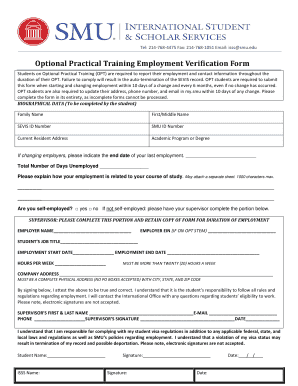
Get Optional Practical Training Employment Verification Form - Smu - Smu
How it works
-

Open form follow the instructions
-

Easily sign the form with your finger
-

Send filled & signed form or save
How to fill out the Optional Practical Training Employment Verification Form - SMU - Smu online
Filling out the Optional Practical Training Employment Verification Form is an essential step for students on Optional Practical Training. This guide provides clear instructions to help you accurately complete the form online, ensuring compliance with reporting requirements.
Follow the steps to complete the form accurately.
- Press the ‘Get Form’ button to access the Optional Practical Training Employment Verification Form and open it in your preferred editor.
- Begin by entering your biographical data as the student. Complete the following fields: Family Name, First/Middle Name, SEVIS ID Number, SMU ID Number, Current Resident Address, and Academic Program or Degree.
- If you are changing employers, indicate the end date of your last employment and state the total number of days you have been unemployed.
- Briefly explain how your new employment relates to your course of study. You have a maximum of 1000 characters and may attach a separate sheet if necessary.
- Indicate whether you are self-employed by checking the appropriate box. If you are not self-employed, have your supervisor complete the next section.
- Request your supervisor to fill in their details, including: Employer Name, Employer EIN (if you are on OPT STEM), Student’s Job Title, Employment Start Date, Employment End Date, and Hours per Week. Remember, the hours per week must be more than twenty.
- Provide the complete company address, ensuring it is a physical address with city, state, and zip code (PO Boxes are not acceptable).
- Your supervisor will need to sign the form, affirming the information is accurate and true. Note that electronic signatures are not permissible.
- Complete the final section that requires you to acknowledge your responsibilities regarding your student visa regulations. Include your name, date, and handwritten signature as required.
- Once all sections are filled out accurately, save your changes to the form. You can download, print, or share it as necessary.
Complete your Optional Practical Training Employment Verification Form online and ensure your compliance with reporting requirements.
Optional Practical Training (OPT) is temporary employment that is directly related to an F-1 student's major area of study.
Industry-leading security and compliance
US Legal Forms protects your data by complying with industry-specific security standards.
-
In businnes since 199725+ years providing professional legal documents.
-
Accredited businessGuarantees that a business meets BBB accreditation standards in the US and Canada.
-
Secured by BraintreeValidated Level 1 PCI DSS compliant payment gateway that accepts most major credit and debit card brands from across the globe.