Loading
Form preview
  • US Legal Forms
  • Other Templates
  • More Forms
  • More Uncategorized Forms
  • Student Name: Osis#: Dob: / / School: Grade: Checklist Based On Common Core Learning Standards

Get Student Name: Osis#: Dob: / / School: Grade: Checklist Based On Common Core Learning Standards

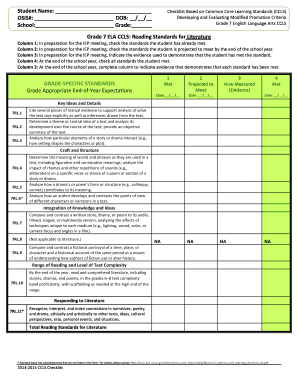
Student Name: OSIS#: DOB: / / School: Grade: Checklist Based on Common Core Learning Standards (CCLS) Developing and Evaluating Modified Promotion Criteria Grade 7 English Language Arts CCLS Grade.

How it works

  1. Open form

    Open form follow the instructions

  2. Easily sign form

    Easily sign the form with your finger

  3. Share form

    Send filled & signed form or save

How to fill out the Student Name: OSIS#: DOB: / / School: Grade: Checklist Based On Common Core Learning Standards online

Filling out the Student Name: OSIS#: DOB: / / School: Grade: Checklist Based On Common Core Learning Standards is essential for documenting a student's progress towards meeting Common Core Learning Standards. This guide offers a clear step-by-step approach to help you complete this important form effectively.

Follow the steps to accurately complete the checklist for your student.

  1. To begin, click the ‘Get Form’ button to access the checklist form. This will open the document in your editor, where you can begin filling it out.
  2. Enter the student's full name in the designated 'Student Name' field. Ensure the name is spelled correctly as it appears on official documents.
  3. Fill in the 'DOB' section with the student's date of birth in the format MM/DD/YYYY. This detail is important for verifying the student's age and grade eligibility.
  4. In the 'School' field, write the name of the school the student attends. Make sure this matches the official name used by the educational institution.
  5. Proceed to the checklist sections, where you will check off the standards the student has already met and those they are projected to meet by the end of the school year in the appropriate columns.
  6. For each standard, indicate the evidence in the 'How Measured (Evidence)' column that demonstrates the student has met the standard. This may include assessments, projects, or other criteria used in the evaluation.
  7. After completing the checklist, review all entries for accuracy and completeness before finalizing the document.
  8. Once you have ensured that all necessary fields are filled out correctly, save your changes, download the form, and share or print it as needed for IEP meetings or other purposes.

Take action today and complete your documents online for a smooth educational experience.

Get form

Experience a faster way to fill out and sign forms on the web. Access the most extensive library of templates available.
Get form

Related content

Student Information Packet - The Bronx High School...
Apr 2, 2020 — For your convenience the list below describes the forms and ... To learn...
Learn more
Rembrandt - Wikipedia
Rembrandt Harmenszoon van Rijn was a Dutch draughtsman, painter, and printmaker. ... In...
Learn more

Related links form

Undergraduate Scholarship & Grant-in-Aid Application - Unlv Unlv Summer Supplemental Application Form Unlv Application UNLV Internal Routing Form For Sponsored Projects - Unlv

Questions & Answers

Get answers to your most pressing questions about US Legal Forms API.

Contact support

The New York City Department of Education (NYCDOE) is the department of the government of New York City that manages the city's public school system.

NYC DOE OSIS number is a nine-digit number that is issued to all students who attend a New York City public school. The number can be found on your ID card or transcript. If you do not know the number, request if from your high school counselor.

After the DOE stops using PupilPath (aka Skedula) on June 30th, 2022 due to security issues, Beacon and other New York City public schools will start using the DOE's New York City Schools Account (NYCSA) as the primary platform for communication with families—and as the online gradebook starting this fall.

This number is located on your child's academic records and report cards. Your child's school can also give you his or her student ID number. For school contact information, visit the School Finder page. Call 311 or 212-NEW-YORK (212-639-9675) if you need more help.

Create Your Own Account Online You will need the Account Creation Code that was sent home with your child in a letter. You can also request a letter from your child's school. You will need this code and the child's 9-digit student ID number to create an NYCSA or to add additional children to an existing account.

New York City Schools Account (NYCSA)

NYC Schools Account (NYCSA) is a web-based application that lets you to see your child's academic and biographic information on any computer, phone, or tablet. The application is translated into nine languages other than English. In the account, you can see a child's: Assessments (Test Scores)

OSIS (Open Student Information System) is a lightweight and yet highly scalable system to manage the core business of higher education institutions.

Get This Form Now!

Use professional pre-built templates to fill in and sign documents online faster. Get access to thousands of forms.
Get form
If you believe that this page should be taken down, please follow our DMCA take down processhere.
Get Student Name: OSIS#: DOB: / / School: Grade: Checklist Based On Common Core Learning Standards
Get form
  • Adoption
  • Bankruptcy
  • Contractors
  • Divorce
  • Home Sales
  • Employment
  • Identity Theft
  • Incorporation
  • Landlord Tenant
  • Living Trust
  • Name Change
  • Personal Planning
  • Small Business
  • Wills & Estates
  • Packages A-Z
  • Affidavits
  • Bankruptcy
  • Bill of Sale
  • Corporate - LLC
  • Divorce
  • Employment
  • Identity Theft
  • Internet Technology
  • Landlord Tenant
  • Living Wills
  • Name Change
  • Power of Attorney
  • Real Estate
  • Small Estates
  • Wills
  • All Forms
  • Forms A-Z
  • Other Templates
  • Legal Hub
  • About Us
  • Help Portal
  • Legal Resources
  • Blog
  • Affiliates
  • Contact Us
  • Delete My Account
  • Site Map
  • Industries
  • Forms in Spanish
  • Localized Forms
  • State-specific Forms
  • Forms Kit
  • Real Estate Handbook
  • All Guides
  • Notarize
  • Incorporation services
  • For Consumers
  • For Small Business
  • For Attorneys
  • USLegal
  • FormsPass
  • pdfFiller
  • signNow
  • altaFlow
  • DocHub
  • Instapage
Form Packages
  • Adoption
  • Bankruptcy
  • Contractors
  • Divorce
  • Home Sales
  • Employment
  • Identity Theft
  • Incorporation
  • Landlord Tenant
  • Living Trust
  • Name Change
  • Personal Planning
  • Small Business
  • Wills & Estates
  • Packages A-Z
Form Categories
  • Affidavits
  • Bankruptcy
  • Bill of Sale
  • Corporate - LLC
  • Divorce
  • Employment
  • Identity Theft
  • Internet Technology
  • Landlord Tenant
  • Living Wills
  • Name Change
  • Power of Attorney
  • Real Estate
  • Small Estates
  • Wills
  • All Forms
  • Forms A-Z
  • Other Templates
Customer Service
  • Legal Hub
  • About Us
  • Help Portal
  • Legal Resources
  • Blog
  • Affiliates
  • Contact Us
  • Delete My Account
  • Site Map
  • Industries
  • Forms in Spanish
  • Localized Forms
  • State-specific Forms
  • Forms Kit
Legal Guides
  • Real Estate Handbook
  • All Guides
Prepared for you
  • Notarize
  • Incorporation services
Our Customers
  • For Consumers
  • For Small Business
  • For Attorneys
Our Sites
  • USLegal
  • FormsPass
  • pdfFiller
  • signNow
  • altaFlow
  • DocHub
  • Instapage
Social Media
Call us now toll free:
+1 833 426 79 33
As seen in:
© Copyright 1999-2026 airSlate Legal Forms, Inc. 17 Station Street, Suite 303, Brookline, MA 02445
  • Your Privacy Choices
  • Terms of Service
  • Privacy Notice
  • Content Takedown Policy
  • Bug Bounty Program