Loading
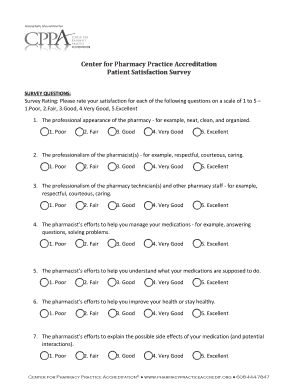
Get Pharmacy Patient Satisfaction Survey
How it works
-

Open form follow the instructions
-

Easily sign the form with your finger
-

Send filled & signed form or save
How to fill out the Pharmacy Patient Satisfaction Survey online
Completing the Pharmacy Patient Satisfaction Survey online is an essential way to provide feedback about your experience with pharmacy services. This guide offers a clear, step-by-step approach to help you navigate the survey efficiently.
Follow the steps to complete your survey effectively.
- Click 'Get Form' button to access the survey and open it in your preferred online editor.
- Begin by rating your satisfaction for each survey question on a scale of 1 to 5, where 1 represents 'Poor' and 5 represents 'Excellent'. Carefully select the rating that reflects your experience for each aspect, such as the professionalism of the pharmacists and the cleanliness of the pharmacy.
- For questions 8 and 9, if you rated any item as 'Fair' or 'Poor', provide specific feedback in the designated area to explain your concerns. In the additional comments section, feel free to share any further insights about your overall experience with the pharmacy.
- Once you have completed all sections of the survey, review your answers to ensure accuracy. You may want to double-check that all sections are filled out as intended.
- Save your changes, and then choose to download or print the completed survey, or share your responses with the pharmacy as required.
Take a moment to complete the Pharmacy Patient Satisfaction Survey online today and share your valuable feedback.
It's simple, as long as you follow these key steps. Step 1: Identify what you want to know. ... Step 2: Create your survey. ... Step 3: Choose a platform to launch your survey. ... Step 4: Evaluate the results. ... Step 5: Make Changes.