Loading
Get Registration Form - Rider University - Rider
How it works
-

Open form follow the instructions
-

Easily sign the form with your finger
-

Send filled & signed form or save
How to fill out the REGISTRATION FORM - Rider University - Rider online
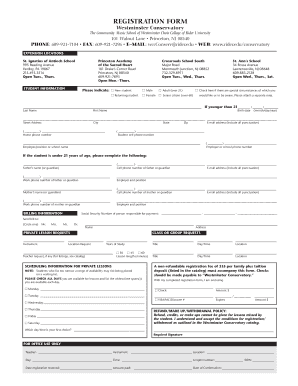
This guide provides a comprehensive overview of how to accurately complete the registration form for the Westminster Conservatory at Rider University. Following these instructions will ensure that you provide all necessary information for successful registration.
Follow the steps to complete your registration form online.
- Click the ‘Get Form’ button to access the registration form. You will be prompted to open it in an online editor, allowing you to fill it out seamlessly.
- Begin by providing your personal information in the 'Student Information' section. Indicate whether you are a new or returning student by selecting the appropriate checkbox. Fill in your last name, first name, and birth date in the specified format (month/day/year).
- Next, complete your address details, including street address, city, state, and zip code. Ensure that your email address is accurate, including all punctuation.
- You will need to provide contact information, including your home phone number and cell phone number. If applicable, include the employer or school name and the corresponding phone number.
- If you are under 21 years of age, complete the sections detailing parental or guardian information, including names, contact details, and employment information.
- For billing information, enter the Social Security number of the person responsible for payment. Specify where to send the bill by choosing a title and entering the recipient's name and address.
- In the 'Private Lesson Requests' section, list your instrument, preferred location, and number of years studied. Provide details on the lesson length and preferred days and times for lessons.
- Indicate your availability for lessons by checking all relevant days. Detail your first choice for day and time.
- A non-refundable registration fee of $35 plus the tuition deposit is required. Specify your payment method by completing the relevant section.
- Finally, review the refund, make-up, and withdrawal policy carefully. Confirm your understanding by providing your required signature.
- Once the form is complete, you can save changes, download a copy for your records, or print the document if needed. Share the form with the necessary parties to finalize your registration.
Complete your registration form online today to secure your spot at Westminster Conservatory!
Your Rider ID is a unique identification number assigned to you as a student at Rider University. This ID is crucial for accessing student services and resources, including the REGISTRATION FORM - Rider University - Rider. Keep your Rider ID handy, as you will need it throughout your time at the university.
Industry-leading security and compliance
US Legal Forms protects your data by complying with industry-specific security standards.
-
In businnes since 199725+ years providing professional legal documents.
-
Accredited businessGuarantees that a business meets BBB accreditation standards in the US and Canada.
-
Secured by BraintreeValidated Level 1 PCI DSS compliant payment gateway that accepts most major credit and debit card brands from across the globe.