Loading
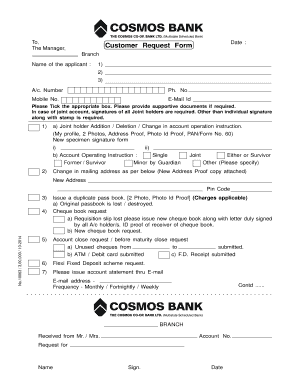
Get Cosmosbank Form
How it works
-

Open form follow the instructions
-

Easily sign the form with your finger
-

Send filled & signed form or save
How to fill out the Cosmosbank Form online
Completing the Cosmosbank Form online is a straightforward process that allows you to manage your banking requests conveniently. This guide will walk you through each section of the form, providing step-by-step instructions to help you submit your requests accurately and efficiently.
Follow the steps to successfully fill out the Cosmosbank Form online.
- Press the ‘Get Form’ button to access the Cosmosbank Form and open it in your preferred editor.
- Begin by entering the date and the branch name in the designated fields at the top of the form.
- Fill in your name as the applicant in the provided space, ensuring that all names are completed as they appear on your official documents.
- Provide your account number, phone number, mobile number, and email ID in the respective fields, ensuring accuracy for communication purposes.
- Review the available options and tick the appropriate box corresponding to your request. If additional documents are required, prepare to submit those alongside the form.
- If you are requesting changes related to joint holder accounts, complete the section regarding joint holder addition, deletion, or changes in account operation instructions, and include relevant documents such as identification proof.
- Complete any additional requests for changes in mailing address or to issue a duplicate passbook as necessary, ensuring that all required documents are attached.
- If you wish to close the account or initiate other specific requests, check the appropriate boxes and provide any necessary supporting documents.
- In the declaration section, confirm that you have read and understood the terms and conditions related to your requests by including your signature.
- Before submitting, review all entered information for accuracy. You can then save changes, download a copy for your records, or print the completed form for submission.
Get started by completing your Cosmosbank Form online today!
Documents of All Partners - Proof of Identity, Proof of Residential Address, Latest Colour Photographs. Documents of Business Concern- 1) Registration Certificate, if registered.