Loading
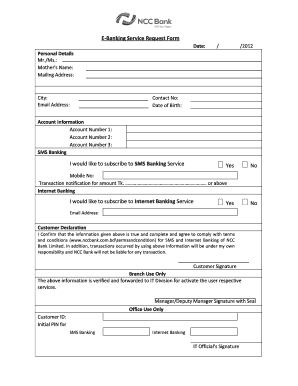
Get Ncc Bank Internet Banking
How it works
-

Open form follow the instructions
-

Easily sign the form with your finger
-

Send filled & signed form or save
How to fill out the Ncc Bank Internet Banking online
This guide provides comprehensive instructions on how to complete the Ncc Bank Internet Banking form online. By following these steps, you will be able to successfully fill out your request for Internet Banking services.
Follow the steps to fill out the form correctly
- Click ‘Get Form’ button to obtain the form and open it in the editor.
- Begin by providing your personal details. Fill in the appropriate fields including the title (Mr./Ms.), mother's name, mailing address, city, email address, contact number, and date of birth.
- In the account information section, enter your account numbers up to three accounts as required. Below this, specify if you would like to subscribe to SMS Banking services by selecting 'Yes' or 'No' and provide your mobile number.
- Indicate the transaction notification amount for SMS banking by entering the specified Tk. amount or above in the designated field.
- Next, express your interest in Internet Banking services by selecting 'Yes' or 'No'. If you choose 'Yes', ensure to provide your email address for further communication.
- Read the customer declaration carefully. Confirm that all the information provided is accurate and complete. Acknowledge your understanding of the responsibility for transactions that occur using the provided information.
- Finally, sign the customer signature field to validate your request. Make sure to review all entered information before concluding.
- Once the form is completed, you can save your changes. Consider downloading or printing the document for your records, or sharing it with the relevant department if required.
Complete your e-banking service request form online today!
Here's how to open a bank account online in a few steps: Choose the type of account you want. Collect your personal documents and information in advance. Fill out the application with your personal details. Fund your new account.