Ou ever been pregnant? YES NO If YES, how many pregnancies?_________ Miscarriages?_________ Are your periods regular? YES NO Do you have pain with your periods? YES NO Date of Last Period__________________ Have you ever had a Sexually Transmitted Disease? Gonorrhea Syphilis NEW YORK UNIVERSITY PRE EMPLOYMENT PHYSICAL NAME:_____________________________________________ VACCINATION HISTORY: Last known Tuberculin Skin Test? _________ Results: Negative Positive - If positive was a Chest X ray done.

Open form follow the instructions

Easily sign the form with your finger

Send filled & signed form or save
How to fill out the NYU Pre Employment Physical online
Completing the NYU Pre Employment Physical form online is a crucial step for prospective employees at New York University. This guide will walk you through each section of the form to ensure you provide all necessary information accurately and efficiently.
Follow the steps to complete your NYU Pre Employment Physical form online.
- Press the ‘Get Form’ button to access the NYU Pre Employment Physical document and open it in your preferred editor.
- Begin by filling out the top section, which requires information such as the department and job type you are applying for. Be sure to print clearly.
- Provide your personal details accurately, including your last name, first name, middle initial, address, city, state, zip code, date of birth, age, and phone number.
- In the emergency contact section, provide the name, relationship, and phone number of a person to notify in case of an emergency.
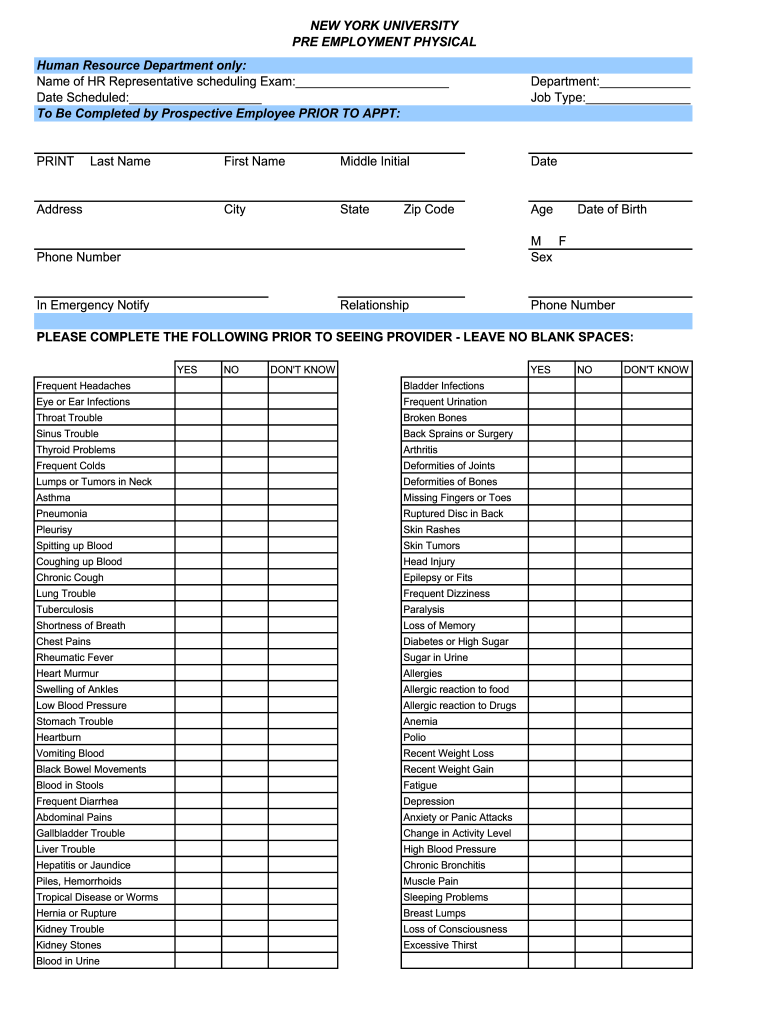
- Carefully read through the health history questions. Indicate 'yes,' 'no,' or 'don’t know' for each item related to your medical history. Ensure there are no blank spaces.
- If applicable, fill in details regarding any past hospital visits, missed work due to illness, and any current medical treatments. Specific details may be requested here.
- Complete the lifestyle questions providing information related to smoking and alcohol consumption, detailing frequency and quantity.
- For individuals assigned male or female, complete the respective sections regarding reproductive and related health history.
- Fill out your vaccination history, including the last tuberculin skin test and tetanus shot, and provide details of any hepatitis B vaccination.
- Provide your primary healthcare provider's name, address, and phone number.
- Sign and print your name in the designated area to confirm that you have provided accurate information to the best of your knowledge.
- Once all sections are completed, review the form to ensure accuracy. Save your changes, then download or print the completed form for submission.
Complete your NYU Pre Employment Physical form online today for an easier onboarding process.
Experience a faster way to fill out and sign forms on the web. Access the most extensive library of templates available.
Related content
Must pass pre-employment physical examination. Participation in the seasonal influenza...
YES. NO. DON'T KNOW. YES. NO. DON'T KNOW. Frequent Headaches. Bladder Infections. Eye or...
A task is any unit of work (job step) to be done by the CPU under the direction of the...
Get answers to your most pressing questions about US Legal Forms API.
What do you wear to a pre employment physical?
For your NYU Pre Employment Physical, wear comfortable clothing that allows for easy movement. Opt for loose-fitting attire like a t-shirt and athletic pants, as you may need to undergo physical tests or examinations. Additionally, consider wearing shoes suitable for walking or light activity during the assessment. Being comfortable can help you focus on the process and ensure you present your best self.
Can I fail a pre-employment physical?
Yes, it is possible to fail a NYU Pre Employment Physical if the results indicate a medical issue that does not meet the employer's requirements. Reasons for failure may include specific medical conditions or failing certain tests. However, it’s important to view this as a chance for growth, as addressing health issues could lead to better outcomes in the future. Always check with your healthcare provider or the testing facility for guidance.
What happens if you fail a pre employment physical?
Failing a NYU Pre Employment Physical can impact your eligibility for the job you applied for. Generally, employers may provide details on why you did not pass and what the next steps are. If you receive the results, you have the option to retest or appeal the decision. Understanding your specific situation is vital, as it can guide your next steps in securing employment.
What if I fail a pre-employment test?
If you fail a pre-employment test related to your NYU Pre Employment Physical, you will likely be notified by the employer or the clinic. Different companies have various protocols; some may offer a retest after a specified period. It’s crucial to understand your rights and options, as clarification can aid in your job journey. Additionally, you can discuss any concerns with your potential employer to better understand the implications.
How long does it take for a pre employment physical to come back?
The results of your NYU Pre Employment Physical typically take between a few days to a week to process. The timing can depend on various factors, such as the specific tests conducted and the clinic's workload. It's essential to plan accordingly, so you know when you can expect to receive your results. Staying informed helps you prepare for the next steps in your job application process.
What is checked in a pre employment physical?
During a pre-employment physical, several assessments are typically performed to evaluate your health. The NYU Pre Employment Physical may include checking your vision, hearing, vital signs, and overall physical fitness. Additionally, blood tests or other screenings might be conducted to ensure that you are fit for the job demands. Having a comprehensive examination ensures your readiness for your new role.
What happens at a pre-employment physical?
During your NYU Pre Employment Physical, you will undergo several health assessments as part of the evaluation process. This typically includes a review of your medical history, a physical examination, and possibly some tests such as vision, hearing, or fitness evaluations. The goal is to ensure that you are physically capable of performing the job's required tasks.
What happens if you fail a pre-employment physical?
Failing a pre-employment physical linked to your NYU Pre Employment Physical can impact your job application. Depending on the specific reasons for the failure, employers might provide you with feedback or ask for additional medical information. It's essential to understand your rights and consult with your healthcare provider for guidance on how to proceed.
Can I get a copy of my pre-employment physical?
Yes, you can obtain a copy of your NYU Pre Employment Physical. After your examination, the healthcare provider usually prepares a report detailing the results. You can request this report directly from your medical provider, ensuring you have the necessary documentation for your records or any employer requirements.
How long does a pre employment physical take?
A standard NYU Pre Employment Physical usually takes about one to two hours. This timeframe includes various examinations and tests required by the employer. From completing paperwork to undergoing medical assessments, you can expect a streamlined process to ensure you are fit for the job.
Use professional pre-built templates to fill in and sign documents online faster. Get access to thousands of forms.
If you believe that this page should be taken down, please follow our DMCA take down process here.