Loading
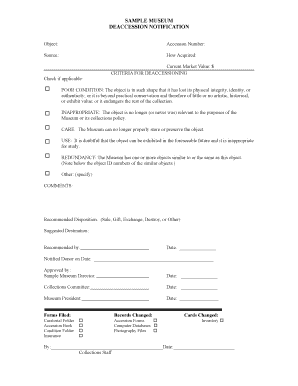
Get Sample Museum Deaccession Notification - Arcs - Arcsinfo
How it works
-

Open form follow the instructions
-

Easily sign the form with your finger
-

Send filled & signed form or save
How to fill out the SAMPLE MUSEUM DEACCESSION NOTIFICATION - ARCS - Arcsinfo online
This guide provides clear instructions on how to fill out the SAMPLE MUSEUM DEACCESSION NOTIFICATION - ARCS - Arcsinfo online. Whether you are familiar with digital forms or a first-time user, this step-by-step approach will assist you in completing the document effectively.
Follow the steps to accurately complete the deaccession notification form.
- To begin, obtain the form by using the ‘Get Form’ button. This will lead you to the document you need to complete online.
- Fill in the object details. Provide the title or name of the object in the 'Object' field, followed by its Accession Number and the Source from which it was acquired.
- Specify how the object was acquired in the 'How Acquired' section. This could include details such as donation, purchase, or any other relevant method.
- Indicate the current market value of the object in the 'Current Market Value' section. Ensure you use the dollar amount in the provided field.
- In the 'Criteria for Deaccessioning' section, check any applicable reasons for deaccessioning the object, such as Poor Condition, Inappropriate, Care, Use, or Redundancy. Specify other criteria if necessary.
- Provide any comments regarding the deaccession of the object in the 'COMMENTS' field.
- In the 'Recommended Disposition' section, indicate how you suggest the object should be handled. Options may include Sale, Gift, Exchange, Destroy, or Other. Additionally, suggest a destination for the object.
- Fill out the 'Recommended by' field, including your name or the individual who is making the recommendation.
- Enter the date of completion in the area marked 'Date' and ensure that the 'Notified Donor on Date' field is also filled in with the relevant notification date.
- Gather approvals by providing the necessary signatures from the Sample Museum Director, Collections Committee, and Museum President along with the corresponding dates.
- Finally, ensure that the forms filed are checked accordingly in the indicated sections, such as Curatorial Folder and Accession Book. You may also want to check any records changed and whether related inventories were updated.
- After completing the form, save your changes, download the file, print it for your records, or share it as needed.
Complete your SAMPLE MUSEUM DEACCESSION NOTIFICATION online today!
Related links form
Google Docs: Online document editor.
Industry-leading security and compliance
US Legal Forms protects your data by complying with industry-specific security standards.
-
In businnes since 199725+ years providing professional legal documents.
-
Accredited businessGuarantees that a business meets BBB accreditation standards in the US and Canada.
-
Secured by BraintreeValidated Level 1 PCI DSS compliant payment gateway that accepts most major credit and debit card brands from across the globe.