Loading
Form preview
  • US Legal Forms
  • Form Library
  • More Forms
  • More Uncategorized Forms
  • Reg E Overdraft Option Form - Axiom Bank

Get Reg E Overdraft Option Form - Axiom Bank

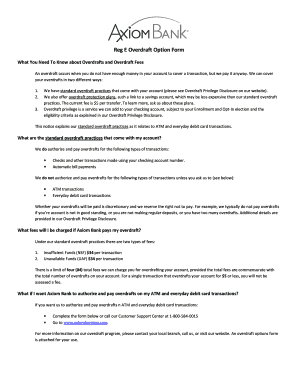
Reg E Overdraft Option Form What You Need To Know about Overdrafts and Overdraft Fees An overdraft occurs when you do not have enough money in your account to cover a transaction, but we pay it anyway.

How it works

  1. Open form

    Open form follow the instructions

  2. Easily sign form

    Easily sign the form with your finger

  3. Share form

    Send filled & signed form or save

How to fill out the Reg E Overdraft Option Form - Axiom Bank online

Filling out the Reg E Overdraft Option Form is an important step for users who want to manage their overdraft preferences with Axiom Bank. This guide will walk you through each part of the form, ensuring that you complete it accurately and efficiently.

Follow the steps to complete the Reg E Overdraft Option Form online.

  1. Press the ‘Get Form’ button to access the Reg E Overdraft Option Form and open it in the designated editor.
  2. Provide your personal information by filling out the customer information section. Enter your first name, last name, phone number, and email address in the respective fields.
  3. In the overdraft account selection section, write your account number in the specified field to ensure proper identification.
  4. Choose your overdraft preference by selecting either option: if you do not want Axiom Bank to authorize and pay overdrafts on your ATM and everyday debit card transactions, mark that box. If you do wish to opt-in, select the appropriate box and acknowledge receipt of the Overdraft Privilege Disclosure.
  5. If this is a joint account, remember that only the signature of one account holder is required to enroll in this service.
  6. To cancel or remove Overdraft Privilege from your account in the future, note the available options provided in the form and familiarize yourself with how to execute them.
  7. After completing all fields, ensure all information is accurate before proceeding to save, download, print, or share your filled-out form.

Complete the Reg E Overdraft Option Form online today to manage your overdraft preferences effectively.

Get form

Experience a faster way to fill out and sign forms on the web. Access the most extensive library of templates available.
Get form

Related content

Higher One Holdings, Inc. - SEC.gov
This annual report on Form 10-K contains forward-looking statements (as defined...
Learn more
The Unbanked Problem in Los Angeles - Insight...
from the perspective of the unbanked and the banks, and proposes potential polices...
Learn more
Mc 105 - UserManual.wiki
Management accounting is highly sensitive to management needs. ... of it is usually in the...
Learn more

Related links form

Jmu Blackboard Non Piu Andrai Work Experience Verification Form - James Madison University - Jmu Jmu Course Substitution Form Undergraduate

Questions & Answers

Get answers to your most pressing questions about US Legal Forms API.

Contact support

How do you open a . DOCX file? Sign in to your Microsoft account. ... Choose the Word icon at the top of the page with an image of a document and blue W on it. ... Upload or open your file by selecting the "More templates" tab at the top right of the page and scrolling through the drop-down menu for ''Upload and open."

A damaged header, corrupted data, or any other issue with your document can lead to the “Windows experienced errors when trying to open the file” prompt. Therefore, the simplest way to troubleshoot the problem is by repairing your corrupt DOC/DOCX file with a tool like Wondershare Repairit – File Repair.

You can upload and download files with the Google Docs app for Android. Import: You can open and edit DOC, DOCX, ODT, TXT, RTF, and HTML files.

Opening Microsoft Word, Excel, and PowerPoint Files Using the Chrome Extension Open File Station. Locate the file. Perform one of the following actions. Action. Steps. Use the toolbar. Select the file. Click . Select Open with Chrome Extension. Use the context menu.

You can open DOCX files on a number of free applications, including Open Office and Google Docs. You can also open DOCX files on Microsoft Word online, though this is a more limited service than the full software. Alternatively, you can convert to PDF for free, using Adobe's free conversion tool.

Navigate to the Documents tool. Locate the file you want to open and edit in Microsoft Office 365. Hover over the file and click the icon that corresponds with the file you want to open. For example, for a Word document, click the Word icon to Open in Word.

If you don't have Microsoft Word installed on your computer, you can download and it from the Microsoft website or use a free alternative like Google Docs or LibreOffice to open and edit DOCX file.

In 2008, Microsoft released an updated version of the DOC format that could be used in other programs with a few functional limitations. Microsoft Office Open XML (DOCX)

Get This Form Now!

Use professional pre-built templates to fill in and sign documents online faster. Get access to thousands of forms.
Get form
If you believe that this page should be taken down, please follow our DMCA take down processhere.

Industry-leading security and compliance

US Legal Forms protects your data by complying with industry-specific security standards.
  • In businnes since 1997
    25+ years providing professional legal documents.
  • Accredited business
    Guarantees that a business meets BBB accreditation standards in the US and Canada.
  • Secured by Braintree
    Validated Level 1 PCI DSS compliant payment gateway that accepts most major credit and debit card brands from across the globe.
Get Reg E Overdraft Option Form - Axiom Bank
Get form
  • Adoption
  • Bankruptcy
  • Contractors
  • Divorce
  • Home Sales
  • Employment
  • Identity Theft
  • Incorporation
  • Landlord Tenant
  • Living Trust
  • Name Change
  • Personal Planning
  • Small Business
  • Wills & Estates
  • Packages A-Z
  • Affidavits
  • Bankruptcy
  • Bill of Sale
  • Corporate - LLC
  • Divorce
  • Employment
  • Identity Theft
  • Internet Technology
  • Landlord Tenant
  • Living Wills
  • Name Change
  • Power of Attorney
  • Real Estate
  • Small Estates
  • Wills
  • All Forms
  • Forms A-Z
  • Form Library
  • Legal Hub
  • About Us
  • Help Portal
  • Legal Resources
  • Blog
  • Affiliates
  • Contact Us
  • Delete My Account
  • Site Map
  • Industries
  • Forms in Spanish
  • Localized Forms
  • State-specific Forms
  • Forms Kit
  • Real Estate Handbook
  • All Guides
  • Notarize
  • Incorporation services
  • For Consumers
  • For Small Business
  • For Attorneys
  • USLegal
  • FormsPass
  • pdfFiller
  • signNow
  • altaFlow
  • DocHub
  • Instapage
Form Packages
  • Adoption
  • Bankruptcy
  • Contractors
  • Divorce
  • Home Sales
  • Employment
  • Identity Theft
  • Incorporation
  • Landlord Tenant
  • Living Trust
  • Name Change
  • Personal Planning
  • Small Business
  • Wills & Estates
  • Packages A-Z
Form Categories
  • Affidavits
  • Bankruptcy
  • Bill of Sale
  • Corporate - LLC
  • Divorce
  • Employment
  • Identity Theft
  • Internet Technology
  • Landlord Tenant
  • Living Wills
  • Name Change
  • Power of Attorney
  • Real Estate
  • Small Estates
  • Wills
  • All Forms
  • Forms A-Z
  • Form Library
Customer Service
  • Legal Hub
  • About Us
  • Help Portal
  • Legal Resources
  • Blog
  • Affiliates
  • Contact Us
  • Delete My Account
  • Site Map
  • Industries
  • Forms in Spanish
  • Localized Forms
  • State-specific Forms
  • Forms Kit
Legal Guides
  • Real Estate Handbook
  • All Guides
Prepared for you
  • Notarize
  • Incorporation services
Our Customers
  • For Consumers
  • For Small Business
  • For Attorneys
Our Sites
  • USLegal
  • FormsPass
  • pdfFiller
  • signNow
  • altaFlow
  • DocHub
  • Instapage
Social Media
Call us now toll free:
+1 833 426 79 33
As seen in:
© Copyright 1999-2026 airSlate Legal Forms, Inc. 3720 Flowood Dr, Flowood, Mississippi 39232
  • Your Privacy Choices
  • Terms of Service
  • Privacy Notice
  • Content Takedown Policy
  • Bug Bounty Program