Get Jmu Blackboard
How it works
-

Open form follow the instructions
-

Easily sign the form with your finger
-

Send filled & signed form or save
How to fill out the Jmu Blackboard online
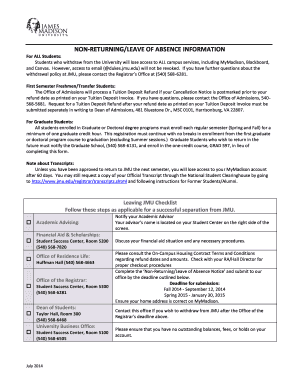
This guide is designed to help students effectively navigate the Jmu Blackboard online platform. You will find step-by-step instructions to complete the Non-Returning/Leave of Absence Notice with ease.
Follow the steps to successfully complete your form.
- Click ‘Get Form’ button to obtain the Non-Returning/Leave of Absence Notice and open it in the editor.
- Begin by filling in your personal information, including your name, student ID, date of birth, and phone number. Ensure all details are accurate.
- Provide your preferred email address. This will be used for further communications regarding your withdrawal or leave of absence.
- Indicate which semester you are withdrawing from by checking the appropriate box for either Fall or Spring semester. Ensure to include the year.
- Select your academic level by checking one of the following: Undergraduate, Graduate, Doctoral Student, or Outreach (Non-Degree).
- If you are a first semester Freshman or Transfer Student, check the box indicating that you would like to cancel your admission, but only if you are withdrawing before attending classes.
- State whether you attended any classes for the semester from which you are withdrawing by checking 'Yes' or 'No'. If 'Yes', provide your last date of attendance.
- Select a reason for your withdrawal from the specified options, ensuring to provide information if you select 'Other/Personal'.
- Review your Financial Aid options by checking any boxes that apply regarding your financial aid status.
- Indicate whether you will be taking courses at another College/University during your absence and whether these courses will transfer for your final hours to graduate.
- Lastly, confirm your intention to re-enter JMU by selecting one of the options provided. Be sure to sign the form and include the date.
- Return the completed form to the Registrar’s office either via the address or fax number provided above.
Complete your Jmu Blackboard forms online today to ensure a smooth withdrawal or leave of absence process.
Related links form
JMU, or James Madison University, tends to be more liberal in its social atmosphere, particularly among its student body. However, you'll find a range of perspectives that reflect diverse viewpoints, making the environment inclusive and welcoming. Engaging with different organizations on campus can help you understand this dynamic further. If you are navigating through academic resources, the JMU Blackboard platform can assist you in accessing essential materials that support various student viewpoints.
Industry-leading security and compliance
-
In businnes since 199725+ years providing professional legal documents.
-
Accredited businessGuarantees that a business meets BBB accreditation standards in the US and Canada.
-
Secured by BraintreeValidated Level 1 PCI DSS compliant payment gateway that accepts most major credit and debit card brands from across the globe.