Loading
Get Lbespa
How it works
-

Open form follow the instructions
-

Easily sign the form with your finger
-

Send filled & signed form or save
How to fill out the Lbespa online
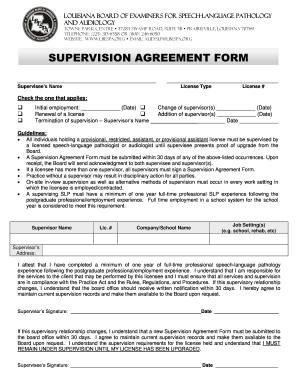
Filling out the Louisiana Board of Examiners for Speech-Language Pathology and Audiology (Lbespa) form can be straightforward when you understand its components. This guide will help you navigate the Supervision Agreement Form effectively and ensure you complete all required sections accurately.
Follow the steps to complete the Lbespa Supervision Agreement Form online.
- Press the ‘Get Form’ button to access the Supervision Agreement Form and open it in your chosen digital editor.
- Begin by entering the supervisee's name in the designated field. Ensure the spelling is correct as it will appear on official documents.
- Select the appropriate license type from the options available. Include the corresponding license number in the field provided.
- Choose the one applicable option regarding the reason for submitting this form: initial employment, change of supervisor(s), renewal of a license, addition of supervisor(s), or termination of supervision. Fill in the corresponding date for the selected option.
- Input the supervisor’s name and license number accurately to establish the supervisory relationship. If there are multiple supervisors, ensure each one is included.
- List the job setting(s) where the supervision will occur, such as a school or rehabilitation center. Provide the name of the company or school where the supervisee will work.
- Fill in the supervisor’s address in the specified section to enable contact regarding the supervision.
- Both the supervisor and supervisee should carefully read the attestation statement. This includes confirming experience and compliance with regulations. Both parties must sign and date the form at the designated areas.
- Once all sections are complete and verified for accuracy, you can save the changes and choose to download, print, or share the form as necessary.
Complete your Lbespa documents online today to ensure all your requirements are met quickly and efficiently.
You can easily create a document in Word by choosing Blank Document, or if Word is already open, choose File > New Document. From there, you can edit and then save your document.
Industry-leading security and compliance
US Legal Forms protects your data by complying with industry-specific security standards.
-
In businnes since 199725+ years providing professional legal documents.
-
Accredited businessGuarantees that a business meets BBB accreditation standards in the US and Canada.
-
Secured by BraintreeValidated Level 1 PCI DSS compliant payment gateway that accepts most major credit and debit card brands from across the globe.