Get Da 67-10-1a 2013
How it works
-

Open form follow the instructions
-

Easily sign the form with your finger
-

Send filled & signed form or save
How to fill out the DA 67-10-1A online
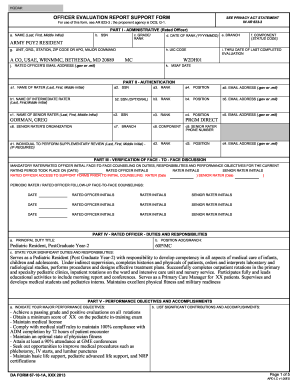
The DA 67-10-1A is an essential support form used for officer evaluation within the Army. Completing this form accurately is crucial for performance evaluation and professional development. This guide will help you understand and navigate the process of filling out the DA 67-10-1A online, ensuring that all necessary information is provided correctly.
Follow the steps to complete the DA 67-10-1A online effectively.
- Press the ‘Get Form’ button to access the DA 67-10-1A. This will allow you to open the form in an editable format.
- Begin with Part I - Administrative (Rated Officer). Fill in the rated officer's name, including last name, first name, and middle initial, as well as the SSN, grade, and rank.
- Continue in Part I by entering the date of rank, branch, component status code, the unit address, UIC code, email, and the date of the last completed evaluation.
- Move to Part II - Authentication. Provide the names, SSNs, ranks, positions, and email addresses for the rater, intermediate rater, and senior rater. Ensure that all information is accurate to facilitate proper evaluation.
- In Part III - Verification of Face-to-Face Discussion, indicate the initial counseling date and obtain initials from the rated officer, rater, and senior rater. Document any periodic follow-up counseling dates as required.
- In Part IV - Rated Officer Duties and Responsibilities, enter the principal duty title and position AOC/branch. Describe significant duties and responsibilities, ensuring that the language is clear and concise.
- Proceed to Part V - Performance Objectives and Accomplishments. Clearly indicate major performance objectives and significant contributions. Use bullet points for clarity and organization.
- Continue filling out any additional comments or objectives in the remaining sections as applicable.
- Finally, review all entered information for accuracy, save changes, and then download, print, or share the completed form as needed.
Complete your documents online with confidence and ensure accurate submissions!
Get form
The Army OER support form number is DA Form 67-10-1A. This form assists officers in outlining their goals and documenting their accomplishments throughout the evaluation period. Properly using this form increases clarity during evaluations and ensures that all achievements are communicated effectively. Utilizing the strengths of the DA 67-10-1A can significantly enhance your OER experience.