Loading
Get Anaphylaxis Emergency Plan - Camp Kawartha
How it works
-

Open form follow the instructions
-

Easily sign the form with your finger
-

Send filled & signed form or save
How to fill out the Anaphylaxis Emergency Plan - Camp Kawartha online
Filling out the Anaphylaxis Emergency Plan is crucial for ensuring the safety of individuals with life-threatening allergies. This guide provides clear, step-by-step instructions to help you complete the form accurately and efficiently.
Follow the steps to fill out your Anaphylaxis Emergency Plan easily and effectively.
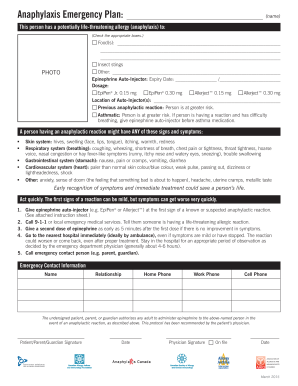
- Click the ‘Get Form’ button to access the Anaphylaxis Emergency Plan. This action will allow you to open the form in the online editor.
- Begin by identifying the allergens to which the individual is allergic. Check the relevant boxes for food allergies, insect stings, or any other specific allergies. Provide detailed information where indicated.
- Upload a recent photograph of the individual with the allergy in the designated area. This visual identification can be important during emergencies.
- Indicate the expiry date of the epinephrine auto-injector. This is crucial for ensuring that the medication is usable in an emergency.
- Select the correct dosage for the epinephrine auto-injector by checking the corresponding box next to either ® or Allerject™ options.
- Input the location of the auto-injector(s). This helps ensure that caregivers know where to find the medication quickly.
- Note any previous anaphylactic reactions and asthmatic conditions by checking the appropriate boxes. This information is vital for assessing the risk involved.
- Review the signs and symptoms of anaphylaxis listed in the form to ensure a clear understanding of what to look for in an emergency situation.
- Follow the emergency action plan outlined in the form, ensuring awareness of the steps to take during an anaphylactic reaction.
- Fill in the emergency contact information accurately, providing names and phone numbers for each contact method.
- Complete the authorization section by signing and dating as the patient, parent, or guardian. Ensure the physician's signature is provided on file.
- After completing all sections, be sure to save your changes, and you may choose to download, print, or share the form as needed.
Take action now and complete your Anaphylaxis Emergency Plan online to ensure safety in case of an emergency.
0:50 1:54 eSignature: Forms for Real Estate - YouTube YouTube Start of suggested clip End of suggested clip Use. You can add more documents to the envelope. And adjust recipients to your specifications. OnceMoreUse. You can add more documents to the envelope. And adjust recipients to your specifications. Once you fill out the form. And send it on to your recipients.