Loading
Form preview
  • US Legal Forms
  • Form Library
  • Industry Forms
  • Industry Academic Forms
  • Panola College Request For An Official Transcript By Mail

Get Panola College Request For An Official Transcript By Mail

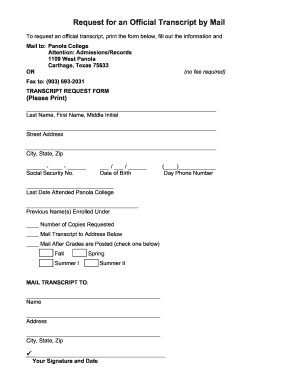
On: Admissions/Records 1109 West Panola Carthage, Texas 75633 OR (no fee required) Fax to: (903) 693-2031 TRANSCRIPT REQUEST FORM (Please Print) _____________________________________________________________ Last Name, First Name, Middle Initial _____________________________________________________________ Street Address _____________________________________________________________ City, State, Zip ______ - ____ - ______ Social Security No. ___ / ___ / ______ Date of Birth (____)____________.

How it works

  1. Open form

    Open form follow the instructions

  2. Easily sign form

    Easily sign the form with your finger

  3. Share form

    Send filled & signed form or save

How to fill out the Panola College Request for an Official Transcript by Mail online

This guide provides step-by-step instructions on how to accurately fill out the Panola College Request for an Official Transcript by Mail online. Ensuring all information is correctly entered will help expedite the process of receiving your official transcript.

Follow the steps to complete your transcript request form online.

  1. Click ‘Get Form’ button to obtain the form and open it in the editor.
  2. Begin by entering your last name, first name, and middle initial in the designated fields to identify yourself.
  3. Input your street address in the appropriate section to ensure accurate delivery of your transcript.
  4. Fill in the city, state, and zip code fields, which are crucial for confirming your address.
  5. Provide your social security number in the format indicated, ensuring it is accurate for verification purposes.
  6. Enter your date of birth using the specified format to further support identification.
  7. Input your day phone number to offer a contact point for any questions regarding your request.
  8. Indicate the last date you attended Panola College to help validate your enrollment history.
  9. List any previous names you were enrolled under, if applicable, to trace your records accurately.
  10. Select the number of copies you would like to request by filling in that section.
  11. Decide whether to send the transcript to the address you will provide or if it should be mailed after specific grades are posted. Check the appropriate semester box: Fall, Spring, Summer I, or Summer II.
  12. In the 'MAIL TRANSCRIPT TO' section, provide the recipient's name, address, city, state, and zip code.
  13. Finally, sign and date the form to validate your request before submitting.
  14. Once all fields are completed and checked for accuracy, save any changes, and download, print, or share the completed form as necessary.

Complete your transcript request online to ensure timely processing and delivery.

Get form

Experience a faster way to fill out and sign forms on the web. Access the most extensive library of templates available.
Get form

Related content

Panola College | College Your Way - Carthage /...
With the resources available to support you, Panola College is here to help you succeed in...
Learn more
Transcript Requests
Transcript request forms are available in the Admission/Records Office and online. The...
Learn more

Related links form

UT Affidavit and Exemption Certificate for Home School Instruction UT Alarm Permit Application UT Basic 5 Observation Form 2012 UT Building Permit Application - Mapleton City 2008

Questions & Answers

Get answers to your most pressing questions about US Legal Forms API.

Contact support

If you've submitted a Panola College Request for an Official Transcript by Mail, you can expect to receive your transcript within 5 to 10 business days after processing. This mailing timeframe may vary, so factor in the possibility of delays during busy periods. Always allow ample time for processing when planning ahead.

After you submit your Panola College Request for an Official Transcript by Mail, you can check the status by contacting the registrar's office. They typically can confirm whether your transcript has been sent. Keeping track of your request helps ensure that you are aware of its progress.

Once your Panola College Request for an Official Transcript by Mail is processed, it typically takes an additional 5 to 10 business days for the transcript to reach its destination. The exact time can depend on the postal service and the distance to the recipient's address. Always make sure to provide accurate mailing information for swift delivery.

When you place a Panola College Request for an Official Transcript by Mail, processing usually takes between three to five business days. However, this can vary based on your specific request and any backlog during peak times. It's important to submit your request early to ensure timely processing.

You can send your official transcripts to yourself, allowing you to keep a personal copy. When you do this through Panola College, be sure to note it in your request. Following the correct steps for the Panola College Request for an Official Transcript by Mail ensures that you receive an official version. Just remember that while you may have a copy for your records, sending them elsewhere typically involves a different process.

Yes, you can request for your official transcript to be sent directly to yourself. However, keep in mind that some institutions may have policies regarding this practice. For your Panola College Request for an Official Transcript by Mail, check all requirements to ensure you follow the correct procedure. This way, you can receive a copy while still adhering to official protocols.

Usually, colleges do not accept PDFs of transcripts as official documents. Panola College requires official transcripts to be sent directly by mail or in other authorized formats. If you're considering sending a transcript electronically, it’s best to check with the recipient college's policies. For a smooth experience, focus on the Panola College Request for an Official Transcript by Mail.

You can send your official transcript by completing the required request form on the Panola College website. If you prefer a physical copy, you can opt for the 'Panola College Request for an Official Transcript by Mail'. Ensure that you provide accurate mailing details to prevent any issues.

When writing a letter to request academic transcripts, include your full name, student ID number, and the address where you want the transcript sent. Clearly state your request for a 'Panola College Request for an Official Transcript by Mail'. Be polite, concise, and mention any specific details to facilitate the process.

To request a transcript from Panola College, you need to complete the official request form on their website or through the student portal. Ensure you select the option for a physical copy, which means you will use the Panola College Request for an Official Transcript by Mail. Follow the instructions carefully to avoid delays.

Get This Form Now!

Use professional pre-built templates to fill in and sign documents online faster. Get access to thousands of forms.
Get form
If you believe that this page should be taken down, please follow our DMCA take down processhere.

Industry-leading security and compliance

US Legal Forms protects your data by complying with industry-specific security standards.
  • In businnes since 1997
    25+ years providing professional legal documents.
  • Accredited business
    Guarantees that a business meets BBB accreditation standards in the US and Canada.
  • Secured by Braintree
    Validated Level 1 PCI DSS compliant payment gateway that accepts most major credit and debit card brands from across the globe.
Get Panola College Request for an Official Transcript by Mail
Get form
  • Adoption
  • Bankruptcy
  • Contractors
  • Divorce
  • Home Sales
  • Employment
  • Identity Theft
  • Incorporation
  • Landlord Tenant
  • Living Trust
  • Name Change
  • Personal Planning
  • Small Business
  • Wills & Estates
  • Packages A-Z
  • Affidavits
  • Bankruptcy
  • Bill of Sale
  • Corporate - LLC
  • Divorce
  • Employment
  • Identity Theft
  • Internet Technology
  • Landlord Tenant
  • Living Wills
  • Name Change
  • Power of Attorney
  • Real Estate
  • Small Estates
  • Wills
  • All Forms
  • Forms A-Z
  • Form Library
  • Legal Hub
  • About Us
  • Help Portal
  • Legal Resources
  • Blog
  • Affiliates
  • Contact Us
  • Delete My Account
  • Site Map
  • Industries
  • Forms in Spanish
  • Localized Forms
  • State-specific Forms
  • Forms Kit
  • Real Estate Handbook
  • All Guides
  • Notarize
  • Incorporation services
  • For Consumers
  • For Small Business
  • For Attorneys
  • USLegal
  • FormsPass
  • pdfFiller
  • signNow
  • altaFlow
  • DocHub
  • Instapage
Form Packages
  • Adoption
  • Bankruptcy
  • Contractors
  • Divorce
  • Home Sales
  • Employment
  • Identity Theft
  • Incorporation
  • Landlord Tenant
  • Living Trust
  • Name Change
  • Personal Planning
  • Small Business
  • Wills & Estates
  • Packages A-Z
Form Categories
  • Affidavits
  • Bankruptcy
  • Bill of Sale
  • Corporate - LLC
  • Divorce
  • Employment
  • Identity Theft
  • Internet Technology
  • Landlord Tenant
  • Living Wills
  • Name Change
  • Power of Attorney
  • Real Estate
  • Small Estates
  • Wills
  • All Forms
  • Forms A-Z
  • Form Library
Customer Service
  • Legal Hub
  • About Us
  • Help Portal
  • Legal Resources
  • Blog
  • Affiliates
  • Contact Us
  • Delete My Account
  • Site Map
  • Industries
  • Forms in Spanish
  • Localized Forms
  • State-specific Forms
  • Forms Kit
Legal Guides
  • Real Estate Handbook
  • All Guides
Prepared for you
  • Notarize
  • Incorporation services
Our Customers
  • For Consumers
  • For Small Business
  • For Attorneys
Our Sites
  • USLegal
  • FormsPass
  • pdfFiller
  • signNow
  • altaFlow
  • DocHub
  • Instapage
Social Media
Call us now toll free:
+1 833 426 79 33
As seen in:
© Copyright 1999-2026 airSlate Legal Forms, Inc. 3720 Flowood Dr, Flowood, Mississippi 39232
  • Your Privacy Choices
  • Terms of Service
  • Privacy Notice
  • Content Takedown Policy
  • Bug Bounty Program