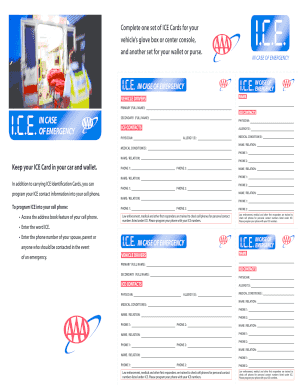
Contacts Secondary (Full name): Physician: ICE Contacts Physician: I.C.E. IN CASE OF EMERGENCY Name Vehicle Drivers IN CASE OF EMERGENCY IN CASE OF EMERGENCY Allergy(S): Allergy (S): Medical Condition(S): Name / Relation: Medical Condition(S): Phone 1: Name / Relation: Keep your ICE Card in your car and wallet. In addition to carrying ICE Identification Cards, you can program your ICE contact information into your cell phone. To program ICE into your cell phone: • Access t.
Open form follow the instructions
Easily sign the form with your finger
Send filled & signed form or save
How to fill out the AAA ICE Card online
The AAA ICE Card, which stands for In Case of Emergency, is an essential document that provides important medical and emergency contact information. This guide offers step-by-step instructions to help users fill out the form accurately and efficiently online.
Follow the steps to complete your ICE Card effectively.
- Click ‘Get Form’ button to obtain the ICE Card and open it in the editor.
- Begin by entering your primary full name in the first field, ensuring it is accurately represented as this will be your main identification in case of an emergency.
- Next, enter the secondary full name, which can be another emergency contact or individual that should be notified.
- Fill in the physician's name, ensuring that it is someone who can provide medical assistance in case of an emergency.
- In the 'ICE Contacts' section, enter the names and relationships of individuals you wish to be contacted during an emergency, indicating their importance in your life.
- Input allergies in the dedicated field to inform first responders of any potential allergies you may have.
- Document any medical conditions you have in the relevant field, providing first responders with critical information about your health.
- Include phone numbers for your primary and secondary contacts, ensuring they are up-to-date and reach the intended persons.
- Once all fields are accurately filled, review the form for any errors or omissions.
- Finally, save your changes, and download, print, or share the completed ICE Card as needed.
Complete your ICE Card online today to ensure your emergency contacts are readily available when needed.
Experience a faster way to fill out and sign forms on the web. Access the most extensive library of templates available.
Related content
AAA Ice Co. is part of a family-owned business that has been serving the Baltimore...
Our favorite ice cream shop is Cowlick's in Fort Bragg, California. They make their ice...
Apr 28, 2025 — If you like creamy fresh turpps clean burns and decent quality this one's...
Get answers to your most pressing questions about US Legal Forms API.
Can I download my AAA card to my Apple Wallet?
Yes, you can download your AAA ICE Card to your Apple Wallet. Once you have access to your digital card through the AAA app or website, look for the option to add it to Apple Wallet. This feature helps you streamline your access to your AAA card right on your iPhone, promising convenience at your fingertips.
How to get a temporary AAA card?
If you need a temporary AAA card, you can easily request one through your AAA account online or via the member services hotline. The AAA ICE Card can often be issued immediately, ensuring you have coverage while waiting for your permanent card. Reach out to AAA for the most efficient process in obtaining your temporary card.
Can I keep my AAA card on my phone?
Yes, you can store your AAA card on your phone. The AAA ICE Card can be saved to your mobile device using the AAA app or your digital wallet, making it readily accessible whenever you need it. This option enhances your ability to access your card quickly in various situations.
What is ice card?
An ICE Card, or In Case of Emergency Card, contains vital information about you and your medical preferences. The AAA ICE Card provides critical details that can assist first responders during emergencies. It’s an essential tool for ensuring that your needs are respected in urgent situations.
Can I get my AAA card digitally?
Certainly, you can acquire your AAA card in a digital format. Access your AAA account and opt for the digital card option to receive your AAA ICE Card directly on your device. This feature enhances convenience, allowing you to carry your card wherever you go.
Can I get a copy of my AAA card online?
Yes, you can easily get a copy of your AAA card online. Log into your account, and you will find options to view and download your current AAA ICE Card. This convenience means you can keep your card information handy when you need it.
How to get AAA digital card?
Obtaining your AAA digital card is simple. Just access your AAA account online or via the mobile app, and look for the digital card option. By following the prompts, you can obtain your AAA ICE Card without any hassle, allowing you to always have it accessible.
How to make an ice card?
To create your AAA ICE Card, you should log into your AAA account through the official website or app. Navigate to the section for digital cards, and follow the instructions to generate your ICE Card. This card provides essential information for emergencies, ensuring you have important details at your fingertips.
How do I get an emergency set of contacts?
You can obtain an emergency set of contacts by reaching out to close family members or friends. Discuss their willingness to be your emergency contacts in case an emergency arises. By adding their details to your AAA ICE Card, you streamline access to this essential information for emergency responders.
How to make emergency contact cards?
To make emergency contact cards, gather information about your emergency contacts, including their names and phone numbers. You can then use online design tools or software for printing professional-looking cards. Don’t forget to include your AAA ICE Card details, ensuring that first responders have all the necessary information they need.
Use professional pre-built templates to fill in and sign documents online faster. Get access to thousands of forms.
If you believe that this page should be taken down, please follow our DMCA take down process here.