Ss amount of final check Comments: Company or employer Address (street, city, state, ZIP) This information is true and correct to the best of my knowledge and belief. Signature of person verifying this information Title Date Phone number Thank you for taking the time to complete all of the information on this form. Your help is greatly appreciated. .

Open form follow the instructions

Easily sign the form with your finger

Send filled & signed form or save
How to fill out the TX H1028-MBIC online
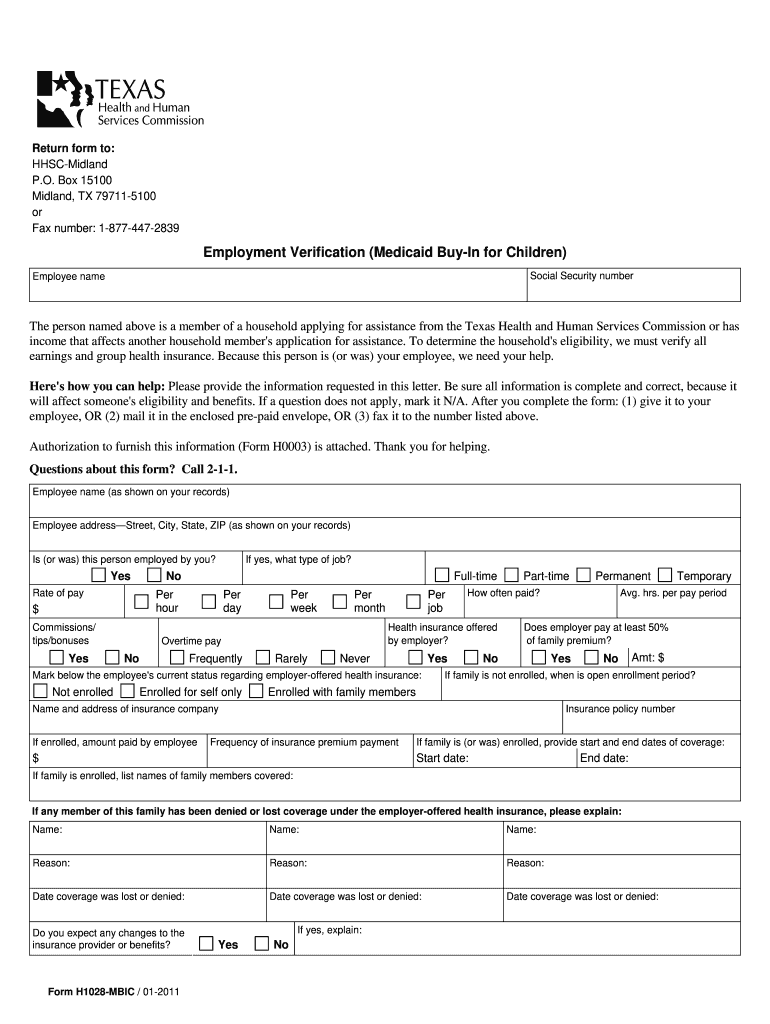
The TX H1028-MBIC form is essential for verifying employment and income for Medicaid Buy-In for Children assistance. This guide will provide step-by-step instructions on how to fill out the form effectively online.
Follow the steps to complete the TX H1028-MBIC online.
- Click ‘Get Form’ button to obtain the form and open it in the editor.
- Carefully fill in the employee's name and address as shown in your records. This information ensures accurate identification in the application process.
- Indicate whether the employee is currently employed by you by selecting 'Yes' or 'No'. If 'Yes', provide the employee's rate of pay and employment status (full-time, part-time).
- If the employee has any additional earnings such as commissions, tips, or bonuses, indicate these amounts in the respective fields.
- Mark the employee's current status regarding employer-offered health insurance. Indicate if they are 'Enrolled', 'Not enrolled', or 'Enrolled with family members', and provide relevant policy details.
- Complete the wages chart with all payments received by the employee over the last six months. Include dates and amounts for gross pay and any additional pay.
- If the employee is no longer employed, specify the date of separation, reason for it, and provide details about the final paycheck including its gross amount.
- Provide the company or employer's name and address, followed by the signature of the person verifying this information, the title, date, and phone number.
- Once all fields are accurately filled out, review the form for completeness. You may then save your changes, download, print, or share the form as needed.
Start filling out your TX H1028-MBIC form online today for seamless assistance.
Experience a faster way to fill out and sign forms on the web. Access the most extensive library of templates available.
Related content
Form H1028-MBIC is used to get verification of income, health insurance information or...
Get answers to your most pressing questions about US Legal Forms API.
What is a good answer to probability of continued employment?
When addressing the probability of continued employment, a good answer includes assurance of job stability based on current performance, company growth, and economic conditions. You may highlight your contributions and how they align with the company's goals. Providing context using the TX H1028-MBIC can add credibility to your response.
How do I fill out an employment verification?
To fill out an employment verification form, start by carefully reading the instructions provided. Input your personal details, your employer’s information, and any relevant employment history. The TX H1028-MBIC can streamline this process, ensuring you complete the form accurately and efficiently.
Why did I get a letter from Texas Health and Human Services?
Receiving a letter from Texas Health and Human Services often indicates that they need additional information regarding your employment or eligibility for benefits. This letter may require you to complete the TX H1028-MBIC or other documentation. It's essential to respond promptly to avoid delays in your application or benefits.
What is form H1028 used for in Texas?
Form H1028 in Texas is primarily used for verifying employment for individuals applying for various assistance programs. This form helps confirm the applicant's job status and works as proof of employment income. Completing the TX H1028-MBIC accurately is essential for expedited processing of your application.
How to fill out an employment verification form?
Filling out an employment verification form involves providing accurate details about your employment. Start with your personal information, and then move on to your employer’s details, job title, and duration of employment. Using the TX H1028-MBIC will guide you through the process and ensure you include all needed elements correctly.
What information can be released for employment verification in Texas?
In Texas, employers can release various types of information for employment verification, including dates of employment, job titles, and salary history. However, personal data like medical information must remain confidential. It's crucial to use the TX H1028-MBIC to understand what your employer can disclose to avoid any complications.
What do I fill out for employment eligibility verification?
For employment eligibility verification, you typically need to provide specific personal details, including your full name, social security number, and address. Additionally, you'll need to include your employment history and any relevant identification documents. Utilizing the TX H1028-MBIC form can help ensure you provide all necessary information in the required format.
Can I email Texas Health and Human Services?
Texas Health and Human Services does not typically accept email for sensitive documents or inquiries. However, you can use their secure messaging service through Your Texas Benefits for certain communications. If you are looking for detailed instructions on how to contact them, refer to TX H1028-MBIC for reliable guidance.
How to file a complaint on health and human services in Texas?
If you wish to file a complaint regarding health and human services in Texas, you can do so online or by calling their hotline. Clearly state the nature of your complaint and provide any necessary details. The TX H1028-MBIC can provide you with the steps needed to ensure your complaint reaches the right department.
How do I report changes to Texas Health and Human Services?
Reporting changes to Texas Health and Human Services can be done online through your account, via phone, or by mailing in a form. It is crucial to report any changes as soon as they occur to prevent complications with your benefits. For assistance with this process, TX H1028-MBIC can be a valuable resource to guide you.
Use professional pre-built templates to fill in and sign documents online faster. Get access to thousands of forms.
If you believe that this page should be taken down, please follow our DMCA take down process here.