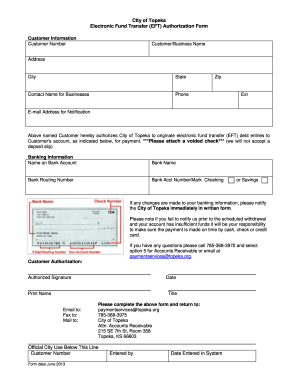
City of Topeka Electronic Fund Transfer (EFT) Authorization Form Customer Information Customer Number Customer/Business Name Address City State Contact Name for Businesses Zip Phone Ext Email Address.

How it works
  • Open form

    Open form follow the instructions

  • Easily sign form

    Easily sign the form with your finger

  • Share form

    Send filled & signed form or save

How to fill out the KS Electronic Fund Transfer (EFT) Authorization Form - City of Topeka online

This guide will assist you in completing the KS Electronic Fund Transfer (EFT) Authorization Form for the City of Topeka online. Follow these steps carefully to ensure that your information is accurately submitted and processed.

Follow the steps to complete the form effectively.

  1. Click the ‘Get Form’ button to obtain the EFT Authorization Form and open it in a suitable online editor.
  2. Begin by filling out the customer information section. Provide your customer number, customer or business name, and complete your address including city, state, and zip code. If you are representing a business, include the contact name for the business and a phone number.
  3. Next, enter your email address for notification regarding your EFT transactions. This ensures you receive timely updates on any transactions.
  4. In the banking information section, accurately fill in the name on the bank account, the name of your bank, the bank routing number, and your bank account number. Indicate whether this account is for checking or savings.
  5. Attach a voided check to the form as specified. Note that deposit slips are not accepted.
  6. Review the authorization statement that allows the City of Topeka to process your electronic fund transfers. Ensure you understand the implications of the authorization.
  7. Provide your authorized signature, the date, and print your name. If applicable, include your title within the organization.
  8. Finally, save your completed form and choose to either download, print, or share it as required. You may submit the form via email, fax, or postal mail to the specified contact information.

Submit your completed KS Electronic Fund Transfer Authorization Form online today to ensure timely processing of your payments.

Get form

Experience a faster way to fill out and sign forms on the web. Access the most extensive library of templates available.

Related content

Authorization Form for Electronic Funds Transfer

The information provided in this authorization grants the Kansas Department of Revenue...

Learn more
USE OF COOPERATIVE EXTENSION FUNDS

Jan 1, 2024 — One (1) copy of each Electronic Fund Transfer authorization. One (1) copy...

Learn more
General Ledger Accounting and Financial Reporting...

Dec 3, 2009 — Payments are made via paper check or Electronic Funds Transfer (EFT)....

Learn more
Questions & Answers

Get answers to your most pressing questions about US Legal Forms API.

Contact support

How is an EFT payment done?

An EFT payment is executed by submitting your KS Electronic Fund Transfer (EFT) Authorization Form - City of Topeka along with the required banking information. The process typically involves the automated transfer of funds through secure electronic channels, reducing the need for physical checks. This method is efficient, quick, and reliable, ensuring that your payments are made on time without hassle.

Doing an EFT transfer involves completing the KS Electronic Fund Transfer (EFT) Authorization Form - City of Topeka and providing your bank details. After the form is submitted, you can set up transfers through your bank's online portal or mobile app. This method saves time and minimizes paperwork, allowing you to manage payments from the comfort of your home.

To send an EFT transfer, you typically need to fill out a KS Electronic Fund Transfer (EFT) Authorization Form - City of Topeka and submit it to your financial institution. Once your bank processes the form, you can initiate transfers through your online banking platform, ensuring you have the necessary information at hand. Following these steps facilitates a smooth and efficient transfer process.

The KS Electronic Fund Transfer (EFT) Authorization Form - City of Topeka is a document that authorizes your bank to process electronic transactions from your account. This form allows you to set up and manage automatic payments, making it convenient for both you and the city. By completing this form, you give permission for transactions to occur without needing to write checks or make manual payments every time.

To initiate a KS Electronic Fund Transfer (EFT) payment, you need to provide essential details such as your bank account number, routing number, and a completed KS Electronic Fund Transfer (EFT) Authorization Form - City of Topeka. This information ensures that the funds are transferred accurately and securely. Additionally, having your account in good standing and verifying your identity helps avoid any delays in processing the payment.

Filling out the KS Electronic Fund Transfer (EFT) Authorization Form - City of Topeka is straightforward. Begin with your basic information, including your name, address, and account details. Follow this by signing where indicated to grant the city permission to transfer funds. To make this process easier, consider using the US Legal Forms platform, which offers step-by-step guidance to ensure everything is completed correctly.

To complete an EFT, you first need to fill out the KS Electronic Fund Transfer (EFT) Authorization Form - City of Topeka with the necessary banking details. After providing your consent through a signature, submit the form to the city’s finance department. The city will then process your authorization and begin the electronic transfer of funds as directed. It’s an efficient way to manage payments without the hassle of writing checks.

To successfully fill in the KS Electronic Fund Transfer (EFT) Authorization Form - City of Topeka, start by providing your personal and bank information, ensuring accuracy. Next, you will need to authorize the city to initiate transfers from your account by signing the form. Double-check all entered details to avoid errors that could delay the process. Using the US Legal Forms platform can streamline this task, providing clear instructions for each section.

Get This Form Now!

Use professional pre-built templates to fill in and sign documents online faster. Get access to thousands of forms.

If you believe that this page should be taken down, please follow our DMCA take down process here.

Get KS Electronic Fund Transfer (EFT) Authorization Form - City of Topeka