Loading
Get Virginia Notice To Vacate
How it works
-

Open form follow the instructions
-

Easily sign the form with your finger
-

Send filled & signed form or save
How to fill out the VIRGINIA NOTICE TO VACATE online
Filling out the Virginia Notice to Vacate is a crucial step for tenants who intend to move out of a rental property. This guide will provide a comprehensive walkthrough of the form, ensuring you understand each component and how to complete it effectively.
Follow the steps to successfully fill out the VIRGINIA NOTICE TO VACATE online.
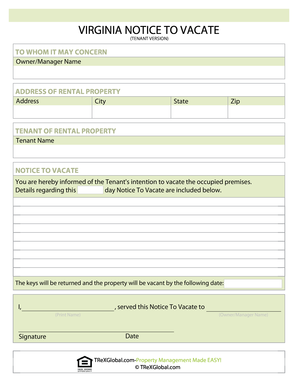
- Click the ‘Get Form’ button to access the Virginia Notice to Vacate form and open it in an online editor.
- Enter the owner's or property manager's name in the designated field under 'Owner/Manager Name.'
- In the 'ADDRESS OF RENTAL PROPERTY' section, provide the complete address, including street address, city, state, and zip code.
- Fill in the 'TENANT OF RENTAL PROPERTY' section with your full name as the tenant.
- In the 'NOTICE TO VACATE' section, specify your date of intention to vacate the premises. Clearly state when the keys will be returned and when the property will be vacant.
- Print your name in the area provided, sign the form, and include the owner’s or manager’s name in the specified area.
- Finally, add the date on which you are completing this notice.
Complete and submit your documents online for a hassle-free process.
Under Virginia law, the landlord may not shut off utilities, lock you out of the rental unit, or evict you without giving notice and going to court.