Loading
Get Authorization For Verbal Communication 1280490v-dt 08-18-15doc - Uwhealth
How it works
-

Open form follow the instructions
-

Easily sign the form with your finger
-

Send filled & signed form or save
How to fill out the Authorization For Verbal Communication 1280490V-DT 08-18-15doc - Uwhealth online
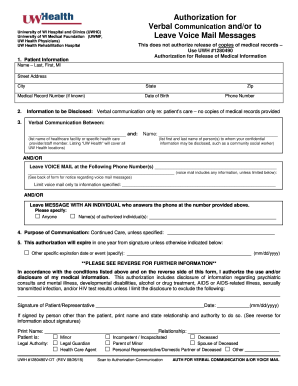
Filling out the Authorization For Verbal Communication form is an essential step for ensuring that your medical information is communicated effectively and confidentially. This guide will walk you through the process of completing the form with clear instructions for each section.
Follow the steps to fill out the authorization form accurately and efficiently.
- Use the ‘Get Form’ button to access the Authorization For Verbal Communication document in your preferred digital format.
- Begin by entering the patient information. Fill in the patient's last name, first name, middle initial, street address, city, state, zip code, medical record number (if known), date of birth, and phone number.
- Specify the information to be disclosed. Indicate that the authorization is for verbal communication only regarding the patient’s care and state that no copies of medical records will be provided.
- Identify the individuals or healthcare providers involved in the verbal communication. Write the name of the healthcare facility or specific health care provider/staff member. You may specify multiple names as needed.
- If applicable, indicate the phone number(s) where voice mail can be left. You can choose to limit the information shared in the messages by specifying any restrictions.
- Select whether voice mail messages can be left with an individual who answers the phone. If you want to set any specific names authorized to receive information, include those here.
- State the purpose of the communication. By default, it will be for continued care. If there are other specific purposes, please state them.
- Indicate the expiration of this authorization. It will automatically expire in one year, but you may enter a different specific expiration date if desired.
- Read and understand the disclosure information before signing. Once you confirm your understanding, sign your name, and enter the date.
- If someone other than the patient is signing, provide their printed name and state their relationship to the patient. Specify the legal authority if necessary.
- Review the completed form for accuracy and save your changes, download, or print the document if needed. You can also share the completed form as appropriate.
Complete your forms online today to ensure clear and effective communication regarding your healthcare.
The new Exchange admin center (EAC) is a modern, web-based management console for managing Exchange that is designed to provide an experience more in line with the overall Microsoft 365 admin experience. It replaces the Exchange Control Panel (ECP) to manage email settings for your organization.