Loading
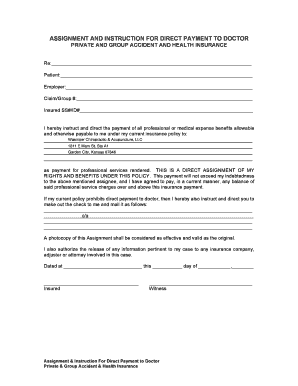
Get Assignment Instructions For Direct Payment To Doctor
How it works
-

Open form follow the instructions
-

Easily sign the form with your finger
-

Send filled & signed form or save
How to fill out the Assignment Instructions For Direct Payment To Doctor online
Filling out the Assignment Instructions For Direct Payment To Doctor form is an essential step in ensuring that your medical expenses are covered by your insurance policy. This guide provides clear and detailed instructions to help you complete the form easily and accurately.
Follow the steps to fill out your form correctly.
- Click the ‘Get Form’ button to obtain the form and open it in your preferred editor.
- Fill in the 'Re:' section with the relevant information pertaining to your specific case, ensuring all details are accurate.
- In the 'Patient' field, enter your full name as it appears in your insurance records.
- Complete the 'Employer' section with the name of your current employer.
- Input your 'Claim/Group #' in the designated field. This number is typically found on your insurance documents.
- Provide your 'Insured SS#/ID#' to verify your identity and eligibility for insurance coverage.
- Direct the payment of benefits by filling in the details of 'Wasinger Chiropractic & Acupuncture, LLC,' including their address, to ensure funds are sent properly.
- Review the statement regarding the direct assignment of rights and benefits under your policy, ensuring you understand your obligations.
- If your policy prohibits direct payment, specify the alternative mailing address in the provided sections to ensure the check reaches you correctly.
- Date the form and sign in the designated area to validate the document.
- Include a witness signature if required, ensuring they also print their name to validate the agreement.
- After completing the form, save your changes, and consider downloading or printing for your records before submitting.
Complete your Assignment Instructions For Direct Payment To Doctor online today to ensure timely processing of your medical payments.
Right-click the PDF, choose Open With > Choose default program or another app in. 2. Choose Adobe Acrobat Reader DC or Adobe Acrobat DC in the list of programs, and then do one of the following: (Windows 10) Select Always use this app to open .