MEMBER SIGNATURE EVAL/FITREP PERIOD YYMMDD-YYMMDD HAS CLEAR RECORD No NJP FOR PAST N/A PROMOTION REC RETENTION YEARS AS REQUIRED MEETS SECURITY CLEARANCE REQUIREMENTS RECOMMENDED COMMAND UIC COMMAND ENDORSEMENT COMMENTS Address acceptable gap relief requirement waivers etc. COMMANDING OFFICER NAVPERS 1306/7 Rev. 01-03 DATE FOR OFFICIAL USE ONLY When filled in S/N 0106-LF-983-3400 Page 1 of 2 CLEAR FORM Slovakia s Daniela Hantuchova APPROVED ORDERS WILL BE ISSUED TO TRANSFER IN TO COMMAND/UIC. ENLISTED PERSONNEL ACTION REQUEST DATE YYMMDD SSN FROM RATE NEC PRI/SEC TO DUTY PHONE HOME PHONE VIA MEMBERS E-MAIL CCC E-MAIL COMMAND TEAMING INFO UPDATED REF YES NO FAMILY MEMBER DATA MILITARY SPOUSE DATA REQUESTED ACTION REASON FOR SUBMISSION Remarks are limited to 250 characters DATE AVAILABLE YYMM Earliest Latest SPOUSE SSN SIGNATURE EAOS/SEAOS BRANCH OF SERVICE USN USMC USA SPOUSE RATE/RANK STATUS ENLISTED USCG CURRENT DUTY STATION ROTATION DATE YYMM OFFICER SPOUSE DETAILER/MONITOR NO. OF IM....
Loading

Open form follow the instructions

Easily sign the form with your finger

Send filled & signed form or save
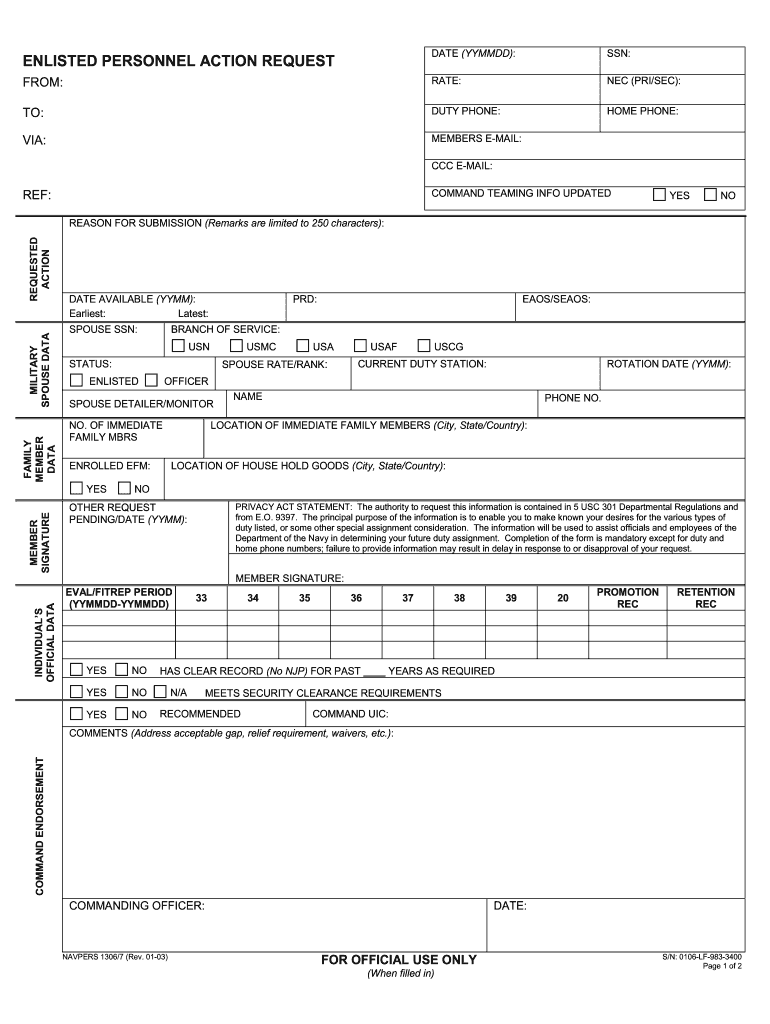
How to fill out the NAVPERS 1306/7 online
Filling out the NAVPERS 1306/7 form is a vital step in managing your enlisted personnel actions. This guide will provide you with comprehensive instructions to help you complete the form accurately and efficiently online.
Follow the steps to complete the NAVPERS 1306/7 form online.
- Click ‘Get Form’ button to obtain the form and open it in the editor.
- Begin by entering the date (YYMMDD) in the designated field at the top of the form.
- Provide your Social Security Number (SSN) in the appropriate section.
- Fill in your name in the 'FROM' field and specify your rate in the next field.
- Indicate your primary and secondary Navy Enlisted Classification (NEC) numbers.
- Input the destination in the 'TO' field and provide your duty phone and home phone numbers.
- Include your email address and the email address of your Command Career Counselor (CCC).
- Update the command teaming information section, marking 'YES' or 'NO' as needed.
- Fill out the family member data field accurately, including military spouse data.
- In the 'REQUESTED ACTION' section, specify the action you are requesting and provide a reason for submission, limited to 250 characters.
- State your date available, including earliest and latest dates, and fill in your spouse's SSN if applicable.
- Sign the form in the member signature area, and include relevant service information such as EAOS/SEAOS and the branch of service.
- Indicate the current duty station, rotation date, and any other significant military information.
- Complete the sections concerning eligibility, including family information, duty requests, and comments.
- Once all fields are filled accordingly, save your changes, and choose to download, print, or share the completed form.
Start filling out your NAVPERS 1306/7 online today to ensure your enlisted personnel action request is submitted promptly.
Experience a faster way to fill out and sign forms on the web. Access the most extensive library of templates available.
Related content
Jul 13, 2018 — NAVPERS 1306/7. NAVPERS 1500/33. NAVPERS 1530/1. NAVPERS 427. NAVPERS...
5 days ago — At its core, Navpers 1306/7 is an Officer Evaluation Report (OER) form used...
Enlisted personnel will submit requests via NAVPERS. 1306/7 (Rev. 01-03), Enlisted...
Get answers to your most pressing questions about US Legal Forms API.
How do I fill out a 1306 7?
Filling out NAVPERS 1306/7 requires careful attention to detail and understanding of specific instructions. Begin by gathering all necessary information about the incident and the individual involved. Then, follow the provided guidelines to ensure all sections are accurately completed before submission to avoid delays in processing.
What information is contained on the navpers 1300 22 that is specifically directed at the unit leadership?
NAVPERS 1300/22 contains vital information for unit leadership regarding the assignment and career management of personnel. This form includes key details relevant to the personnel’s qualifications, assignments, and performance. By reviewing the NAVPERS 1300/22, leaders can make informed decisions that affect their personnel’s career paths.
Where can I find navpers forms?
You can find NAVPERS forms, including NAVPERS 1306/7, on the official U.S. Navy website and other resources that provide military documentation. Additionally, platforms like uslegalforms offer easy access to various Navy forms. This access simplifies the process of downloading, completing, and submitting necessary paperwork.
What specific form is a Navpers 1626 7?
The NAVPERS 1626/7 is specifically designed to track disciplinary actions against Navy personnel. It provides a structured way to record the offense, resulting actions, and relevant remarks. Using the correct form ensures that all actions are properly documented and can be referenced in the future, reinforcing accountability.
What navpers form is known as the report and disposition of offenses (s)?
The report and disposition of offenses is documented using NAVPERS 1626/7. This form captures details related to offenses committed and the corresponding actions taken. Proper completion of NAVPERS 1626/7 is essential for maintaining records of disciplinary actions within the Navy.
What form is Navpers 1626 7?
NAVPERS 1626/7 refers to the official Navy form used for reporting administrative actions regarding enlisted personnel. This form is crucial for documenting misconduct and ensuring proper procedures are followed. Correct usage of NAVPERS 1626/7 helps maintain order and discipline within the Navy, promoting a fair and just environment.
What is Navpers 1626 7?
NAVPERS 1626 7 is a form used to facilitate the request and management of reintegrating personnel after deployment. This form addresses various aspects of re-transitioning soldiers into their roles effectively. The NAVPERS 1306/7 process can help integrate the essential information contained in NAVPERS 1626 7, thereby enhancing the overall reintegration effort.
What does an overseas screening consist of?
An overseas screening involves a review of your medical, personal, and professional qualifications before you are assigned to an overseas duty station. This process looks into your ability to adapt to different environments while ensuring readiness for deployment. Utilizing the NAVPERS 1306/7 form ensures all necessary details are included, supporting smooth overseas assignment transitions.
What is navpers 1300 16?
NAVPERS 1300 16 is a form used primarily for the evaluation of overseas assignments. This form collects essential information needed for effective assignment planning. When completing NAVPERS 1306/7, sailors must ensure to reference NAVPERS 1300 16 to guarantee proper processing of overseas assignments and screenings.
What is a suitability screening?
A suitability screening evaluates a service member's qualifications for specific assignments or programs. This process ensures that those selected for certain roles meet the necessary requirements and standards. The NAVPERS 1306/7 plays a pivotal role in documenting the outcomes of these screenings, ensuring that personnel are best matched to their roles.
Use professional pre-built templates to fill in and sign documents online faster. Get access to thousands of forms.
If you believe that this page should be taken down, please follow our DMCA take down process here.