Loading
Form preview
  • US Legal Forms
  • Form Library
  • Executive Forms
  • Executive Department DOD Forms
  • Navmc 10476 2002

Get Navmc 10476 2002-2026

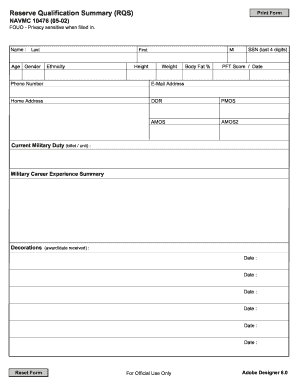
Designer 8.0 NAVMC 10476 (05-02) FOUO - Privacy sensitive when filled in. Military Education (school/date completed) : Date : Date : Date : Date : Civilian Education (school/date completed) : Date : Date : Date : Date : Civilian Occupation (job, description of duties) : Languages (spoken/written/reading skills) : Remarks (Include community activities, civilian skills beneficial to military service, etc) : Signature : Date Completed : For Official Use Only Adobe Designer 8.0 .

How it works

  1. Open form

    Open form follow the instructions

  2. Easily sign form

    Easily sign the form with your finger

  3. Share form

    Send filled & signed form or save

How to fill out the NAVMC 10476 online

The NAVMC 10476, also known as the Reserve Qualification Summary (RQS), is essential for capturing military and civilian qualifications not reflected in your Official Military Personnel Files. This guide offers clear, step-by-step instructions to assist users in completing the form online efficiently.

Follow the steps to successfully complete the NAVMC 10476 online

  1. Press the ‘Get Form’ button to access the document and open it in your editor.
  2. Begin by filling out your personal information including your name, age, gender, ethnicity, height, weight, and body fat percentage.
  3. Enter the last four digits of your Social Security Number and provide your PFT score along with the date of evaluation.
  4. Include your phone number, email address, and home address in the designated fields.
  5. Indicate your date of rank (DOR), primary military occupational specialty (PMOS), and any additional military occupational specialties (AMOS and AMOS2) if applicable.
  6. Detail your current military duty, specifying your billet and unit.
  7. Summarize your military career experience by noting significant decorations and the dates you received them.
  8. Input your military education, listing educational institutions and the dates completed.
  9. Provide details about your civilian education, and civilian occupation, including a brief description of your job duties.
  10. List any languages you speak or write, including reading skills.
  11. In the remarks section, include any community activities or civilian skills that may be beneficial to military service.
  12. Complete the form by signing it and entering the date of completion. Ensure all information is clear and accurate.
  13. After completing the form, you can save your changes, download it for your records, print it, or share it with the appropriate Headquarters element as required.

Complete your NAVMC 10476 online to ensure your qualifications are up-to-date.

Get form

Experience a faster way to fill out and sign forms on the web. Access the most extensive library of templates available.
Get form

Related content

convening of the college of distance education and...
Officers must complete, sign (digitally or physically) and attach their RQS NAVMC 10476...
Learn more
Monthly catalog of United States Government...
... 10476. 251. Commercial vegetables for fresh market and processing In ... NAVMC 2578.])...
Learn more

Related links form

WA RPD-224-002 2011 WA SF 137 2004 WA Single Trip Oversize Load Permit - City of Lakewood 2013 WA T-Clocs Motorcycle Inspection Form

Questions & Answers

Get answers to your most pressing questions about US Legal Forms API.

Contact support

To enlist in the Marine Reserves, start by contacting a Marine recruiter who can provide detailed guidance and support. You will need to complete the application process, including medical examinations and training assessments. Utilizing the NAVMC 10476 can maintain your timeline and organizational aspects during this important transition.

To access your Army W2 online, log into the Defense Finance and Accounting Service (DFAS) portal. Ensure you have the necessary login credentials to retrieve your tax documents. The NAVMC 10476 may not directly relate to this, but understanding military documentation helps you stay organized while managing your finances.

The timeline to become a Marine Reserve can vary but usually takes a few months. After completing initial training and meeting all requirements, you will enter the Reserve component. Using the NAVMC 10476 can help you understand the training phases and expected durations so you can plan accordingly.

Joining the Marine Corps Reserve involves visiting a local recruiting office and discussing your options with a recruiter. They will guide you through the application process, including necessary paperwork and evaluations. Make sure to explore resources such as the NAVMC 10476, which detail the steps you'll need to take to enlist successfully.

You can obtain verification of your military experience through official channels, including your unit’s administrative office. The NAVMC 10476 may also assist in providing the necessary documentation. Services like USLegalForms offer guidance on how to complete this process smoothly and efficiently, ensuring you have the correct proof.

To get promoted quickly in the USMC, focus on meeting and exceeding your responsibilities. Keep a clean service record and seek additional training opportunities. Utilize resources like the NAVMC 10476 to track your progress and stay organized. Participation in leadership roles and volunteer activities can also enhance your chances of promotion.

The lineal list in the Marine Corps is a ranking system that determines the relative seniority of officers. It is essential for promotion considerations and assignments. Understanding how your position relates to others helps you navigate your career effectively, and familiarizing yourself with relevant forms like the NAVMC 10476 ensures you stay organized throughout the process.

You can check your Navy leave days by accessing NSIPS or consulting your command’s administrative office. In NSIPS, look for the leave balance section that provides details on your accrued leave. Keeping track of your leave using forms like the NAVMC 10476 can help you manage your time off effectively.

To fill out the leave form in the Navy, gather required personal information like your service number and leave dates. Use the NAVMC 10476 to document details accurately and specify the type of leave. Ensure you submit your completed form according to your command’s guidelines to facilitate timely approval.

Filling out the Armed Forces Post Office (APO) form requires your personal information, destination, and packages details. Make sure to have all details ready, such as your address and service member information, to ensure quick processing. Using the NAVMC 10476 can also help streamline other military paperwork you may need to submit alongside your APO form.

Get This Form Now!

Use professional pre-built templates to fill in and sign documents online faster. Get access to thousands of forms.
Get form
If you believe that this page should be taken down, please follow our DMCA take down processhere.

Industry-leading security and compliance

US Legal Forms protects your data by complying with industry-specific security standards.
  • In businnes since 1997
    25+ years providing professional legal documents.
  • Accredited business
    Guarantees that a business meets BBB accreditation standards in the US and Canada.
  • Secured by Braintree
    Validated Level 1 PCI DSS compliant payment gateway that accepts most major credit and debit card brands from across the globe.
Get NAVMC 10476
Get form
  • Adoption
  • Bankruptcy
  • Contractors
  • Divorce
  • Home Sales
  • Employment
  • Identity Theft
  • Incorporation
  • Landlord Tenant
  • Living Trust
  • Name Change
  • Personal Planning
  • Small Business
  • Wills & Estates
  • Packages A-Z
  • Affidavits
  • Bankruptcy
  • Bill of Sale
  • Corporate - LLC
  • Divorce
  • Employment
  • Identity Theft
  • Internet Technology
  • Landlord Tenant
  • Living Wills
  • Name Change
  • Power of Attorney
  • Real Estate
  • Small Estates
  • Wills
  • All Forms
  • Forms A-Z
  • Form Library
  • Legal Hub
  • About Us
  • Help Portal
  • Legal Resources
  • Blog
  • Affiliates
  • Contact Us
  • Delete My Account
  • Site Map
  • Industries
  • Forms in Spanish
  • Localized Forms
  • State-specific Forms
  • Forms Kit
  • Real Estate Handbook
  • All Guides
  • Notarize
  • Incorporation services
  • For Consumers
  • For Small Business
  • For Attorneys
  • USLegal
  • FormsPass
  • pdfFiller
  • signNow
  • altaFlow
  • DocHub
  • Instapage
Form Packages
  • Adoption
  • Bankruptcy
  • Contractors
  • Divorce
  • Home Sales
  • Employment
  • Identity Theft
  • Incorporation
  • Landlord Tenant
  • Living Trust
  • Name Change
  • Personal Planning
  • Small Business
  • Wills & Estates
  • Packages A-Z
Form Categories
  • Affidavits
  • Bankruptcy
  • Bill of Sale
  • Corporate - LLC
  • Divorce
  • Employment
  • Identity Theft
  • Internet Technology
  • Landlord Tenant
  • Living Wills
  • Name Change
  • Power of Attorney
  • Real Estate
  • Small Estates
  • Wills
  • All Forms
  • Forms A-Z
  • Form Library
Customer Service
  • Legal Hub
  • About Us
  • Help Portal
  • Legal Resources
  • Blog
  • Affiliates
  • Contact Us
  • Delete My Account
  • Site Map
  • Industries
  • Forms in Spanish
  • Localized Forms
  • State-specific Forms
  • Forms Kit
Legal Guides
  • Real Estate Handbook
  • All Guides
Prepared for you
  • Notarize
  • Incorporation services
Our Customers
  • For Consumers
  • For Small Business
  • For Attorneys
Our Sites
  • USLegal
  • FormsPass
  • pdfFiller
  • signNow
  • altaFlow
  • DocHub
  • Instapage
Social Media
Call us now toll free:
+1 833 426 79 33
As seen in:
© Copyright 1999-2026 airSlate Legal Forms, Inc. 3720 Flowood Dr, Flowood, Mississippi 39232
  • Your Privacy Choices
  • Terms of Service
  • Privacy Notice
  • Content Takedown Policy
  • Bug Bounty Program