Loading
Get Benicomp Select Claim Form
How it works
-

Open form follow the instructions
-

Easily sign the form with your finger
-

Send filled & signed form or save
How to fill out the Benicomp Select Claim Form online
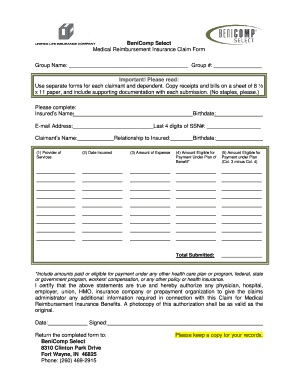
Filling out the Benicomp Select Claim Form is a crucial step in ensuring you receive the reimbursements you are entitled to under your medical plan. This guide provides you with clear, step-by-step instructions to complete the form online efficiently, making the claims process straightforward and manageable.
Follow the steps to accurately complete the form online.
- Press the ‘Get Form’ button to access the claim form and open it in the editor.
- In the 'Group Name' section, enter the name of the group associated with your insurance. Fill in the 'Group #' field with your specific group number.
- In the 'Insured’s Name' field, provide the full name of the person insured by the plan. Enter their 'Birthdate' and 'E-mail Address' as needed. For identification, fill in the last four digits of the Social Security Number.
- Complete the 'Claimant’s Name' section with the name of the individual submitting the claim.
- For the 'Provider of Services,' write the name of the medical provider who delivered the services.
- In 'Date Incurred,' input the date the services were provided.
- Indicate the 'Relationship to Insured' by selecting the appropriate option.
- Fill in the 'Claimant’s Birthdate' to provide further identification as needed.
- In the 'Amount of Expense' field, specify the total amount you are claiming for reimbursement.
- Record the 'Amount Eligible for Payment Under Plan of Benefit' based on your coverage details.
- Calculate the 'Amount Eligible for Payment under Plan' by subtracting column four from column three. Enter the resulting amount.
- Total all submitted claims by entering the figure in the 'Total Submitted' field.
- Review all entries for accuracy, then sign and date the form to certify that the information provided is true. Ensure to include an authorization for the claims administrator to obtain necessary information from relevant parties.
- Once completed, you may save changes, download, print, or share the form as needed.
Take action now by filling out the Benicomp Select Claim Form online to ensure swift processing of your claims.
The UB-04 (CMS-1450) form is the claim form for institutional facilities such as hospitals or outpatient facilities. This would include things like surgery, radiology, laboratory, or other facility services. The HCFA-1500 form (CMS-1500) is used to submit charges covered under Medicare Part B.
Industry-leading security and compliance
US Legal Forms protects your data by complying with industry-specific security standards.
-
In businnes since 199725+ years providing professional legal documents.
-
Accredited businessGuarantees that a business meets BBB accreditation standards in the US and Canada.
-
Secured by BraintreeValidated Level 1 PCI DSS compliant payment gateway that accepts most major credit and debit card brands from across the globe.