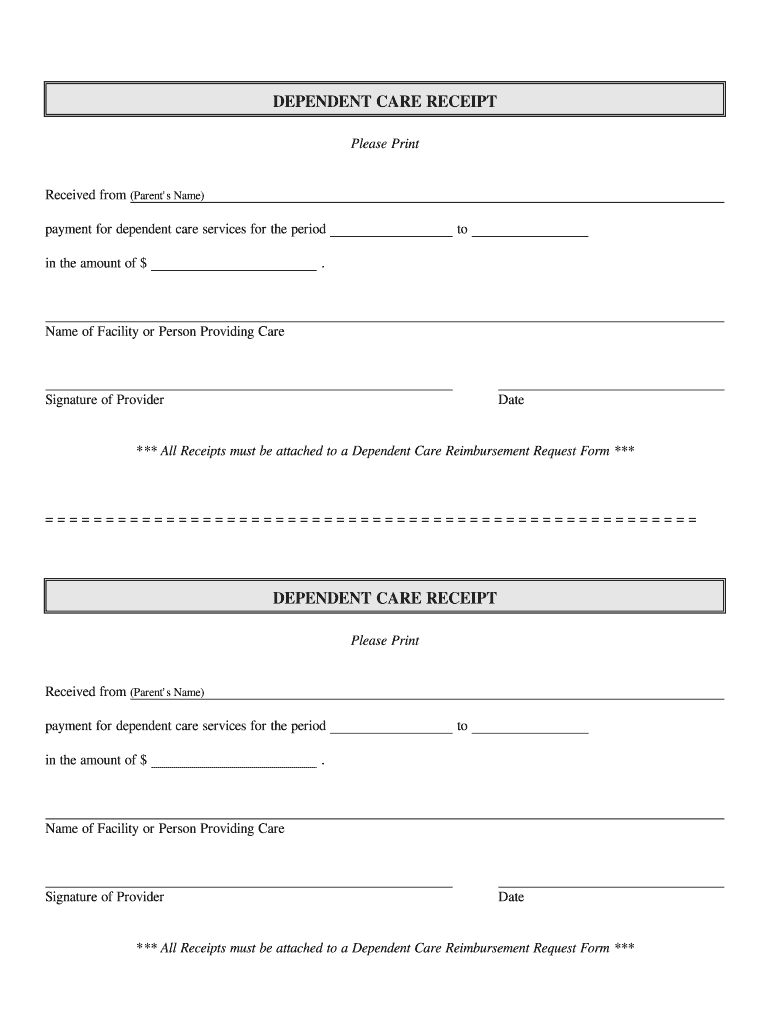
Request Form *** ====================================================== DEPENDENT CARE RECEIPT Please Print Received from (Parent's Name) payment for dependent care services for the period in the amount of $ to . Name of Facility or Person Providing Care Signature of Provider Date *** All Receipts must be attached to a Dependent Care Reimbursement Request Form *** .
Loading

Open form follow the instructions

Easily sign the form with your finger

Send filled & signed form or save
How to fill out the 24HourFlex Dependent Care Receipt online
Filling out the 24HourFlex Dependent Care Receipt accurately is essential for proper reimbursement processing. This guide provides clear and detailed instructions to assist users in completing the form online.
Follow the steps to fill out your dependent care receipt
- Press the ‘Get Form’ button to access the 24HourFlex Dependent Care Receipt and open it in your preferred document editor.
- In the 'Received from (Parent's Name)' section, enter the full name of the parent or guardian who is claiming the dependent care services.
- Locate the 'payment for dependent care services for the period' field. Fill in the specific time period for which care was provided. Be clear and precise to avoid any confusion.
- In the 'in the amount of $' section, indicate the total amount paid for the dependent care services. Ensure the figure is accurate and corresponds with your records.
- Provide the dates for the services rendered in the 'to' section. This should reflect the start and end date of the care period.
- Under the 'Name of Facility or Person Providing Care,' enter the name of the daycare facility or the individual caregiver responsible for providing the care services.
- Obtain the signature of the provider in the 'Signature of Provider' field. Ensure they sign to validate the receipt.
- Fill in the 'Date' section with the date on which the receipt is completed or signed, providing an accurate date helps maintain clear records.
- After completing all sections, remember that all receipts must be attached to a Dependent Care Reimbursement Request Form for processing.
- Lastly, save your changes, and consider options to download, print, or share the completed form as needed.
To ensure timely reimbursement, complete and file your dependent care receipt online today.
Experience a faster way to fill out and sign forms on the web. Access the most extensive library of templates available.
Related content
Jan 1, 2013 — Year for the Dependent Care Flexible Spending Account. However, if you...
Jul 1, 2022 — is responsible for payment of any dependent or other coverage as if in...
Get answers to your most pressing questions about US Legal Forms API.
How do I get reimbursed for dependent care in FSA?
To get reimbursed for dependent care in your FSA, submit a claim along with your supporting documentation, including receipts. The 24HourFlex Dependent Care Receipt format provides the clarity and details required for faster processing. Once your claim is verified, the reimbursement will be processed according to your plan’s timeline. This straightforward approach simplifies how you access your funds for eligible expenses.
What happens if you don't have a receipt for FSA?
Failing to present a receipt for your FSA claim can lead to issues in getting your reimbursement processed. The IRS requires valid documentation, and lacking it may render your claims invalid. Utilizing a 24HourFlex Dependent Care Receipt not only helps you stay compliant but also eases the claim process. It’s wise to maintain thorough records, ensuring you do not miss out on benefits.
What happens if I don't have a receipt for FSA?
If you do not have a receipt for your FSA claims, you may face delays in reimbursement or denial of your request. Proper documentation, like a 24HourFlex Dependent Care Receipt, is crucial for compliance with IRS rules. In some cases, you might need to provide alternative proof, like bank statements, which may not be as effective. It's always better to keep organized records to avoid these complications.
How does FSA verify receipts?
The FSA verifies receipts by checking for key details that confirm the legitimacy of the expense. Typically, this includes the date of service, provider details, and the nature of the expense. A 24HourFlex Dependent Care Receipt captures all the necessary information, ensuring your claims are processed efficiently. This level of documentation supports both you and the plan in meeting IRS guidelines.
Does the IRS require receipts for FSA?
Yes, the IRS requires receipts for Flexible Spending Accounts (FSA) to substantiate expenses. This requirement ensures that only eligible expenses are reimbursed from your account. By using a 24HourFlex Dependent Care Receipt, you can easily document your dependent care expenses. Accurate record-keeping helps you comply with IRS regulations and allows for smoother reimbursements.
How do I get reimbursed from FSA dependent care?
To get reimbursed from your FSA dependent care, submit your 24HourFlex Dependent Care Receipts along with a reimbursement form to your FSA administrator. After processing, you will receive your reimbursement based on the approved claims. Keep an eye on your account for updates and ensure all documentation is accurate. This process can help you recover your dependent care costs efficiently.
How to submit receipts for dependent care FSA?
To submit receipts for your dependent care FSA, start by gathering your 24HourFlex Dependent Care Receipts that clearly detail your expenses. You can typically submit these online through your FSA account portal or by mailing them if required. Make sure to follow the submission guidelines for your specific FSA plan. Proper submission ensures you get reimbursed promptly.
What happens if you don't provide a receipt for FSA?
If you don’t provide a 24HourFlex Dependent Care Receipt for your Flexible Spending Account (FSA), you may not receive reimbursement for your expenses. Receipts serve as proof of your dependent care costs. Without them, your claims could be denied, affecting your budget. It's essential to keep detailed records to ensure you maximize your FSA benefits.
How to submit receipt for dependent care FSA?
Submitting your receipt for dependent care FSA is straightforward. Ensure your 24HourFlex Dependent Care Receipt is clear and complete, then log into your FSA account to upload it. Following these steps will help streamline your reimbursement process.
How do I report dependent care FSA on my taxes?
To report your dependent care FSA on your taxes, you will need to fill out IRS Form 2441. This form helps you calculate your credit for child and dependent care expenses. Remember to keep your 24HourFlex Dependent Care Receipt handy, as it serves as proof of your expenditures and will make filing smoother.
Use professional pre-built templates to fill in and sign documents online faster. Get access to thousands of forms.
If you believe that this page should be taken down, please follow our DMCA take down process here.