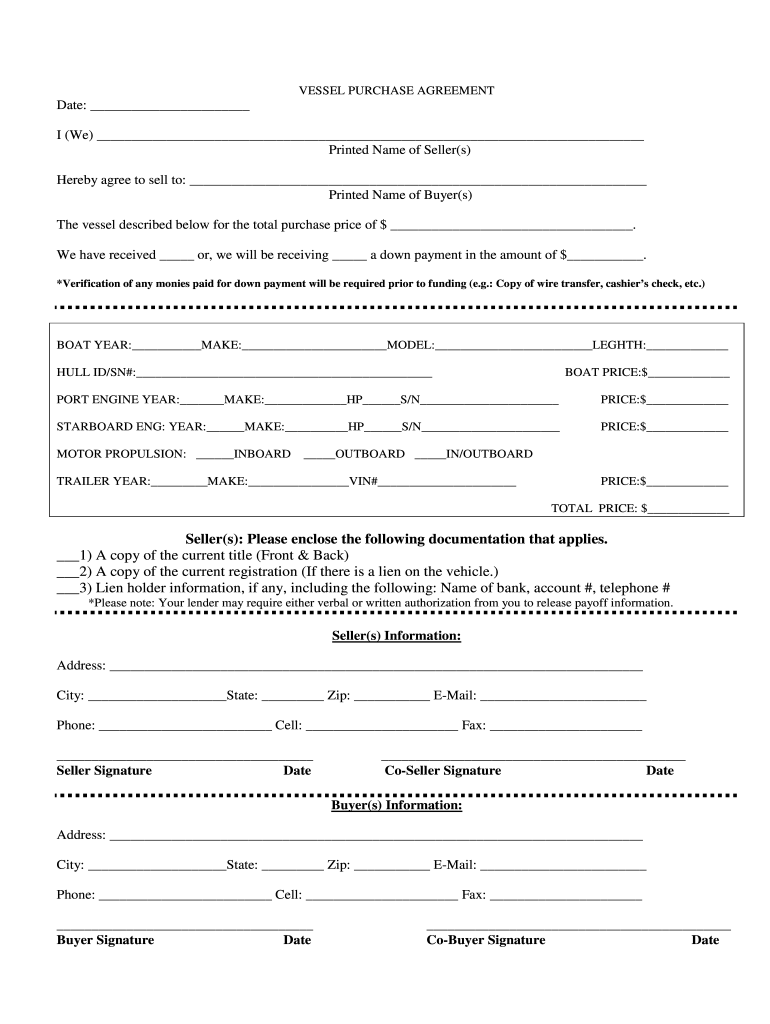
______________________ Fax: ______________________ _____________________________________ Seller Signature Date ____________________________________________ Co-Seller Signature Date Buyer(s) Information: Address: _____________________________________________________________________________ City: ____________________State: _________ Zip: ___________ E-Mail: ________________________ Phone: _________________________ Cell: ______________________ Fax: ______________________ _________________________.
Loading

Open form follow the instructions

Easily sign the form with your finger

Send filled & signed form or save
How to fill out the Excel Credit Vessel Purchase Agreement online
This guide provides detailed instructions for completing the Excel Credit Vessel Purchase Agreement online. By following these steps, you will ensure that all necessary information is accurately filled out, making the documentation process smooth and efficient.
Follow the steps to complete the form correctly.
- Click ‘Get Form’ button to access the form and open it in your preferred online editor.
- Begin by entering the date of the agreement in the designated space.
- In the section labeled 'I (We)', clearly print the full names of the seller(s) as they appear in official documentation.
- Next, fill in the name of the buyer(s) in the space provided below 'Hereby agree to sell to'. Ensure this is accurate and complete.
- Provide the total purchase price for the vessel in the corresponding field. Make sure this amount reflects the agreed transaction.
- Indicate whether you have received a down payment or will be receiving one by marking the appropriate box. Specify the down payment amount in the provided area.
- Complete the vessel details by entering the year, make, model, and length of the boat in the required fields.
- Fill in the Hull ID/SN number for identification purposes. This helps to verify the exact vessel being purchased.
- For the engine details, specify the port engine year, make, horsepower, and serial number, as well as the price for the port engine.
- Repeat step 9 for the starboard engine to ensure all engine details are documented accurately.
- Select the type of motor propulsion by marking the appropriate option: inboard, outboard, or in/outboard.
- Input details for the trailer including the year, make, and VIN number alongside the price.
- Finally, calculate the total price of the entire transaction and enter it in the total price field.
- Sellers must include any relevant documentation as outlined in the section below the total price. Ensure all necessary items are attached.
- Fill in the seller(s) and buyer(s) information, ensuring all contact details are accurate. Each party must provide their signature and the date.
- After completing the form, review all information for accuracy. You can then save changes, download the completed form, print it for records, or share it as needed.
Start completing your Excel Credit Vessel Purchase Agreement online to streamline your transaction.
Experience a faster way to fill out and sign forms on the web. Access the most extensive library of templates available.
Related content
""Closing Date" shall mean the date on which the initial closing occurs pursuant to the...
This guide contains information on getting and using a Pro-Card for Cardholders...
Mar 4, 2021 — In December 2020, the Group has entered into an agreement for the sale of...
Use professional pre-built templates to fill in and sign documents online faster. Get access to thousands of forms.
If you believe that this page should be taken down, please follow our DMCA take down process here.