Loading
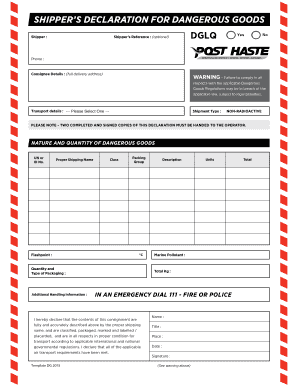
Get Bshipper39s Declarationb For Dangerous Bgoodsb Dglq - Phlextras Co
How it works
-

Open form follow the instructions
-

Easily sign the form with your finger
-

Send filled & signed form or save
How to fill out the shipper’s declaration for dangerous goods DGLQ - Phlextras Co online
Filling out the shipper’s declaration for dangerous goods is a crucial step in ensuring compliance with safety regulations. This guide will provide clear, step-by-step instructions on how to complete the form correctly online, making the process more manageable for users of all experience levels.
Follow the steps to complete the form accurately and efficiently.
- Click ‘Get Form’ button to obtain the form and open it in the editor.
- Determine if the consignment is designated as DGLQ (Dangerous Goods in Limited Quantities). If 'YES' and it meets the criteria, proceed to the next step. If 'NO', black out the DGLQ lettering in the top right corner.
- Enter the shipper's reference in the appropriate field, noting that this step is optional.
- Complete the shipper's name and full address, ensuring no PO Box numbers are used, and include a contact phone number.
- Fill in the consignee's name and full delivery address, again avoiding PO Box numbers.
- Enter the 4 digit UN number that identifies the dangerous goods.
- Provide the proper shipping name. If it is 'N.O.S. (Not Otherwise Specified)', include the technical name as well.
- Enter the UN class number, which is also a 4 digit number.
- Indicate the packing group, ensuring that it is either PG II or PG III, as PG I is not accepted.
- Describe the contents of the inner package, for example, aerosols, tins, or bottles.
- Enter the quantity of inner units.
- Record the total quantity of dangerous goods in the specified units, like 400mls or 3 liters.
- For Class 3 products, enter the flashpoint; for others, indicate 'N/A'.
- State whether the shipment contains marine pollutants by entering 'Yes' or 'No'.
- Detail the quantity and type of packaging, for instance, 4 cartons or 2 x 20 litre drums.
- Complete the total weight of the consignment in kilograms.
- Sign off by completing the signature area, ensuring that all required information is included.
- After completing the form, users can save changes, download, print, or share the form as needed.
Complete your dangerous goods declaration online today for a smoother shipping process.
What is a Dangerous Goods Declaration? It is a declaration given by the party that organizes the transportation of dangerous goods by sea to the carrier. It shows the list of goods that come under the dangerous goods category and states the special packaging, identification marks, and labels on them.
Industry-leading security and compliance
US Legal Forms protects your data by complying with industry-specific security standards.
-
In businnes since 199725+ years providing professional legal documents.
-
Accredited businessGuarantees that a business meets BBB accreditation standards in the US and Canada.
-
Secured by BraintreeValidated Level 1 PCI DSS compliant payment gateway that accepts most major credit and debit card brands from across the globe.