Loading
Get Ca Slacal Sl-2 2004-2026
How it works
-

Open form follow the instructions
-

Easily sign the form with your finger
-

Send filled & signed form or save
How to fill out the CA SLACAL SL-2 online
This guide provides clear and comprehensive instructions on how to complete the CA SLACAL SL-2 form online. Whether you are a seasoned professional or new to digital document management, these steps will help you navigate the process with confidence.
Follow the steps to effectively complete the CA SLACAL SL-2 form.
- Click ‘Get Form’ button to access the CA SLACAL SL-2 form and open it in your editor.
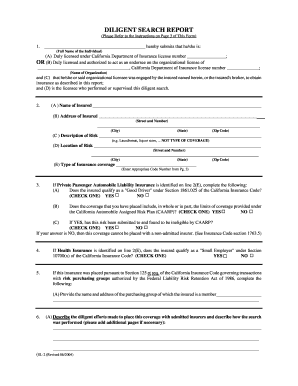
- In section 1, provide the full name of the individual who performed or supervised the diligent search. Include their California Department of Insurance license number in section (A) or the organizational license information in section (B) if applicable.
- For section 2, enter the name, address, and description of the insured's risk. Ensure that you specify the type of insurance coverage using the appropriate code number provided on page 3.
- If applicable, answer the questions in section 3 regarding Private Passenger Automobile Liability Insurance. Confirm if the insured qualifies as a 'Good Driver' and provide details about the coverage limits.
- Fill out section 4 only if Health Insurance applies, indicating whether the insured qualifies as a 'Small Employer'.
- In section 5, describe the purchasing group membership if the insurance is handled under specific federal regulations.
- Detail your diligent search efforts in section 6, including any additional pages if necessary. If another individual performed the search, provide their full name.
- Complete section 7 by indicating whether you submitted the risk to at least three admitted insurers. If yes, fill out the corresponding table with insurer details. If no, provide an explanation.
- At the end of the form, ensure all fields are filled out. Sign and date the form where indicated to certify that the report is true and correct, confirming it is not intended to secure a lower rate from a non-admitted insurer.
- Finally, save your changes, download, print, or share the completed form as necessary.
Complete your CA SLACAL SL-2 form online today for efficient processing.
Related links form
An assignment of benefits form in health insurance allows policyholders to transfer their insurance benefits directly to a healthcare provider. This process simplifies payment for medical services, as providers can bill insurance companies on your behalf. Understanding how this form works in conjunction with your insurance policy, such as the CA SLACAL SL-2, can enhance your overall experience with health services.