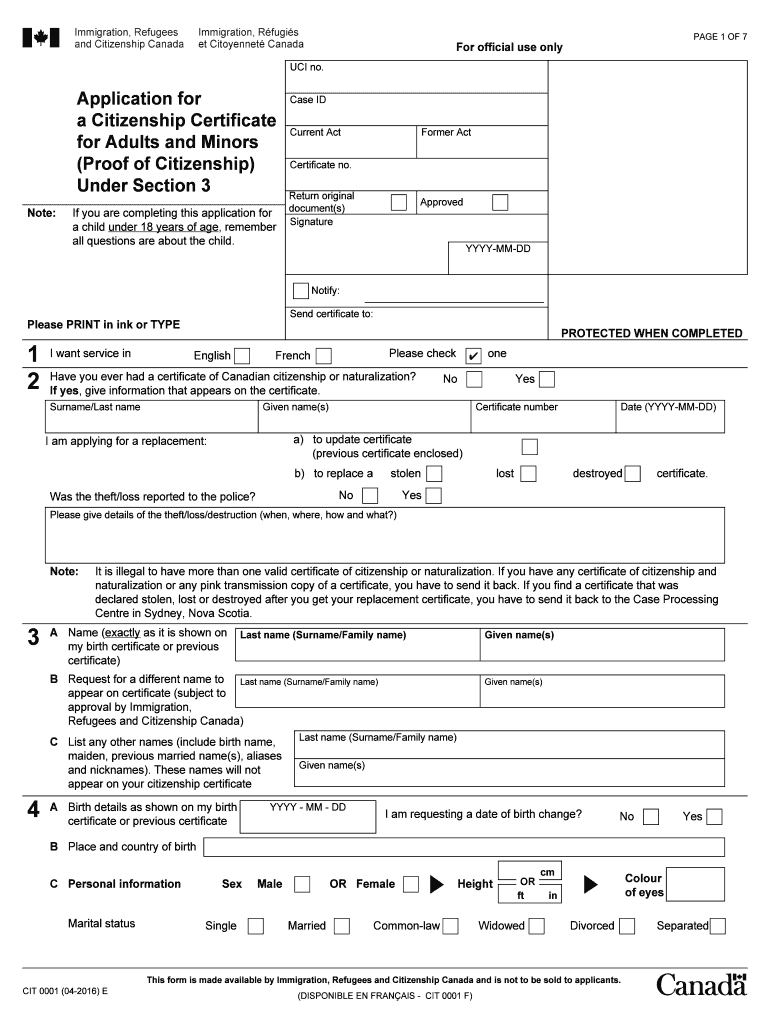
child under 18 years of age, remember all questions are about the child. Case ID Current Act Former Act Certificate no. Return original document(s) Signature Approved YYYY-MM-DD Notify: Send certificate to: Please PRINT in ink or TYPE 1 2 I want service in PROTECTED WHEN COMPLETED English Please check French Have you ever had a certificate of Canadian citizenship or naturalization? If yes, give information that appears on the certificate. Surname/Last name ✔ one No Yes Given .

Open form follow the instructions

Easily sign the form with your finger

Send filled & signed form or save
How to fill out the Canada CIT 0001 E online
Filling out the Canada CIT 0001 E form is a crucial step for individuals seeking proof of Canadian citizenship. This guide provides clear, user-friendly instructions for each section of the form, ensuring a smooth online application process.
Follow the steps to complete your application effectively.
- Press the ‘Get Form’ button to access the Canada CIT 0001 E application form and open it in your preferred document editor.
- Begin by providing your UCI number if you have one, and complete the application type, either for yourself or a minor under 18 years of age, ensuring to answer accordingly for the child if applicable.
- In the personal information section, fill in your surname, given name(s), and indicate your preferred language for service (English or French).
- For applicants who have had a citizenship certificate before, indicate whether you have lost or need a replacement for a destroyed certificate, and provide details about the circumstances if applicable.
- Input your birth details exactly as they appear on your birth certificate, including your date and place of birth. Note if you are requesting a change to your date of birth.
- Describe your marital status and provide additional personal information, including height, eye color, and any other relevant details.
- Complete sections about your parents, including their names, dates of birth, and citizenship status, ensuring to include details on any grandparents if applicable.
- Answer questions regarding your past citizenship status and any absences from Canada, ensuring to document the duration and reasons.
- If appointing a representative for your application, complete the necessary section by including the Use of a Representative form.
- Finally, read the declaration statement, affirm the truthfulness of your provided information, and ensure to sign and date the form appropriately.
- Once all sections are completed, review the form for accuracy, then save your changes, download, print, or share the completed document as needed.
Start your online application process now to obtain your citizenship certificate securely.
Experience a faster way to fill out and sign forms on the web. Access the most extensive library of templates available.
Related content
Subjects referred on MIWs were more likely to be admitted to a psychiatric hospital than...
Get answers to your most pressing questions about US Legal Forms API.
Can I become a Canadian citizen if my grandparents were Canadian?
Yes, if your grandparents were Canadian citizens, you may have Canadian citizenship by descent. To apply, you will need to gather documents proving your lineage and submit an application. For more information on the process and how it connects to Canada CIT 0001 E, consider seeking professional guidance.
Who needs an electronic travel authorization to enter Canada?
Any traveler flying to Canada from a visa-exempt country typically needs an electronic travel authorization, or eTA. This requirement does not apply to U.S. citizens, as they can enter Canada with just their passport. For more information on travel requirements, refer to Canada CIT 0001 E, which provides detailed guidelines.
What is the E1 visa for Canada?
The E1 visa for Canada allows U.S. citizens to conduct substantial trade-related activities in Canada. This visa is designed for individuals who aim to facilitate trade between their home country and Canada. If you are considering applying for this visa, you can find useful insights in the Canada CIT 0001 E document.
Who qualifies for an E1 visa?
To qualify for an E1 visa, you must be a citizen of a country that has a qualifying trade agreement with the U.S. Additionally, you need to demonstrate that the majority of your trade services are between the U.S. and your home country. For detailed information on qualifications and application processes, explore the resources of Canada CIT 0001 E.
Can an E1 visa lead to a green card?
While an E1 visa is primarily a non-immigrant status, it can potentially lead to a green card under certain circumstances. If you establish a successful business in the U.S. and meet specific criteria, you could adjust your status. Ultimately, the path from E1 to a green card is complex, so it's advisable to consult additional resources like Canada CIT 0001 E for guidance.
What is e1 in Canada?
E1 in Canada refers to the Entrepreneurial Visa that permits U.S. citizens to establish and manage a substantial trade enterprise in Canada. This visa is especially beneficial for individuals looking to expand their business reach in the North American market. Those seeking to learn more about the E1 visa can reference Canada CIT 0001 E for comprehensive information.
Do I have to fill out a customs declaration form Canada?
Yes, filling out a customs declaration form is typically required when you enter Canada. This form helps the Canadian government understand your goods and the purpose of your visit. Additionally, knowing the requirements outlined in Canada CIT 0001 E can simplify your travel and make sure you have the necessary paperwork ready.
What is E1 status?
E1 status refers to a non-immigrant visa category in the United States, which allows individuals from countries that hold a trade agreement with the U.S. to enter the country for business purposes. This status permits visa holders to engage in substantial trade between the U.S. and their home country. If you are interested in E1 status and trading opportunities, consider the details outlined in Canada CIT 0001 E for a better understanding.
How fast can I get my citizenship certificate?
The speed at which you receive your citizenship certificate can vary. Generally, it takes several weeks post-Oath for the certificate to arrive. Factors such as processing times and individual application specifics may affect this duration. For those looking for help navigating the process, uslegalforms has resources to assist you.
How long does it take to get a citizenship e-certificate after the oath in Canada?
Similar to the regular citizenship certificate, receiving your citizenship e-certificate after the oath can take several weeks. This duration may depend on various factors, including the review of your application. It’s essential to monitor your application status online for updates. Uslegalforms can provide guidance on tracking your application effectively.
Use professional pre-built templates to fill in and sign documents online faster. Get access to thousands of forms.
If you believe that this page should be taken down, please follow our DMCA take down process here.
This form is available in several versions. Select the version you need from the drop-down list below.