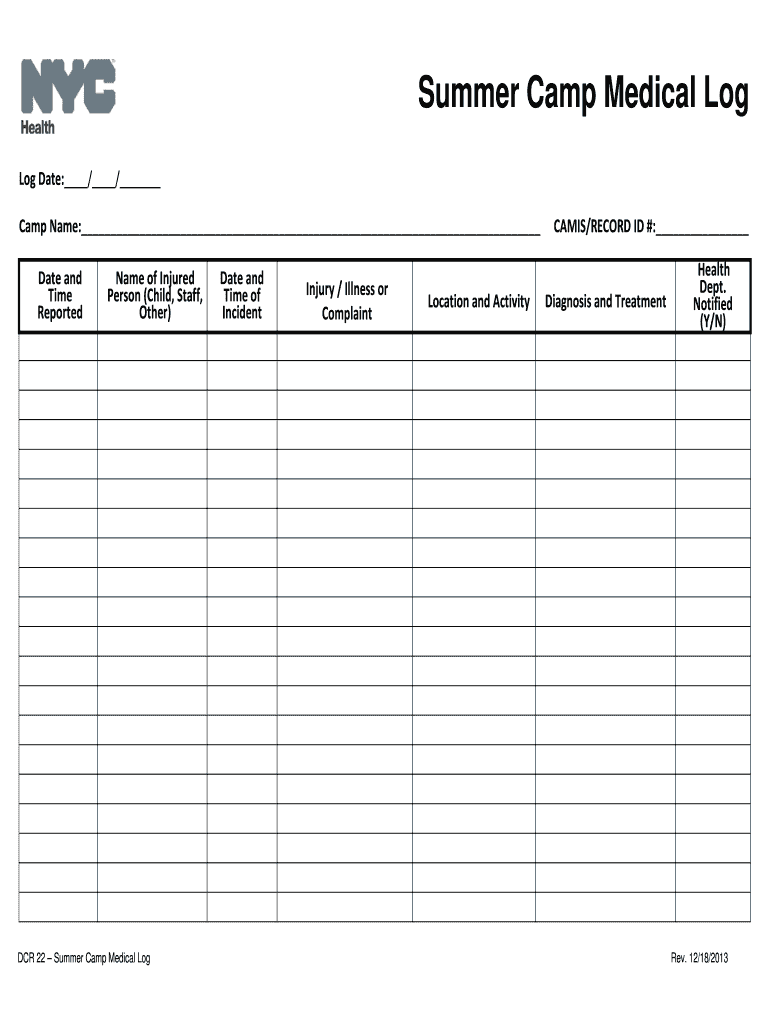
Other) DCR 22 – Summer Camp Medical Log Date and Time of Incident Injury / Illness or Complaint Location and Activity CAMIS/RECORD ID #:________________ Diagnosis and Treatment Health Dept. Notified (Y/N) Rev. 12/18/2013 .
Loading

Open form follow the instructions

Easily sign the form with your finger

Send filled & signed form or save
How to fill out the NY DCR 22 online
The NY DCR 22 form serves as an essential record for documenting medical incidents at summer camps. Filling out this form online allows camp personnel to maintain accurate records efficiently, ensuring the health and safety of all attendees.
Follow the steps to complete the NY DCR 22 form online.
- Press the ‘Get Form’ button to access the NY DCR 22 and open it in your chosen editing tool.
- Begin by entering the log date at the top of the form. This date should reflect when the report is being made.
- In the 'Camp Name' field, input the name of the summer camp where the incident occurred.
- Document the date and time when the incident was reported in the designated section.
- Enter the name of the injured person, which may be a child, staff member, or another individual involved in the incident.
- Fill in the date and time of the incident itself in the provided fields.
- Detail the injury, illness, or complaint reported by the individual in the corresponding section.
- Record the specific location and activity where the incident took place.
- In the CAMIS/Record ID # field, input any relevant identification number associated with the record or incident.
- Document the diagnosis and treatment administered as a result of the incident.
- Indicate whether the health department was notified by selecting 'Y' for yes or 'N' for no in the designated area.
- Once all sections are completed, make sure to save your changes. You can then download, print, or share the NY DCR 22 as required.
Complete your documents online for efficient record-keeping.
Experience a faster way to fill out and sign forms on the web. Access the most extensive library of templates available.
Related content
Proceeding to Establish Alternatives to Traditional Demand-Based Rate Structures for...
by K DeWilde · 2020 · Cited by 3 — Since the time of the Founding, actions in strict...
Record the serial number in the space provided below. Refer to these numbers whenever you...
Get answers to your most pressing questions about US Legal Forms API.
How to remove form IT 225 TurboTax?
Removing form IT 225 in TurboTax requires you to navigate to the section where you can manage your forms. Simply delete the entry linked to IT 225 from your tax return, and TurboTax will adjust your calculations accordingly. By managing your forms properly, you can maintain compliance with the NY DCR 22, keeping your tax filing straightforward and efficient.
What is NY form IT 225?
NY form IT 225 is a crucial document for New York residents that helps in adjusting federal income figures for state tax reporting. It accommodates various additions and subtractions, which assist in accurately reflecting your tax obligations. Utilizing this form effectively supports compliance with the NY DCR 22 and ensures that you're not missing important deductions.
Do I have to file a NY nonresident return?
Yes, if you earned income in New York but do not reside there, you will need to file a NY nonresident return. This applies to income sourced from New York, subject to NY DCR 22 regulations. Filing helps you comply with state laws and ensures that you're reporting your income accurately.
How to fill out NY ST 120 form?
Filling out the NY ST 120 form involves providing your business information and detailing your purchases that qualify for sales tax exemption. You'll need to gather relevant data such as your business's tax identification number and a description of the exempt goods. Completing this form according to the guidelines of the NY DCR 22 ensures that your tax obligations are met correctly, leading to potential savings.
What are New York additions and subtractions?
New York additions and subtractions refer to specific adjustments that taxpayers make to their federal adjusted gross income when filing state taxes. Additions may include certain types of income not subject to federal tax, while subtractions might include qualified deductions. Understanding these adjustments is key to accurate filing under the NY DCR 22, ensuring you're not overpaying your taxes.
What is form IT 225 used for?
Form IT 225 is used by New York residents to report adjustments related to New York State income taxes. This form allows taxpayers to make necessary additions and subtractions from their federal adjusted gross income. Familiarizing yourself with the IT 225 can simplify compliance with the NY DCR 22, streamlining your tax filing process.
What is CT 225 in NY?
CT 225, also known as the New York City Business Corporation Franchise Tax Return, is essential for corporations operating in New York City. This form helps determine the franchise tax that companies owe on their net income or capital. Understanding CT 225 is crucial for compliance with the NY DCR 22 regulations, ensuring your business meets all financial obligations to the state.
How do I file an amended sales tax return in New York?
To file an amended sales tax return in New York, access the appropriate forms on the New York State Department of Taxation and Finance website. Complete the form by providing the correct information and explaining the reason for the amendment. Once finished, submit the form according to the instructions, ensuring to keep copies for your records. For assistance in navigating the process, tools available on US Legal Forms can offer support related to NY DCR 22.
When can you appeal to the Court of Appeals NY?
You can appeal to the New York Court of Appeals after a final decision has been rendered by the Appellate Division. This typically follows an appeal from a trial court, where significant legal issues or constitutional questions arise. Ensure you file your appeal within the specified time limits, as late submissions are generally not accepted. For precise instructions about timing and procedures, use US Legal Forms aligned with NY DCR 22.
What is form it 225 turbotax?
Form IT-225 is used to report New York State tax credits and can be completed using TurboTax software. This form allows you to claim various credits while filing your state taxes, helping you maximize your returns. Ensuring accuracy on this form can prevent issues during tax season, so be meticulous when filling it out. If you need assistance, rely on resources like US Legal Forms that can provide guidance under the NY DCR 22 framework.
Use professional pre-built templates to fill in and sign documents online faster. Get access to thousands of forms.
If you believe that this page should be taken down, please follow our DMCA take down process here.