Calling (866) 602-8861. • • • • • • • • • • • • • • • • • • • • • CRIMINAL PROSECUTION FINANCIAL RESPONSIBILITY PRIVACY NOTICE DMV uses the information on this form to determine your eligibility for a Driver License or Identification Card and for the administration of driver license laws. Information provided to DMV on this form is collected and subject to the limitations in the Information Practices Act (Civil Code 1798 et seq.), the Driver’s.
Loading

Open form follow the instructions

Easily sign the form with your finger

Send filled & signed form or save
How to fill out the CA Form 14 online
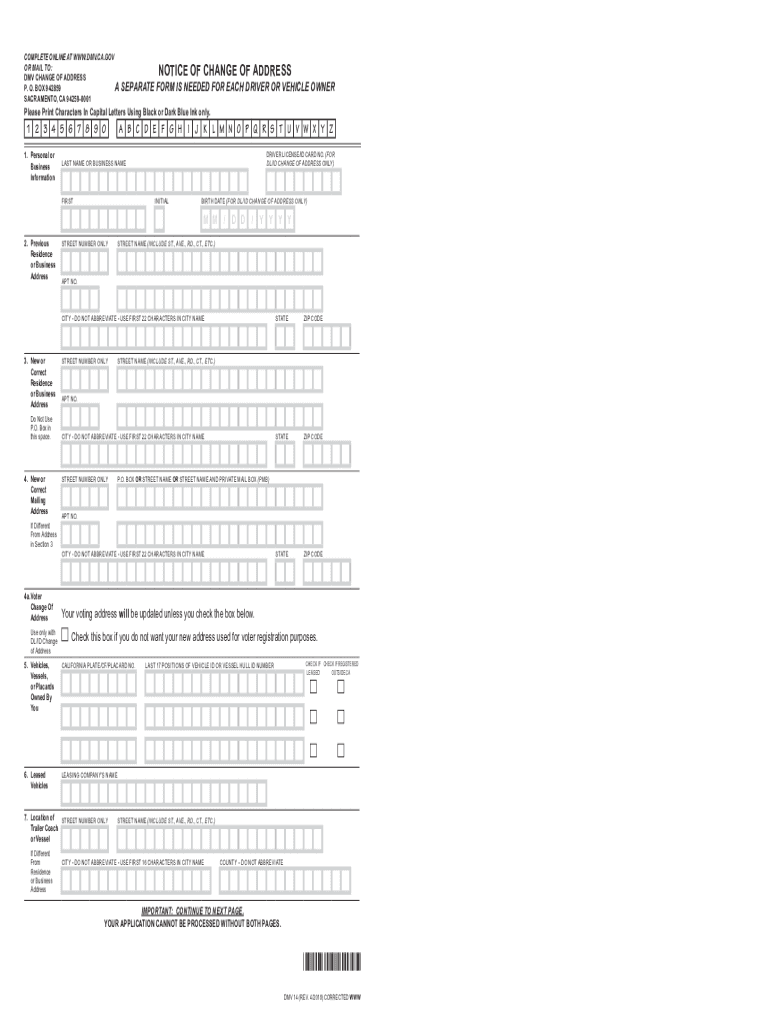
Filling out the CA Form 14 online is a straightforward process designed to help users change their address efficiently. This guide provides step-by-step instructions to ensure that you complete the form accurately and submit it without any issues.
Follow the steps to complete the CA Form 14 online.
- Press the ‘Get Form’ button to access the form and open it in your online editor.
- Complete Section 1 by entering your personal or business information. Provide your driver's license or ID card number, last name, first name, initial, and birth date as required.
- In Section 2, enter your previous residence or business address. Include the street number, street name, apartment number (if applicable), city (do not abbreviate), and ZIP code.
- Proceed to Section 3 to provide your new or correct residence or business address. Make sure to include the street number, street name, apartment number (if applicable), city, and ZIP code. Do not use a P.O. Box in this section.
- If your mailing address is different from the address in Section 3, fill in Section 4 with the new mailing address details, including the street number, street name, apartment number (if applicable), city, state, and ZIP code.
- Complete Section 5 by listing any vehicles, vessels, or placards that you own. Include the California plate number, CF number, or placard number.
- If you have leased vehicles, fill in Section 6 with the leasing company's name.
- Provide information about the location of any trailer coach or vessel in Section 7, if it is different from the residence or business address provided in earlier sections.
- Complete Section 8 if you are updating your driver's license or ID address and wish to register to vote. Answer the questions regarding citizenship and voting eligibility.
- In Section 9, you can choose your voter preferences including political party affiliation and ballot delivery options.
- Finally, complete Section 10 by signing and dating the form to certify that the information provided is true and correct.
- After filling the form, save your changes, download it, print, or share it as necessary.
Start completing your CA Form 14 online today for a seamless address change experience.
Experience a faster way to fill out and sign forms on the web. Access the most extensive library of templates available.
Related content
To change your address for your DP parking placard you may complete a Change of Address...
Form N 14 is a standard government-issued document used for official purposes following an...
Property Declaration (form FL-160) is a multipurpose form, which may be filed with the...
Get answers to your most pressing questions about US Legal Forms API.
Do I need to file a California state tax return?
Filing a California state tax return is often necessary if you meet certain income thresholds, even if you live outside the state now. If you're unsure whether you need to file, consider evaluating your circumstances or consulting a tax professional to get clarity. Accessing the necessary forms, such as CA Form 14, through platforms like USLegalForms can simplify your filing process. Staying informed about your requirements will help you stay compliant and avoid potential penalties.
Where can I get physical copies of tax forms?
You can obtain physical copies of tax forms, including CA Form 14, at libraries, tax offices, or by visiting the California Franchise Tax Board directly. However, consider using USLegalForms for an even easier way to get the physical forms you need. This platform allows you to find and print the required forms directly from your home. It saves you the time and effort of searching through multiple locations.
How do I get a copy of my CA state tax return?
To obtain a copy of your CA state tax return, you can request it from the California Franchise Tax Board. They offer options to order a copy online, by mail, or by phone, which makes the process convenient. If you need CA Form 14 or other related documents, platforms like USLegalForms can assist you in getting the forms you require to complete the request accurately. Ensure you have all necessary identification and details ready.
How to get California state tax form?
To get California state tax forms, including CA Form 14, you can visit the California Franchise Tax Board’s official website. They provide easy access to all necessary forms that you can download and print. Alternatively, you can use USLegalForms for a straightforward way to get your tax forms. This service offers a seamless experience for finding and filling out the correct documents.
Can I get tax forms at the post office?
While you may find some tax forms at the post office, it is not guaranteed that CA Form 14 and other specific forms will be available. It’s often more efficient to visit the California Franchise Tax Board website or use USLegalForms to obtain the latest versions. This ensures you access the most current forms and avoid delays in filing. Additionally, you can download and print CA Form 14 directly from reputable websites.
How to file taxes for LLC with no income?
To file taxes for an LLC with no income, you still need to submit a tax return, often using CA Form 14 depending on your situation. You should indicate zero income on your return while satisfying state filing obligations. Failing to file can result in penalties, so timely submission is crucial. Platforms like uslegalforms can provide the necessary forms and guidance to navigate this process smoothly.
Do I staple or paperclip my California tax return?
When you submit your California tax return, it’s best not to staple or paperclip the documents together. Instead, keep your forms flat and neatly organized. This helps ensure that your return is processed efficiently without any hindrance. Using clear plastic envelopes can keep everything in place without adding any staples or clips.
Can California returns be electronically filed?
Yes, California returns can be electronically filed. E-filing is a quick and efficient way to submit your state taxes, including using forms like CA Form 14 when necessary. Many tax preparation software options support e-filing directly to the California Franchise Tax Board. This method also provides immediate confirmation of receipt, which can offer peace of mind.
Can you file California state taxes without filing federal?
Yes, you can file your California state taxes without filing your federal return. However, it is generally advisable to file both, as California often requires information from your federal return. In many cases, a complete tax profile includes both state and federal filings to ensure compliance. For personalized guidance, consider using platforms like uslegalforms to simplify your filing process.
How to submit power of attorney to California Franchise Tax Board?
To submit a power of attorney to the California Franchise Tax Board, you must use CA Form 14. First, complete the form with the necessary details about the principal and the agent. After that, ensure you sign the form and mail it to the address specified by the Franchise Tax Board. It’s important to keep a copy for your records.
Use professional pre-built templates to fill in and sign documents online faster. Get access to thousands of forms.
If you believe that this page should be taken down, please follow our DMCA take down process here.
This form is available in several versions. Select the version you need from the drop-down list below.