Loading
Form preview
  • US Legal Forms
  • Other Templates
  • Industry Forms
  • Industry Insurance & Medical Forms
  • Vital Signs Flow Sheet

Get Vital Signs Flow Sheet

DicalForms.com Pain Initials .

How it works

  1. Open form

    Open form follow the instructions

  2. Easily sign form

    Easily sign the form with your finger

  3. Share form

    Send filled & signed form or save

How to fill out the Vital Signs Flow Sheet online

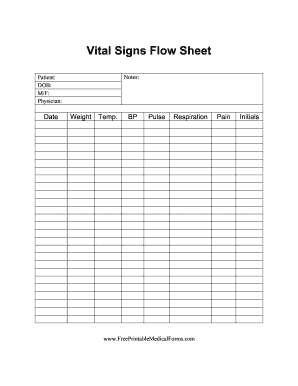
The Vital Signs Flow Sheet is an essential document for capturing and recording a patient’s vital signs and general health information. This guide will provide you with clear and comprehensive instructions on filling out the form online, ensuring that you accurately document the necessary details.

Follow the steps to complete the Vital Signs Flow Sheet online effectively

  1. Click the ‘Get Form’ button to access the Vital Signs Flow Sheet and open it in your preferred editor.
  2. In the 'Patient' field, enter the full name of the person receiving care, ensuring that it is spelled correctly.
  3. In the 'DOB' (Date of Birth) section, input the date of birth in the format MM/DD/YYYY.
  4. For the 'M/F' (Gender) field, select either Male or Female by marking the appropriate option.
  5. In the 'Physician' section, write the name of the physician responsible for the patient's care.
  6. Fill in the 'Date' with the current date to document when the vital signs were taken.
  7. Next, document the 'Weight' in pounds or kilograms, as required by your practice.
  8. Record the 'Temp.' (Temperature) in degrees Fahrenheit or Celsius.
  9. In the 'BP' (Blood Pressure) field, input the systolic and diastolic values (e.g., 120/80).
  10. Provide the 'Pulse' rate by entering the number of beats per minute.
  11. Document the 'Respiration' rate by noting the number of breaths per minute.
  12. In the 'Pain' section, indicate the patient's pain level using a scale or description as appropriate.
  13. Place your initials in the designated area to confirm that the information has been accurately recorded.
  14. Once all fields are filled, review the information for accuracy before proceeding to save your changes.
  15. You can then choose to download, print, or share the completed form as needed.

Complete your documents online today for efficient and accurate record-keeping.

Get form

Experience a faster way to fill out and sign forms on the web. Access the most extensive library of templates available.
Get form

Related content

RECORD OF WEIGHT, VITAL SIGNS AND GENERAL ...
RECORD OF WEIGHT, VITAL SIGNS AND. GENERAL FLOW SHEET. State Form 46318 (R / 9-01). DATE...
Learn more
Vital Signs Log
Vital Signs Log. Week of: Blood Pressure. Pulse. Temperature. Weight. AM. PM. AM. PM...
Learn more
Instructions for Healthcare Personnel (HCP)
All patients should be on supplemental oxygen. Patients must have continuous monitoring of...
Learn more

Related links form

KY OASIS Assessment Deletion Request Form KY PIC Change Wellcare Letter of Intent to Enter Into Contract Negotiations for Provision of Services to Kentucky Medicaid Members LA Application for Registration Renewal Licensed Clinical Social Workers 2012

Questions & Answers

Get answers to your most pressing questions about US Legal Forms API.

Contact support

A vital signs monitor serves the purpose of continuously measuring and displaying a patient's vital signs in real-time. This device is essential in critical care settings where timely intervention can be life-saving. The data collected from a vital signs monitor can be recorded on a vital signs flow sheet to track changes and trends over time.

A vital signs sheet is another term for a vital signs flow sheet, designed to log essential health measurements of patients. This sheet plays a critical role in monitoring a patient's condition and can help highlight any changes that may need immediate attention. Healthcare professionals rely on the vital signs sheet to communicate vital information throughout a patient’s care journey.

The correct order to record vital signs typically starts with temperature, followed by pulse, respiratory rate, and blood pressure. This systematic approach helps ensure that healthcare providers capture data in a consistent manner, aiding accuracy. Using a vital signs flow sheet streamlines this process, allowing for easier data entry and retrieval.

A vital signs flow sheet is specifically used to record key metrics that reflect a patient's immediate health status, including body temperature, pulse rate, blood pressure, and respiratory rate. Recording these measurements consistently allows healthcare providers to identify trends or patterns in the patient’s condition. Ultimately, this information supports timely and informed medical responses.

A flow sheet in a medical record is a graphical representation that organizes multiple data points, making it easy for providers to assess patient information at a glance. This format allows for quick comparisons over time, especially with crucial indicators like vital signs. A well-designed flow sheet can facilitate discussions between healthcare teams and improve decision-making processes.

Proper documentation of vital signs involves accurately recording measurements with the date and time noted, as well as the person's identification information. Each entry on the vital signs flow sheet should be legible and clearly structured to prevent misunderstandings. This attention to detail contributes to a comprehensive medical record and supports patient care continuity.

A vital sign flow sheet is a tool used in healthcare settings to systematically record essential patient metrics, such as temperature, blood pressure, heart rate, and respiratory rate. This sheet helps healthcare professionals track changes over time, ensuring timely interventions. By utilizing a vital signs flow sheet, providers can maintain accurate records, which enhances patient safety and care efficiency.

Filling out a vital sign sheet involves a step-by-step approach. First, gather all necessary measurement tools to record temperature, pulse, respiration, and blood pressure. Next, systematically enter the data into each corresponding section of the Vital Signs Flow Sheet. Consistent and accurate completion of this process enhances patient record integrity and improves healthcare delivery.

Writing patient vital signs requires attention to detail and accuracy. Ensure you utilize a Vital Signs Flow Sheet for organized and legible documentation. Clearly enter the patient's information, measurement values, and any notes about the patient’s condition. This practice not only aids in care continuity but also improves communication among the care team.

To document vital signs, use your Vital Signs Flow Sheet as a guide. Include each assessment's date, time, and values for better tracking over time. Remember to apply any relevant notes or observations alongside the data. This thorough approach supports effective patient management and improves care outcomes.

Get This Form Now!

Use professional pre-built templates to fill in and sign documents online faster. Get access to thousands of forms.
Get form
If you believe that this page should be taken down, please follow our DMCA take down processhere.
Get Vital Signs Flow Sheet
Get form
  • Adoption
  • Bankruptcy
  • Contractors
  • Divorce
  • Home Sales
  • Employment
  • Identity Theft
  • Incorporation
  • Landlord Tenant
  • Living Trust
  • Name Change
  • Personal Planning
  • Small Business
  • Wills & Estates
  • Packages A-Z
  • Affidavits
  • Bankruptcy
  • Bill of Sale
  • Corporate - LLC
  • Divorce
  • Employment
  • Identity Theft
  • Internet Technology
  • Landlord Tenant
  • Living Wills
  • Name Change
  • Power of Attorney
  • Real Estate
  • Small Estates
  • Wills
  • All Forms
  • Forms A-Z
  • Other Templates
  • Legal Hub
  • About Us
  • Help Portal
  • Legal Resources
  • Blog
  • Affiliates
  • Contact Us
  • Delete My Account
  • Site Map
  • Industries
  • Forms in Spanish
  • Localized Forms
  • State-specific Forms
  • Forms Kit
  • Real Estate Handbook
  • All Guides
  • Notarize
  • Incorporation services
  • For Consumers
  • For Small Business
  • For Attorneys
  • USLegal
  • FormsPass
  • pdfFiller
  • signNow
  • altaFlow
  • DocHub
  • Instapage
Form Packages
  • Adoption
  • Bankruptcy
  • Contractors
  • Divorce
  • Home Sales
  • Employment
  • Identity Theft
  • Incorporation
  • Landlord Tenant
  • Living Trust
  • Name Change
  • Personal Planning
  • Small Business
  • Wills & Estates
  • Packages A-Z
Form Categories
  • Affidavits
  • Bankruptcy
  • Bill of Sale
  • Corporate - LLC
  • Divorce
  • Employment
  • Identity Theft
  • Internet Technology
  • Landlord Tenant
  • Living Wills
  • Name Change
  • Power of Attorney
  • Real Estate
  • Small Estates
  • Wills
  • All Forms
  • Forms A-Z
  • Other Templates
Customer Service
  • Legal Hub
  • About Us
  • Help Portal
  • Legal Resources
  • Blog
  • Affiliates
  • Contact Us
  • Delete My Account
  • Site Map
  • Industries
  • Forms in Spanish
  • Localized Forms
  • State-specific Forms
  • Forms Kit
Legal Guides
  • Real Estate Handbook
  • All Guides
Prepared for you
  • Notarize
  • Incorporation services
Our Customers
  • For Consumers
  • For Small Business
  • For Attorneys
Our Sites
  • USLegal
  • FormsPass
  • pdfFiller
  • signNow
  • altaFlow
  • DocHub
  • Instapage
Social Media
Call us now toll free:
+1 833 426 79 33
As seen in:
© Copyright 1999-2026 airSlate Legal Forms, Inc. 17 Station Street, Ste. 203, Brookline, MA 02445
  • Your Privacy Choices
  • Terms of Service
  • Privacy Notice
  • Content Takedown Policy
  • Bug Bounty Program