Loading
Form preview
  • US Legal Forms
  • Form Library
  • Miscellaneous Forms
  • Employee Earnings Record

Get Employee Earnings Record

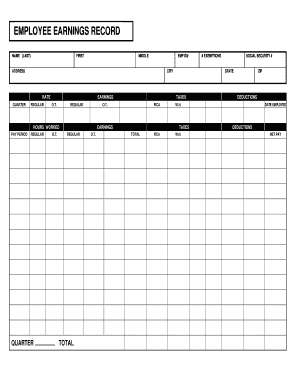
ADDRESS QUARTER PAY PERIOD QUARTER MIDDLE TOTAL FICA FICA CITY EMP ID# TAXES W.H. TAXES W.H. # EXEMPTIONS STATE ZIP NET PAY DATE EMPLOYED SOCIAL SECURITY # DEDUCTIONS DEDUCTIONS .

How it works

  1. Open form

    Open form follow the instructions

  2. Easily sign form

    Easily sign the form with your finger

  3. Share form

    Send filled & signed form or save

How to fill out the Employee Earnings Record online

Filling out the Employee Earnings Record is essential for tracking your earnings and taxes throughout your employment. This guide provides detailed instructions on how to accurately complete the necessary fields to ensure your record is complete and precise.

Follow the steps to fill out the form effectively.

  1. Click ‘Get Form’ button to access the document and open it in your chosen digital editor or viewer for completion.
  2. Begin by entering your name. Fill in your last name in the designated field, ensuring accuracy for identification purposes.
  3. Next, provide your address. This section requires your street address, city, state, and ZIP code to ensure proper mailing of documents and correspondence.
  4. Indicate your employee ID number in the appropriate field. This number is used by your employer for payroll and record-keeping.
  5. Fill in your social security number. Be sure to enter this information carefully as it is used for taxation and identification.
  6. Record your employment start date in the ‘Date Employed’ field. This date should reflect when you began your current position.
  7. Fill in the quarter and pay period dates, which will assist in organizing and reporting your earnings accurately.
  8. Input your hours worked under both regular and overtime categories. Use the fields provided to specify the total hours for each.
  9. List your earnings in the corresponding fields for regular and overtime. Ensure these amounts reflect your actual income during the pay period.
  10. Enter tax exemptions, amounts for FICA deductions, and any other relevant deductions as necessary.
  11. Finally, review all the entered information for accuracy and completeness. Once satisfied, save your changes, and download or print the completed form for your records.

Get your Employee Earnings Record filled out accurately online today!

Get form

Experience a faster way to fill out and sign forms on the web. Access the most extensive library of templates available.
Get form

Related content

Employee Earnings Record - PAY014
DESCRIPTION: This report shows the quarterly earnings summary record for each employee...
Learn more
EMPLOYEE EARNINGS RECORD
The record includes employee's name, address, SSN, gross wages, FICA, federal/state tax...
Learn more
Chapter 32 - Overtime
Nov 17, 2016 — The employee's earnings are the total of all straight time and overtime...
Learn more

Related links form

IL Certificate of Child Health Examination 2015 IL CFS 1050-69 2008 IL CFS 407-4 1996 IL CFS 431-A 2011

Questions & Answers

Get answers to your most pressing questions about US Legal Forms API.

Contact support

The best way to maintain employee records is by implementing an organized system that ensures accuracy and accessibility. Utilizing digital solutions for tracking details like the employee earnings record can help in automating updates and reducing manual errors. Platforms like UsLegalForms offer tools that simplify the management of these records, ensuring that all information is up-to-date and compliant with employment laws.

The employee record of a company includes detailed documentation of each employee's work history, personal information, and earnings. This record plays a vital role in human resources management, ensuring compliance with regulations and facilitating effective employee management. A thorough Employee Earnings Record is an essential part of the overall employee record for accurate payroll and legal considerations.

An earnings summary is a concise overview that aggregates an employee's earnings details, such as total wages, bonuses, and deductions within a specific timeframe. This summary is beneficial for quick reference and financial analysis. It complements an Employee Earnings Record by providing transparency and aiding employees in understanding their financial status.

An earnings account is a financial account where an employer tracks the total earnings attributed to an employee. This account summarizes various income components, such as salaries and bonuses, over time. By accurately managing an Employee Earnings Record within an earnings account, employers can simplify payroll management and enhance financial reporting.

In the United States, the record of employment is a document that outlines an individual's work history, including job titles, durations, and reasons for leaving. This record is important for government benefits, like unemployment insurance. Employers should ensure they maintain an up-to-date employee earnings record to assist in creating accurate records of employment. USLegalForms offers tools to help businesses manage their employment records effectively.

The statement of earnings for an employee is a detailed report summarizing an individual's income for a given timeframe, typically reflecting deductions and taxes. This document plays a crucial role in transparency and helps employees understand their total compensation. It's beneficial for employees when preparing their tax returns, making it essential to keep an accurate employee earnings record. Using dedicated software can help streamline the creation of these statements.

The employee earnings record payroll register is a comprehensive document that outlines each employee's earnings over a specific period. This record details wages, hours worked, and any deductions that may apply. Keeping an accurate employee earnings record is essential for payroll management and tax reporting. Using a platform like USLegalForms can simplify the process and help you maintain compliance.

The employee individual earnings record captures detailed information about an individual employee's earnings over their employment duration. This includes wages, bonuses, deductions, and taxes withheld. Maintaining a precise Employee Earnings Record for each staff member is crucial for compliance and overall payroll accuracy.

The primary purpose of an Employee Earnings Record is to provide a clear and organized overview of each employee’s earnings. This record helps in preparing tax documents, calculating benefits, and resolving any payroll discrepancies. Utilizing a reliable platform like uslegalforms can simplify the creation and management of these records.

Employee earnings refer to the total compensation an employee receives during a specified period. This includes wages, bonuses, and any other forms of remuneration. An accurate Employee Earnings Record will detail all earnings, making it easier for both employees and employers to track income and tax obligations.

Get This Form Now!

Use professional pre-built templates to fill in and sign documents online faster. Get access to thousands of forms.
Get form
If you believe that this page should be taken down, please follow our DMCA take down processhere.

Industry-leading security and compliance

US Legal Forms protects your data by complying with industry-specific security standards.
  • In businnes since 1997
    25+ years providing professional legal documents.
  • Accredited business
    Guarantees that a business meets BBB accreditation standards in the US and Canada.
  • Secured by Braintree
    Validated Level 1 PCI DSS compliant payment gateway that accepts most major credit and debit card brands from across the globe.
Get Employee Earnings Record
Get form
  • Adoption
  • Bankruptcy
  • Contractors
  • Divorce
  • Home Sales
  • Employment
  • Identity Theft
  • Incorporation
  • Landlord Tenant
  • Living Trust
  • Name Change
  • Personal Planning
  • Small Business
  • Wills & Estates
  • Packages A-Z
  • Affidavits
  • Bankruptcy
  • Bill of Sale
  • Corporate - LLC
  • Divorce
  • Employment
  • Identity Theft
  • Internet Technology
  • Landlord Tenant
  • Living Wills
  • Name Change
  • Power of Attorney
  • Real Estate
  • Small Estates
  • Wills
  • All Forms
  • Forms A-Z
  • Form Library
  • Legal Hub
  • About Us
  • Help Portal
  • Legal Resources
  • Blog
  • Affiliates
  • Contact Us
  • Delete My Account
  • Site Map
  • Industries
  • Forms in Spanish
  • Localized Forms
  • State-specific Forms
  • Forms Kit
  • Real Estate Handbook
  • All Guides
  • Notarize
  • Incorporation services
  • For Consumers
  • For Small Business
  • For Attorneys
  • USLegal
  • FormsPass
  • pdfFiller
  • signNow
  • altaFlow
  • DocHub
  • Instapage
Form Packages
  • Adoption
  • Bankruptcy
  • Contractors
  • Divorce
  • Home Sales
  • Employment
  • Identity Theft
  • Incorporation
  • Landlord Tenant
  • Living Trust
  • Name Change
  • Personal Planning
  • Small Business
  • Wills & Estates
  • Packages A-Z
Form Categories
  • Affidavits
  • Bankruptcy
  • Bill of Sale
  • Corporate - LLC
  • Divorce
  • Employment
  • Identity Theft
  • Internet Technology
  • Landlord Tenant
  • Living Wills
  • Name Change
  • Power of Attorney
  • Real Estate
  • Small Estates
  • Wills
  • All Forms
  • Forms A-Z
  • Form Library
Customer Service
  • Legal Hub
  • About Us
  • Help Portal
  • Legal Resources
  • Blog
  • Affiliates
  • Contact Us
  • Delete My Account
  • Site Map
  • Industries
  • Forms in Spanish
  • Localized Forms
  • State-specific Forms
  • Forms Kit
Legal Guides
  • Real Estate Handbook
  • All Guides
Prepared for you
  • Notarize
  • Incorporation services
Our Customers
  • For Consumers
  • For Small Business
  • For Attorneys
Our Sites
  • USLegal
  • FormsPass
  • pdfFiller
  • signNow
  • altaFlow
  • DocHub
  • Instapage
Social Media
Call us now toll free:
+1 833 426 79 33
As seen in:
© Copyright 1999-2026 airSlate Legal Forms, Inc. 3720 Flowood Dr, Flowood, Mississippi 39232
  • Your Privacy Choices
  • Terms of Service
  • Privacy Notice
  • Content Takedown Policy
  • Bug Bounty Program