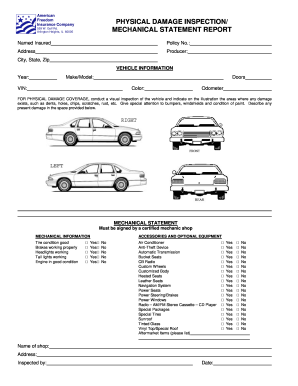
Get American Freedom Physical Damage Inspection/ Mechanical Statement Report
How it works
-

Open form follow the instructions
-

Easily sign the form with your finger
-

Send filled & signed form or save
How to fill out the American Freedom Physical Damage Inspection/ Mechanical Statement Report online
Filling out the American Freedom Physical Damage Inspection/ Mechanical Statement Report online is a straightforward process that helps document any physical damage and mechanical details of your vehicle. This guide provides clear, step-by-step instructions to assist you in completing the form accurately.
Follow the steps to complete the report effectively.
- Click ‘Get Form’ button to obtain the form and open it in your editing platform.
- Fill in the 'Named Insured' field with the name of the person or entity holding the insurance policy.
- Enter the 'Policy No.' which is the specific identifier for the policy related to the vehicle.
- Provide the address details of the named insured, including street address, city, state, and zip code.
- In the 'Vehicle Information' section, fill in the year, make/model, the number of doors, VIN, color, and odometer reading.
- For physical damage coverage, conduct a visual inspection of the vehicle. Indicate areas of damage on the provided illustration. Note any dents, holes, chips, scratches, rust, etc. Describe any present damage in the designated space.
- Complete the mechanical statement section, which must be signed by a certified mechanic shop. Ensure that the mechanical information regarding tires, brakes, headlights, tail lights, and engine condition is reviewed and noted.
- Check the boxes in the 'Accessories and Optional Equipment' section for features relevant to your vehicle, including air conditioning, anti-theft devices, and specialized seating options.
- At the bottom of the form, fill in the name and address of the mechanic shop that conducted the inspection, along with the date and signature of the person who inspected the vehicle.
- Once you have completed the form, review all entries for accuracy. Save your changes and you may download, print, or share the form as needed.
Start filling out your American Freedom Physical Damage Inspection/ Mechanical Statement Report online today.
To fill out an inspection report, begin by gathering all necessary information about the subject being inspected. Document details clearly and accurately, focusing on key elements like condition and any observed issues. Using the American Freedom Physical Damage Inspection/ Mechanical Statement Report will guide you step-by-step, ensuring you don’t overlook important details.