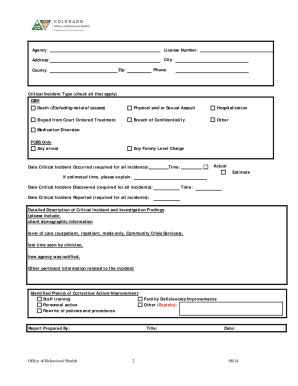
Exhibit OCritical Incident Form Colorado Department of Human Services (CDHS), Office of Behavioral Health (OBH) is committed to maintaining the life, safety, and well being of all consumers, families,.

How it works
  • Open form

    Open form follow the instructions

  • Easily sign form

    Easily sign the form with your finger

  • Share form

    Send filled & signed form or save

How to fill out the CO Critical Incident Form online

The CO Critical Incident Form is essential for reporting critical incidents involving programs and agencies approved by the Colorado Department of Human Services. This guide offers a step-by-step approach to effectively complete the form online, ensuring accurate documentation and compliance.

Follow the steps to complete the form with ease.

  1. Click ‘Get Form’ button to access the form and open it in the designated editor.
  2. Begin by filling in the program, agency, or facility information. This includes entering the agency name, license number, address, city, zip code, county, and phone number.
  3. Select the type of critical incident by checking all applicable boxes. Ensure that you thoroughly understand the definitions provided to categorize the incident correctly.
  4. Enter the date the critical incident occurred, followed by the actual time. If the time is estimated, provide a brief explanation in the designated field.
  5. Fill in the date and time the critical incident was discovered and reported. Accurate timing is crucial for effective reporting.
  6. Provide a detailed description of the critical incident. Include all pertinent details, such as client demographic information, level of care, last time seen by the clinician, and how the agency was notified.
  7. Outline any identified plans for correction, action, or improvement. Indicate whether staff training, facility improvements, personnel actions, or policy rewrites are necessary.
  8. Complete the report by entering your name, title, and the date you prepared the report.
  9. Once completed, you can save changes, download the form, print it, or share it as necessary to finalize the submission.

Complete the CO Critical Incident Form online today to ensure accurate reporting.

Get form

Experience a faster way to fill out and sign forms on the web. Access the most extensive library of templates available.

Related content

Critical Incident Report

Jul 7, 2025 — How to fill out a critical incident report. Step 1: Access the Critical...

Learn more
2 CCR 502-1-2.16 - Critical Incident Reporting

Submit critical incidents reports to the BHA using state prescribed forms that can be...

Learn more
Incident Report Data Security

For this reason, we allow incidents to be reported anonymously. This is made available by...

Learn more
Questions & Answers

Get answers to your most pressing questions about US Legal Forms API.

Contact support

How do you fill out a critical incident report?

To fill out a CO Critical Incident Form accurately, begin by gathering all relevant facts surrounding the incident. Organize the information clearly, starting with who, what, where, and when. Ensure that your documentation is thorough and consistent, as this will provide clarity during any reviews or investigations.

On a CO Critical Incident Form, you should write factual descriptions without personal opinions or assumptions. Include key details like the date, time, location, parties involved, and witness accounts. By focusing on objective information, you create a reliable document that will be useful for any necessary follow-up or assessment.

When writing an incident statement for the CO Critical Incident Form, include a detailed account of what happened, from your perspective. Be sure to mention the context, the parties involved, and any actions taken immediately after the event. Such statements are crucial for clarity and can serve as reference points for further investigations.

A critical incident can range from a workplace accident resulting in severe injury to an unexpected equipment failure causing significant downtime. In such cases, using a CO Critical Incident Form to document immediate impacts and responses is vital. This helps organizations learn from the experience and develop strategies to mitigate similar occurrences in the future.

A properly filled CO Critical Incident Form requires essential details such as the incident's nature, involved parties, and the time and place it occurred. It also necessitates a summary of actions taken post-incident, along with follow-up recommendations if necessary. Ensuring all this information is included strengthens your documentation and supports analysis.

An effective incident report, including the CO Critical Incident Form, should contain specific information like the names of those involved, witness accounts, and descriptions of injuries or damages. You should also include any relevant observations or factors that may have contributed to the event. This thorough approach aids in future prevention and compliance.

When filling out a CO Critical Incident Form, it is important to capture details such as the date, time, location, and individuals involved in the incident. Additionally, document the circumstances surrounding the event and any immediate actions taken. This comprehensive record helps create a clear timeline and supports follow-up investigations.

Include impact on client, staff member or other relevant person; who was involved; how, where and when the incident occurred; who did what; who (if anyone) was injured and the nature and extent of injuries.

Format for the critical incident report Describe the context of the incident. Describe the actual incident in detail. Explain why the incident was critical or significant for you. Explain your concerns at the time. Describe what you were thinking and feeling as it was taking place, and afterwards.

Information required on an incident reporting form Patient name and hospital number/date of birth. Date and time of incident. Location of incident. Brief, factual description of incident. Name and contact details of any witnesses. Harm caused, if any. Action taken at the time.

Get This Form Now!

Use professional pre-built templates to fill in and sign documents online faster. Get access to thousands of forms.

If you believe that this page should be taken down, please follow our DMCA take down process here.

Get CO Critical Incident Form