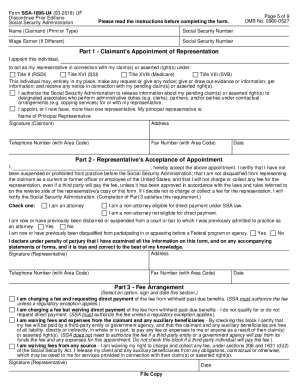
Is release. If you will have more than one representative, check the appropriate block and give the name of the individual you want to be your principal representative. SSA will make contacts with, and send notices or requests for development to, only the principal representative. The principal representative will provide copies of notices or requests to other corepresentatives. You must sign and date the form. Print or type your address, area code and telephone number. If you are appointing a r.
Open form follow the instructions
Easily sign the form with your finger
Send filled & signed form or save
How to fill out the SSA-1696-U4 online
The SSA-1696-U4 form is used to appoint a representative to assist you with Social Security matters. Completing this form online allows you to conveniently choose a representative while ensuring accurate and timely processing of your claim. This guide provides step-by-step instructions to help you fill out the form correctly and efficiently.
Follow the steps to complete the SSA-1696-U4 form online.
- Press the ‘Get Form’ button to access the SSA-1696-U4 form and open it in your chosen editor.
- At the top of the form, enter your full name and Social Security number. If your claim is associated with another individual's work, include the 'wage earner's' name and their Social Security number.
- In Part 1, you will appoint your representative. Provide the individual's name, and select the type of claims under which you need representation (Title II, Title XVI, Title XVIII, or Title VIII).
- Indicate if you wish to permit your representative to designate associates to receive information from your claim file on their behalf by checking the appropriate box.
- If you have more than one representative, select your principal representative and provide their name and address.
- Sign and date the form. Also, print or type your address and phone number.
- In Part 2, the designated representative must complete and sign the acceptance of their appointment, stating their eligibility and conditions for representation.
- Part 3 involves the fee arrangement. The representative must select one of the options regarding fee payment, sign, and date this section.
- After reviewing the completed form for accuracy, save your changes. You can then download, print, or share the form before submitting it to your local Social Security office.
Begin filling out your SSA-1696-U4 form online today to appoint your representative and manage your Social Security claims effectively.
Experience a faster way to fill out and sign forms on the web. Access the most extensive library of templates available.
Related content
“Us” and “SSA” means the Social Security Administration. General Information About...
Sections 206(a) and 1631(d) of the Social Security Act, as amended, authorize us to...
Get answers to your most pressing questions about US Legal Forms API.
How do I fill out Form SSA 1696 u4?
Name of claimant. Social security number. Wage earner. Social security number. Part 1 - Claimant's Appointment of Representation. Name of individual. ... Part 2 - Representative's Acceptance of Appointment. Name. ... Part 3 - Fee Arrangement. ... Signature.
What is a SSA 1696?
Form SSA-1696 | Claimant's Appointment of a Representative Representatives can be attorneys or non-attorneys. Representatives must abide by standards of conduct, which the Social Security Administration has published. ... You may use Form SSA-1696 (Appointment of Representative) for this purpose.
What is Form SSA 1724 f4 used for?
Who needs a Form SSA-1724-F4? This form is used by the relatives of the deceased social security recipient or the legal representative of the estate. Among the immediate relatives allowed to receive these payments are the spouse, children, and parents of the deceased.
Can a power of attorney set up a Social Security account?
The Social Security Administration does not recognize power of attorney as conferring authority to manage another person's benefits. ... Applying to become a representative payee usually requires a face-to-face interview at your local Social Security office, which you can schedule by calling 800-772-1213.
What is a 1696 form from Social Security?
Form SSA-1696 is used by the Social Security Administration (SSA) to document your appointment of a representative in your dealings with the SSA. ... If an individual signs on behalf of a corporation or firm, the individual signing the document is considered the representative.
What is Form SSA 1696?
Form SSA-1696 | Claimant's Appointment of a Representative A representative cannot charge you until Social Security authorizes the fee the representative is looking to collect from you. ... You may use Form SSA-1696 (Appointment of Representative) for this purpose.
How do I fill out a Social Security form 11 BK?
Name of the number holder. Social security number. Name of the person(s) for whom you are filing (claimant) Claimant's social security number. Indication if you are the claimant and what your benefits paid directly to you.
What form do I use to apply for Social Security benefits?
Form SSA-1 | Information You Need To Apply For Retirement Benefits Or Medicare | Social Security Administration.
How do I submit documents to Social Security?
If you'd like to learn more about submitting client records online, visit www.socialsecurity.gov/ere, send an email to electronic-records-express@ ssa.gov, or call 1-866-691-3061. The most convenient way to contact us anytime, anywhere is to visit www.socialsecurity.gov.
Use professional pre-built templates to fill in and sign documents online faster. Get access to thousands of forms.
If you believe that this page should be taken down, please follow our DMCA take down process here.