Loading
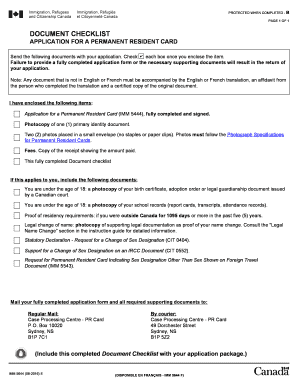
Get Canada Imm 5644 E 2016
How it works
-

Open form follow the instructions
-

Easily sign the form with your finger
-

Send filled & signed form or save
How to fill out the Canada IMM 5644 E online
The Canada IMM 5644 E form is essential for applying for a permanent resident card. This guide offers a step-by-step approach to efficiently complete the form online, ensuring that you fulfill all necessary requirements.
Follow the steps to successfully fill out the form.
- Click ‘Get Form’ button to obtain the form and open it in the editor.
- Start by entering your personal details in the designated fields. This may include your full name, date of birth, and contact information.
- Provide a photocopy of a primary identity document by uploading it in the appropriate section of the form.
- Attach two recent photographs placed in a small envelope. Ensure they adhere to the Photograph Specifications for Permanent Resident Cards.
- Confirm that you have included the receipt of the fees paid for the application. Upload this document in the specified field.
- Review the Document checklist and ensure you have enclosed all necessary items, such as any applicable supporting documents based on your situation.
- Once every field is completed and reviewed, save your changes. You can download, print, or share the form as needed.
Complete your documents online today for a seamless application experience.
Get form
Experience a faster way to fill out and sign forms on the web. Access the most extensive library of templates available.
Related links form
The IMM 5644 form is a document used by the Canadian government for various immigration processes. It often pertains to individuals seeking to validate their residency status or other immigration-related matters. Completing this form accurately is crucial, so be prepared with the necessary details when referencing the Canada IMM 5644 E during your application.
Get This Form Now!
Use professional pre-built templates to fill in and sign documents online faster. Get access to thousands of forms.