Loading
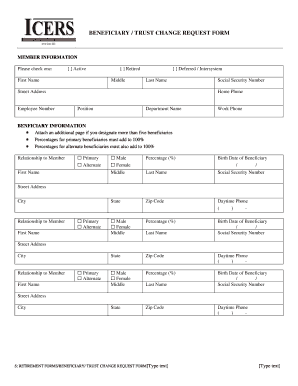
Get Beneficiary Trust Change Request Form - Icers
How it works
-

Open form follow the instructions
-

Easily sign the form with your finger
-

Send filled & signed form or save
How to fill out the BENEFICIARY TRUST CHANGE REQUEST FORM - ICERS online
Completing the Beneficiary Trust Change Request Form - ICERS online is an essential step for individuals looking to update their beneficiary designations. This guide provides clear, step-by-step instructions to help you navigate each section of the form with confidence.
Follow the steps to successfully complete the form.
- Press the ‘Get Form’ button to access the Beneficiary Trust Change Request Form - ICERS and open it in your editor.
- Begin by filling out the member information section. Indicate your status as either Active, Retired, or Deferred/Intersystem. Provide your first name, middle name, last name, street address, employee number, social security number, home phone, position, and department name.
- Next, move to the beneficiary information section. If you have more than five beneficiaries, attach an additional page. Ensure that the total percentage for primary beneficiaries equals 100% and do the same for alternate beneficiaries.
- For each beneficiary, fill out their personal details, including first name, middle name, last name, relationship to you (select either Primary or Alternate), percentage (%) of benefit, birth date, social security number, state, zip code, and daytime phone number. If there are multiple beneficiaries, be sure to fill in their information correctly.
- If selecting a Trust as a beneficiary, complete the Trust information section by providing the official name of the Trust, tax identification number, contact person for the Trust, date established, contact address for the Trust, and contact phone number. Additionally, include a copy of the trust agreement.
- Review all the information you have entered for accuracy. Your signature is required to certify that the information is correct and to authorize ICERS to update your records. If a witness is needed, ensure they are either a notary public or a retirement staff member.
- Finally, you can save your changes, download the completed form, print it, or share it as needed. Once completed, submit the form to ICERS at the provided address.
Please complete your Beneficiary Trust Change Request Form - ICERS online to ensure your beneficiary designations are up to date.
If you decide to have more than one beneficiary, you will allocate a percentage of the death benefit for each, so that the total allocation equals 100%. A simple example of this would be allocating 50% to your partner, and 25% to each of your two children, for a total of 100%.
Industry-leading security and compliance
US Legal Forms protects your data by complying with industry-specific security standards.
-
In businnes since 199725+ years providing professional legal documents.
-
Accredited businessGuarantees that a business meets BBB accreditation standards in the US and Canada.
-
Secured by BraintreeValidated Level 1 PCI DSS compliant payment gateway that accepts most major credit and debit card brands from across the globe.