Loading
Form preview
  • US Legal Forms
  • Form Library
  • More Forms
  • More Uncategorized Forms
  • Anthem Provider Adjustment Form

Get Anthem Provider Adjustment Form

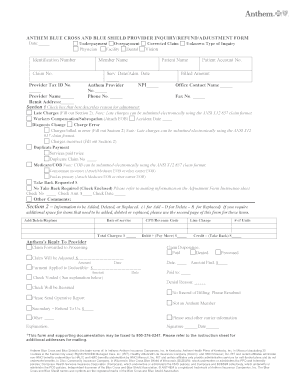
ANTHEM BLUE CROSS AND BLUE SHIELD PROVIDER INQUIRY/REFUND/ADJUSTMENT FORM Date Underpayment Overpayment Physician Facility Dental T Identification Number Corrected Claim Member Name Claim No. Patient Name Serv. Date/Adm. Date Provider Tax ID No. Anthem Provider No. Phone No. Provider Name Remit Address Unknown Type of Inquiry Vision NPI Patient Account No. Billed Amount Office Contact Name Fax No. Section 1 Check box that best describes reason fo.

How it works

  1. Open form

    Open form follow the instructions

  2. Easily sign form

    Easily sign the form with your finger

  3. Share form

    Send filled & signed form or save

How to fill out the Anthem Provider Adjustment Form online

The Anthem Provider Adjustment Form is an essential document for healthcare providers to address claims adjustments, overpayments, and underpayments. This guide provides step-by-step instructions to help you complete the form accurately and efficiently when filing online.

Follow the steps to fill out the Anthem Provider Adjustment Form online.

  1. Press the 'Get Form' button to access the Anthem Provider Adjustment Form and open it in your document editor.
  2. Fill in the date at the top of the form.
  3. Indicate whether you are addressing an underpayment or overpayment by selecting the appropriate option.
  4. Provide the identification number relevant to the claim.
  5. Enter the corrected claim information, including the member name and claim number.
  6. Input the patient's name and the service or admission date.
  7. Include the provider's tax identification number and Anthem provider number.
  8. List the phone number and name of the provider who is submitting the adjustment.
  9. Fill in the remit address where adjustments should be sent.
  10. Select the appropriate type of query by checking the box in Section 1 that best describes the reason for your adjustment.
  11. If needed, provide details about any late charges in Section 2.
  12. In Section 2, use 'A' for items to add, 'D' for deletions, and 'R' for replacements, detailing service dates and CPT/revenue codes.
  13. Include total charges, any amounts that need to be adjusted, and whether a payment is being requested or returned.
  14. Complete the explanation section if necessary, providing any additional information relevant to the adjustment.
  15. Sign and date the form at the bottom.
  16. Review all entered information for accuracy before submitting.
  17. Once completed, save your changes, and you may choose to download, print, or share the form as needed.

Complete the Anthem Provider Adjustment Form online today to ensure your claims are addressed promptly.

Get form

Experience a faster way to fill out and sign forms on the web. Access the most extensive library of templates available.
Get form

Related content

Anthem Blue Cross and Blue Shield Provider and...
corrected information on a full, partially paid, or denied claim, an adjustment must be...
Learn more
Medical Claim Form
Health care services: Use this section to report any COVERED health service that has not...
Learn more
Affordable Care Act - Wikipedia
The Affordable Care Act (ACA), formally known as the Patient Protection and Affordable...
Learn more

Related links form

University Student Fees Committee - Application Form For Student ... - Mcmaster V23 Form Laboratory Safety Quiz - University Of Massachusetts Dartmouth - Umassd LIVING LESSONS - Montville

Questions & Answers

Get answers to your most pressing questions about US Legal Forms API.

Contact support

Anthem's timely filing for corrected claims refers to the period during which you can update and resubmit claims that contained errors. Typically, claims must be corrected and submitted within 180 days from when the service was provided. Completing the Anthem Provider Adjustment Form accurately will streamline this process and enhance your chances of successful claim adjustments.

Timely filing for a corrected claim refers to the requirement to submit corrections within a set timeframe, usually defined by your insurance provider. For Anthem, this usually means filing within 180 days from the date of service. Utilizing the Anthem Provider Adjustment Form can help you stay within this limit and ensure proper claim handling.

Anthem and Blue Cross Blue Shield are related but distinct entities. Anthem operates as a licensee of the Blue Cross Blue Shield Association, offering insurance products under that brand. While they share some services, they have separate policies, so it's best to refer to the specific Anthem Provider Adjustment Form for clarification.

To initiate a refund with Anthem, you typically need to follow a specific process outlined on their website. Begin by gathering all relevant documentation, including the Anthem Provider Adjustment Form if applicable. Submitting your request through the proper channels will help ensure a smooth refund process.

To contact Anthem CA customer service, you can call their dedicated hotline or visit their website for assistance. Representatives are available to help you with inquiries regarding your policy or the Anthem Provider Adjustment Form. Be prepared to provide relevant information to expedite your support experience.

The timely filing limit for Anthem corrected claims typically depends on your specific policy and state guidelines. Generally, you have up to 180 days from the date of service to submit your correction. It is important to use the Anthem Provider Adjustment Form to ensure that your claim is processed accurately and promptly within this timeframe.

To appeal your Anthem Blue Cross provider decision, you should first gather all necessary documentation, including the initial claim and any denial letters. Next, complete the Anthem Provider Adjustment Form to detail the reasons for your appeal. Submitting this form promptly is essential as there are deadlines for appeals. If you need assistance, don't hesitate to contact Anthem’s customer service for additional help.

You can contact Anthem Healthkeepers Virginia by calling their customer service number, which is generally found on the back of your insurance card. They also provide online support through their official website where you can find various resources. Additionally, consider keeping the contact information handy when filling out the Anthem Provider Adjustment Form, as this can be useful for clarifying any questions you might have.

You should mail your Anthem provider appeal to the address specified on the denial letter. It is essential to follow these instructions closely to ensure your appeal is received and processed. Additionally, keeping a copy of your appeal records can be beneficial for future reference. The Anthem Provider Adjustment Form can help streamline this mailing process by organizing your appeal details.

The timely filing limit for Anthem appeals generally is 90 days from the date of notification of the claim’s denial. Adhering to this timeline is crucial for a successful appeal process. If you need assistance, using the Anthem Provider Adjustment Form can help ensure that all necessary information is provided correctly and promptly.

Get This Form Now!

Use professional pre-built templates to fill in and sign documents online faster. Get access to thousands of forms.
Get form
If you believe that this page should be taken down, please follow our DMCA take down processhere.

Industry-leading security and compliance

US Legal Forms protects your data by complying with industry-specific security standards.
  • In businnes since 1997
    25+ years providing professional legal documents.
  • Accredited business
    Guarantees that a business meets BBB accreditation standards in the US and Canada.
  • Secured by Braintree
    Validated Level 1 PCI DSS compliant payment gateway that accepts most major credit and debit card brands from across the globe.
Get Anthem Provider Adjustment Form
Get form
  • Adoption
  • Bankruptcy
  • Contractors
  • Divorce
  • Home Sales
  • Employment
  • Identity Theft
  • Incorporation
  • Landlord Tenant
  • Living Trust
  • Name Change
  • Personal Planning
  • Small Business
  • Wills & Estates
  • Packages A-Z
  • Affidavits
  • Bankruptcy
  • Bill of Sale
  • Corporate - LLC
  • Divorce
  • Employment
  • Identity Theft
  • Internet Technology
  • Landlord Tenant
  • Living Wills
  • Name Change
  • Power of Attorney
  • Real Estate
  • Small Estates
  • Wills
  • All Forms
  • Forms A-Z
  • Form Library
  • Legal Hub
  • About Us
  • Help Portal
  • Legal Resources
  • Blog
  • Affiliates
  • Contact Us
  • Delete My Account
  • Site Map
  • Industries
  • Forms in Spanish
  • Localized Forms
  • State-specific Forms
  • Forms Kit
  • Real Estate Handbook
  • All Guides
  • Notarize
  • Incorporation services
  • For Consumers
  • For Small Business
  • For Attorneys
  • USLegal
  • FormsPass
  • pdfFiller
  • signNow
  • altaFlow
  • DocHub
  • Instapage
Form Packages
  • Adoption
  • Bankruptcy
  • Contractors
  • Divorce
  • Home Sales
  • Employment
  • Identity Theft
  • Incorporation
  • Landlord Tenant
  • Living Trust
  • Name Change
  • Personal Planning
  • Small Business
  • Wills & Estates
  • Packages A-Z
Form Categories
  • Affidavits
  • Bankruptcy
  • Bill of Sale
  • Corporate - LLC
  • Divorce
  • Employment
  • Identity Theft
  • Internet Technology
  • Landlord Tenant
  • Living Wills
  • Name Change
  • Power of Attorney
  • Real Estate
  • Small Estates
  • Wills
  • All Forms
  • Forms A-Z
  • Form Library
Customer Service
  • Legal Hub
  • About Us
  • Help Portal
  • Legal Resources
  • Blog
  • Affiliates
  • Contact Us
  • Delete My Account
  • Site Map
  • Industries
  • Forms in Spanish
  • Localized Forms
  • State-specific Forms
  • Forms Kit
Legal Guides
  • Real Estate Handbook
  • All Guides
Prepared for you
  • Notarize
  • Incorporation services
Our Customers
  • For Consumers
  • For Small Business
  • For Attorneys
Our Sites
  • USLegal
  • FormsPass
  • pdfFiller
  • signNow
  • altaFlow
  • DocHub
  • Instapage
Social Media
Call us now toll free:
+1 833 426 79 33
As seen in:
© Copyright 1999-2026 airSlate Legal Forms, Inc. 3720 Flowood Dr, Flowood, Mississippi 39232
  • Your Privacy Choices
  • Terms of Service
  • Privacy Notice
  • Content Takedown Policy
  • Bug Bounty Program