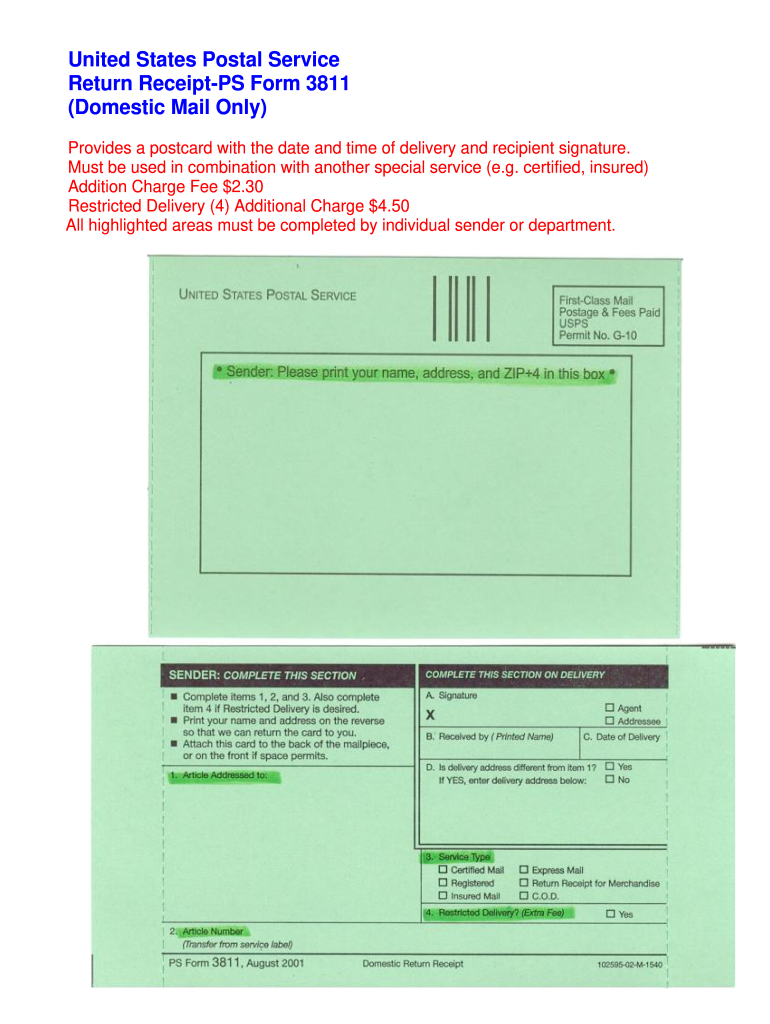
United States Postal Service Return Receipt-PS Form 3811 Domestic Mail Only Provides a postcard with the date and time of delivery and recipient signature. Must be used in combination with another special service e*g* certified insured Addition Charge Fee 2. 30 Restricted Delivery 4 Additional Charge 4. 50 All highlighted areas must be completed by individual sender or department. Must be used in combination with another special service e*g* certified insured Addition Charge Fee 2. 30 Restricted Delivery 4 Additional Charge 4. 50 All highlighted areas must be completed by individual sender or department. .

Open form follow the instructions

Easily sign the form with your finger

Send filled & signed form or save
How to fill out the USPS PS 3811 online
The USPS PS 3811, also known as the return receipt, is an essential form used to confirm the delivery of mail. This guide provides a comprehensive overview on how to complete the form online effectively and accurately.
Follow the steps to complete the USPS PS 3811 online.
- Click ‘Get Form’ button to obtain the form and open it in the editor.
- Begin by filling out the sender's information in the designated section. Include your name, address, and any additional details as required.
- In the 'Recipient' section, enter the name and address of the person receiving the mail. Ensure this information is accurate to avoid delivery issues.
- Next, indicate the type of service you are combining with the PS 3811. This could be certified mail, insured mail, or other special services.
- If applicable, select additional options such as restricted delivery. Note that this will require an additional charge, so confirm pricing as necessary.
- Review all completed fields for accuracy before finalizing the form. Make sure every highlighted area is filled out.
- Once all information is correct, save your changes. You can then choose to download, print, or share the completed form as needed.
Start filling out your USPS PS 3811 online today for quick and efficient delivery confirmation.
Experience a faster way to fill out and sign forms on the web. Access the most extensive library of templates available.
Related content
Return receipt (hardcopy PS Form 3811) may be used with Adult Signature shipments paid for...
Peel the thin white strip off the Certified Form number then. Affix to Return Receipt...
Note: This PS Form 3811-A serves to provide delivery information for a hardcopy return...
Get answers to your most pressing questions about US Legal Forms API.
What is USPS Form 3811 used for?
USPS Form 3811 serves as a proof of delivery for certified mail. It is particularly useful for important communications that require a signature upon receipt. This form provides a record of the delivery process, ensuring that sensitive information reaches its intended recipient. If you need assistance managing certified mail, uslegalforms can offer helpful tools and templates.
How to fill out certified mail PS form 3811?
Filling out the USPS PS 3811 form is straightforward. First, make sure to provide accurate sender and recipient information. Next, indicate the type of service selected, such as return receipt. To ensure your mail is processed correctly, consult resources like uslegalforms for detailed instructions tailored to your needs.
Why am I receiving certified mail?
Certified mail ensures that important documents reach you securely and provides verification of delivery. You might receive certified mail for various reasons, including legal documents, tax notifications, or official communications. The USPS PS 3811 form accompanies this mail to document the delivery. By confirming receipt, you help maintain accurate records.
Why did I get a PS form 3811?
You received a USPS PS 3811 form because a piece of certified mail was sent to you. This form serves as a notification that the sender wants to obtain proof of delivery. Keep in mind that you must sign for this mail to confirm receipt. Understanding the purpose of the USPS PS 3811 can help you respond accordingly.
How to ps form 3811?
To use the USPS PS 3811, first fill out the form by providing the necessary details about the sender and recipient. Attach it securely to the item you want to send, ensuring that it is properly labeled as certified mail. Completing this process accurately will facilitate smoother tracking and delivery verification.
What is the PS 3811 green card?
The PS 3811 green card is a key component of the certified mail process, as it serves as a delivery confirmation. Upon successful delivery, the recipient signs the card, which you can keep as proof. This feature of the USPS PS 3811 ensures accountability for important documents, giving you peace of mind.
What is the difference between PS form 3800 and 3811?
The primary difference between PS form 3800 and PS form 3811 lies in their functions. While PS form 3800 is a receipt confirming the mailing of a certified letter, PS form 3811 acts as a delivery confirmation for that letter. Understanding this distinction can help you manage your certified mail with the USPS more effectively.
How to fill out USPS form 3811?
Filling out the USPS PS 3811 is a straightforward process. Begin by providing your return address information and the recipient’s details. Next, check any required boxes to indicate the type of mail service you are using. Finally, make sure to sign the form; this ensures its authenticity. For clarity and efficiency, you may consider using the USLegalForms platform, which offers guidance and templates tailored to help you complete forms correctly.
Can I print form 3811?
Yes, you can print USPS PS 3811 directly from the official USPS website or other trusted online sources. It is important to ensure you have the latest version of the form for accurate processing. After printing, double-check to make sure all sections are clear and legible. This will help avoid any issues during mail handling.
What can you do with PS Form 3811?
With USPS PS 3811, you can request a return receipt for your mail. This form serves as proof of delivery, allowing you to track important documents securely. Whether you're sending sensitive information or valuable goods, using the USPS PS 3811 enhances your shipping experience by confirming delivery. You can also keep a copy for your records.
Use professional pre-built templates to fill in and sign documents online faster. Get access to thousands of forms.
If you believe that this page should be taken down, please follow our DMCA take down process here.