Ormation on my right to cancel a PAD Agreement at any branch of my financial institution or by visiting www.cdnpay.ca. This authorization applies only to the method of payment and I agree that cancellation of this authorization does not terminate or otherwise have any effect on any contract that exists between me and the Bank. 4. I agree that my Financial Institution is not required to verify that any Personal PAD has been drawn in accordance with this Agreement, including the amount, frequenc.

Open form follow the instructions

Easily sign the form with your finger

Send filled & signed form or save
How to fill out the Canada BMO Form 3360 online
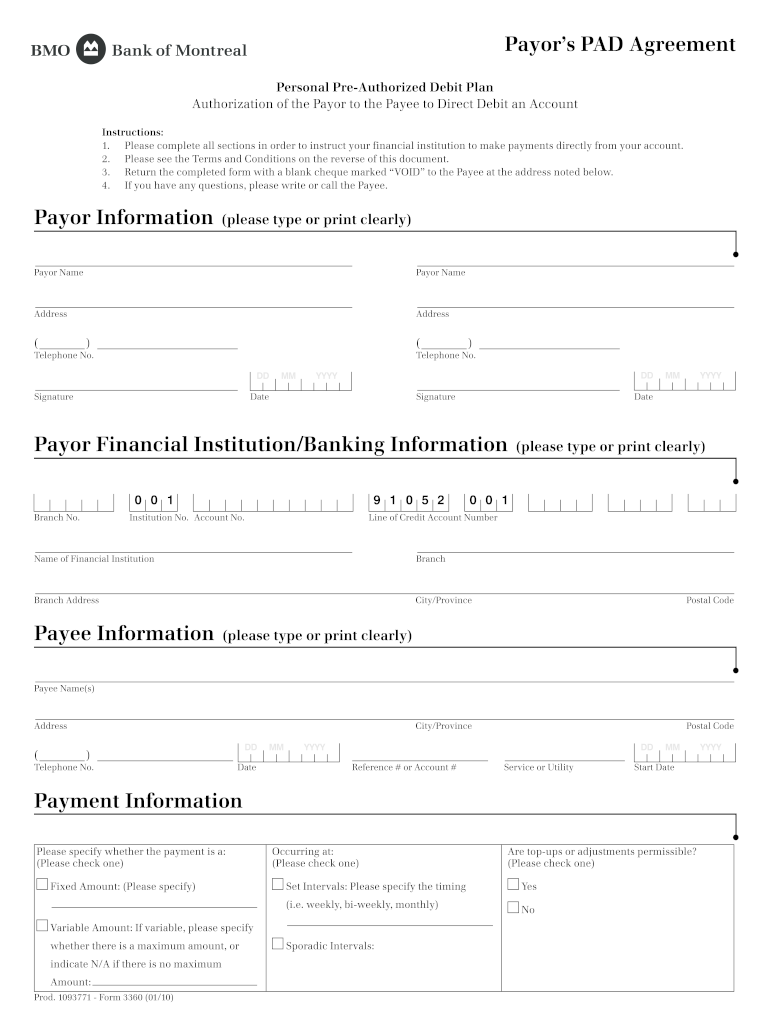
Filling out the Canada BMO Form 3360 online can facilitate the process of setting up your pre-authorized debit agreement. This guide provides clear, step-by-step instructions to help you complete the form accurately and efficiently.
Follow the steps to successfully complete the form
- Click ‘Get Form’ button to obtain the form and open it in the editor.
- Fill out the payor information section. Enter your name, address, and telephone number. Ensure all details are clear and accurate.
- Sign and date the form in the appropriate fields labeled with 'Signature' and 'Date'.
- Complete the payor financial institution/banking information section. This includes the branch number, account number, and name of your financial institution.
- Provide the payee information. Enter the payee's name, address, and telephone number, ensuring that this information is correct.
- Specify the payment information. Indicate whether payments will be fixed or variable. If fixed, denote the amount; if variable, indicate the max amount or state 'N/A'.
- State the intervals for payments. Check the appropriate box for the schedule of payments you prefer, whether it's weekly, bi-weekly, or monthly.
- Review all sections of the form to ensure that all information is complete and accurate.
- Save your changes. Once you have filled out the form completely, you can save it and choose to download, print, or share the document.
Complete the Canada BMO Form 3360 online now to set up your pre-authorized debit agreement effortlessly.
Experience a faster way to fill out and sign forms on the web. Access the most extensive library of templates available.
Related content
Dec 5, 2024 — Note 27 of the consolidated financial statements lists the intercorporate...
Jun 27, 2025 — loan application form indicating date, time and place where the equipment...
by O ANNU · Cited by 1 — This financial report covers the consolidated entity...
Get answers to your most pressing questions about US Legal Forms API.
Are BMO Bank and BMO Harris Bank the same?
BMO Bank and BMO Harris Bank refer to the same parent bank but operate in different geographic regions. BMO Bank typically refers to their services in Canada, while BMO Harris Bank is focused on U.S. customers. This distinction is vital when seeking services since offerings may vary by location. It’s useful to reference the Canada BMO Form 3360 if you require specific documentation.
How do I contact BMO outside Canada?
To contact BMO while you are outside Canada, you can call their international customer service line or use their online banking platform for assistance. They provide various methods to reach out for help, ensuring that you have support regardless of your location. You can get answers to your questions efficiently, especially regarding forms like the Canada BMO Form 3360.
Is BMO Harris in Canada?
BMO Harris is not physically located in Canada; it primarily operates in the United States. However, it is a part of the Bank of Montreal, which is the bank’s Canadian counterpart. If you are looking for services in Canada, consider BMO Canada, which offers a wide range of banking solutions. You might find the Canada BMO Form 3360 useful for understanding specific transactions.
How do I get my BMO annual mortgage statement?
To obtain your BMO annual mortgage statement, you can log into your BMO online banking account or contact customer service for assistance. The statement should provide detailed information about your mortgage, including your balance and payment history. If you prefer a paper version, you may request it to be mailed to you. Accessing financial documents is straightforward, especially with tools like the Canada BMO Form 3360.
Are BMO Harris and BMO Canada the same?
BMO Harris and BMO Canada are distinct entities, but they are part of the same banking family. BMO Harris operates primarily in the United States, while BMO Canada is focused on Canadian banking services. Understanding this distinction is important for navigating financial transactions between the two countries. If you need specific services, check if they are offered under the Canada BMO Form 3360.
Can I use my BMO Harris debit card in Canada?
Yes, you can use your BMO Harris debit card in Canada. However, it's important to notify your bank before traveling to prevent any issues with your transactions. Using your card allows you to access funds conveniently while you're overseas, which simplifies managing your finances. Ensure your card is enabled for international use to avoid disruptions.
How to do an e-transfer with BMO?
To do an e-Transfer with BMO, first log in to your online banking account and navigate to the e-Transfer section. Enter the recipient's email or mobile number, input the amount, and create a security question if applicable. Confirm your details and submit the transfer. Using the Canada BMO Form 3360 can enhance the documentation of your transfers, making tracking easier.
What is the IBAN number for Bank of Montreal wire transfer?
The Bank of Montreal, also known as BMO, does not use the IBAN system as it is primarily used in Europe. Instead, for wire transfers, you will need the BMO bank code or the routing number. Make sure to use the correct information when processing payments to ensure they reach the intended destination. For legal checks, the Canada BMO Form 3360 can simplify the documentation process.
How do you do an e-Transfer step by step?
To perform an e-Transfer, first, log in to your BMO online banking account. Select 'Interac e-Transfer', then choose the recipient and enter the transfer amount. After that, you must create a security question, if required, and confirm your details. This process facilitates a quick transfer using the Canada BMO Form 3360 for ease of tracking and record-keeping.
How to fill out a BMO cheque?
Filling out a BMO cheque involves several simple steps. First, you need to write the date in the top right corner. Next, enter the recipient's name, the amount in numbers, and also in words. Lastly, sign at the bottom to authorize the payment. If you are completing this form for a legal or formal purpose, consider using the Canada BMO Form 3360 for additional records.
Use professional pre-built templates to fill in and sign documents online faster. Get access to thousands of forms.
If you believe that this page should be taken down, please follow our DMCA take down process here.