Loading
Form preview
  • US Legal Forms
  • Form Library
  • More Forms
  • More Uncategorized Forms
  • Fsrp0023

Get Fsrp0023

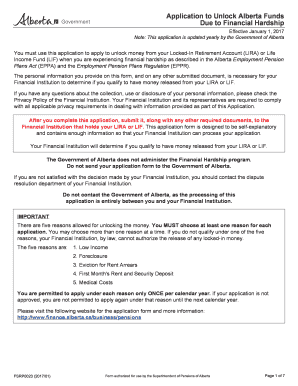
Application to Unlock Alberta Funds Due to Financial Hardship Effective January 1, 2016 Note: This application is updated yearly by the Government of Alberta You must use this application to apply.

How it works

  1. Open form

    Open form follow the instructions

  2. Easily sign form

    Easily sign the form with your finger

  3. Share form

    Send filled & signed form or save

How to fill out the Fsrp0023 online

The Fsrp0023 form is an application used to unlock funds from your Locked-In Retirement Account (LIRA) or Life Income Fund (LIF) due to financial hardship. This guide provides clear and supportive steps to help you fill out the form online.

Follow the steps to complete your application successfully.

  1. Click the ‘Get Form’ button to access the Fsrp0023 document and open it in your online editor.
  2. Begin by filling out the 'General Applicant Information' section. Provide your title, last name, first name, middle name, mailing address, city, province/territory, postal code, telephone number, date of birth, and email address. Make sure all details are accurate.
  3. In the 'Source of Locked-In Money' section, answer the questions regarding whether your funds are still in a pension plan and if you have previously applied under this program. Choose only one option from the provided list on how you received your LIRA or LIF.
  4. If applicable, complete the 'Pension Partner Information' section. Indicate if you have a pension partner and provide their details as required.
  5. Specify your reason for applying to unlock funds in the 'Locked-In Account Access Rules' section. Choose at least one reason from the five options provided and fill in any required documents or information.
  6. In the 'Pension Partner Agreement' section, if you have a pension partner, ensure they complete the appropriate agreement to proceed with your application.
  7. In the 'Certification of the Applicant' section, carefully review the declaration, confirming all information is accurate. Sign and date this certification in front of a witness aged 18 or older.
  8. Once all sections are completed, save your changes. You can then download, print, or share the form as needed before submitting it to your Financial Institution.

Complete your Fsrp0023 application online today to unlock the funds you need.

Get form

Experience a faster way to fill out and sign forms on the web. Access the most extensive library of templates available.
Get form

Related content

Minerals Management Service Documentation of...
Dec 30, 2008 — Preliminary Survey of Potential Wind Project Sites in Aquinnah...
Learn more

Related links form

EY - Spotlight On Oil And Gas Megaprojects - Ernst & Young A Man For All Markets Pdf Declaration Under Section 197a1 Permit Template

Questions & Answers

Get answers to your most pressing questions about US Legal Forms API.

Contact support

The Pension Benefits Act sets out four categories of financial hardship under which you can unlock your pension funds held in a locked-in retirement account (LIRA) or life income fund (LIF). You can unlock for any of these reasons and you can unlock for a combination of reasons.

There are four types of financial hardship unlocking allowed for Ontario locked-in accounts: for medical expenses; for arrears of rent or default of secured debt secured on a main home (such as a mortgage); for payment of first and last months' rent to obtain a main home; and. for low expected income.

If the Canada Revenue Agency (CRA) determines that you are a non-resident of Canada for tax purposes, and confirms this in writing, then you may unlock your LIRA or LIF. You can apply for non-residency status by completing the federal form NR-73 E(12). This form is available on the CRA website.

At retirement, the money in an LIRA can be transferred to another retirement fund or used to purchase a life annuity. Locked-in Retirement Accounts are governed by provincial pension laws. Federal pension laws govern a similar type of account known as a locked-in Registered Retirement Savings Plan (RRSP).

The funds within a LIRA are locked-in until you've reached the minimum age prescribed by pension law. This means you can't dip into your savings early. This allows you to keep more of your money for your retirement years.

Funds may be transferred from a LIRA to: • an RPP (if that plan so permits); • another LIRA (same or different financial institution); • a LIF; or • an insurance company authorized to issue annuity contracts in Canada to purchase a life annuity.

Age 55 and over - One-time 50% unlocking: they may transfer 50% of the funds in their RLIF into an RRSP or an RRIF. Cash can then be withdrawn, from either of these vehicles, subject to any applicable income tax rules. The funds cannot be taken directly in cash from an RLIF.

Getting money out of your LIRA For that reason, typically the only way to unlock a LIRA is to retire, and the earliest age you can do that is 55. To get income from a LIRA in retirement, you'll need to transfer the funds to a life income fund (LIF) or a life annuity. Money that's moved into a LIRA can be self-managed.

Get This Form Now!

Use professional pre-built templates to fill in and sign documents online faster. Get access to thousands of forms.
Get form
If you believe that this page should be taken down, please follow our DMCA take down processhere.
Get Fsrp0023
Get form
  • Adoption
  • Bankruptcy
  • Contractors
  • Divorce
  • Home Sales
  • Employment
  • Identity Theft
  • Incorporation
  • Landlord Tenant
  • Living Trust
  • Name Change
  • Personal Planning
  • Small Business
  • Wills & Estates
  • Packages A-Z
  • Affidavits
  • Bankruptcy
  • Bill of Sale
  • Corporate - LLC
  • Divorce
  • Employment
  • Identity Theft
  • Internet Technology
  • Landlord Tenant
  • Living Wills
  • Name Change
  • Power of Attorney
  • Real Estate
  • Small Estates
  • Wills
  • All Forms
  • Forms A-Z
  • Form Library
  • Legal Hub
  • About Us
  • Help Portal
  • Legal Resources
  • Blog
  • Affiliates
  • Contact Us
  • Delete My Account
  • Site Map
  • Industries
  • Forms in Spanish
  • Localized Forms
  • State-specific Forms
  • Forms Kit
  • Real Estate Handbook
  • All Guides
  • Notarize
  • Incorporation services
  • For Consumers
  • For Small Business
  • For Attorneys
  • USLegal
  • FormsPass
  • pdfFiller
  • signNow
  • altaFlow
  • DocHub
  • Instapage
Form Packages
  • Adoption
  • Bankruptcy
  • Contractors
  • Divorce
  • Home Sales
  • Employment
  • Identity Theft
  • Incorporation
  • Landlord Tenant
  • Living Trust
  • Name Change
  • Personal Planning
  • Small Business
  • Wills & Estates
  • Packages A-Z
Form Categories
  • Affidavits
  • Bankruptcy
  • Bill of Sale
  • Corporate - LLC
  • Divorce
  • Employment
  • Identity Theft
  • Internet Technology
  • Landlord Tenant
  • Living Wills
  • Name Change
  • Power of Attorney
  • Real Estate
  • Small Estates
  • Wills
  • All Forms
  • Forms A-Z
  • Form Library
Customer Service
  • Legal Hub
  • About Us
  • Help Portal
  • Legal Resources
  • Blog
  • Affiliates
  • Contact Us
  • Delete My Account
  • Site Map
  • Industries
  • Forms in Spanish
  • Localized Forms
  • State-specific Forms
  • Forms Kit
Legal Guides
  • Real Estate Handbook
  • All Guides
Prepared for you
  • Notarize
  • Incorporation services
Our Customers
  • For Consumers
  • For Small Business
  • For Attorneys
Our Sites
  • USLegal
  • FormsPass
  • pdfFiller
  • signNow
  • altaFlow
  • DocHub
  • Instapage
Social Media
Call us now toll free:
+1 833 426 79 33
As seen in:
© Copyright 1999-2026 airSlate Legal Forms, Inc. 3720 Flowood Dr, Flowood, Mississippi 39232
  • Your Privacy Choices
  • Terms of Service
  • Privacy Notice
  • Content Takedown Policy
  • Bug Bounty Program