Loading
Get Volunteer Permission Slip
How it works
-

Open form follow the instructions
-

Easily sign the form with your finger
-

Send filled & signed form or save
How to fill out the Volunteer Permission Slip online
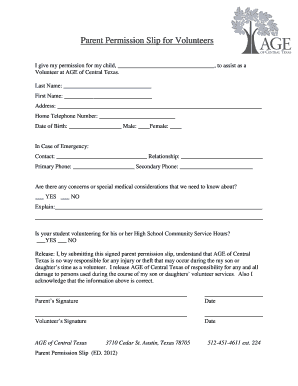
Filling out the Volunteer Permission Slip is an important step for enabling your child to participate in volunteer activities. This guide will provide you with clear instructions on how to complete the form online, making the process easier and more efficient.
Follow the steps to successfully complete the Volunteer Permission Slip.
- Click ‘Get Form’ button to obtain the form and open it in the editor.
- Begin by entering your child's full name in the designated fields for Last Name and First Name.
- Fill in your address accurately in the provided space to ensure proper communication.
- Enter your home telephone number to be used for any necessary contact.
- Provide your child's date of birth and select their gender using the available options.
- In the ‘In Case of Emergency’ section, list an emergency contact's name and their relationship to your child, along with both primary and secondary phone numbers.
- Indicate whether there are any special medical considerations that need to be known by checking ‘YES’ or ‘NO’ and providing an explanation if necessary.
- Specify if your child is volunteering for High School Community Service Hours by selecting ‘YES’ or ‘NO’.
- Read the release statement carefully. By submitting the form, you acknowledge the terms and release AGE of Central Texas from any responsibility for injuries or damages.
- Sign the form where indicated, providing both your signature and the date. Ensure that your child also signs and dates the form.
- After completing the form, save the changes made, then download, print, or share the document as needed for your records.
Complete the Volunteer Permission Slip online today to empower your child's volunteering journey.
Related links form
So even when you're writing a cover letter with no experience, it's a good idea to express interest in a specific project or fundraising mission that the charity has undertaken in the past. You can use the job description, charity website, social media and any other relevant online platforms to conduct your research.