Loading
Get Vac4496a
How it works
-

Open form follow the instructions
-

Easily sign the form with your finger
-

Send filled & signed form or save
How to fill out the Vac4496a online
Filling out the Vac4496a claim form can be a straightforward process if you follow these steps carefully. This guide will walk you through each section of the form to ensure you provide all necessary information accurately and completely.
Follow the steps to complete your Vac4496a claim form online.
- Press the ‘Get Form’ button to download the Vac4496a form and open it in your preferred online editor.
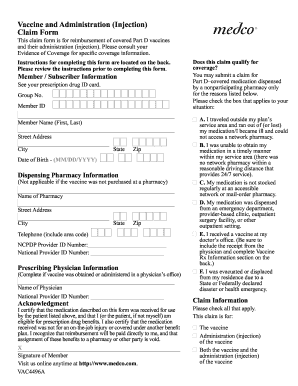
- Begin by entering your member or subscriber information. This includes your group number, member ID, name (first and last), home address (street, city, state, and zip), and birth date in MM/DD/YYYY format.
- If applicable, provide the dispensing pharmacy information. Fill in the pharmacy's name, street address, city, state, zip code, and telephone number. Additionally, include the NCPDP provider ID and national provider ID numbers.
- Complete the prescribing physician information section if the vaccine was obtained or administered in a physician's office. Enter the physician's name and their national provider ID number.
- Read the acknowledgment section carefully. You must certify that you have received the medication and that you are eligible for prescription drug benefits. Then, sign and date the form.
- Review the eligibility for coverage. Check the box that corresponds to your situation regarding why you are submitting this claim.
- In the claim information section, indicate whether your claim is for the vaccine, administration of the vaccine, or both.
- Fill out the vaccine Rx information section. Select the appropriate box for the vaccine received and complete the required fields, including Rx# (if applicable), NDC number, quantity, vaccine charge, and administration fee as needed.
- Ensure that you have included all required receipts for the vaccine with your completed claim form.
- Finally, save your changes and choose to download, print, or share the completed form as necessary before submitting it to Medco Health Solutions, Inc. at the address provided.
Start filling out your Vac4496a claim form online today for a seamless reimbursement process.
To fill out a customs declaration, you should clearly understand the items you need to declare. Follow the instructions carefully, providing accurate descriptions and values according to VAC4496a guidelines. Online tools can simplify this task, ensuring compliance with customs requirements and reducing hassles during travel.