Loading
Get Sd Dss-ea-320 2002
How it works
-

Open form follow the instructions
-

Easily sign the form with your finger
-

Send filled & signed form or save
How to fill out the SD DSS-EA-320 online
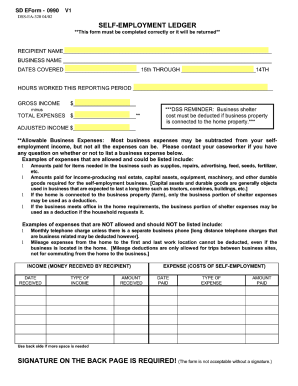
The SD DSS-EA-320 form is an essential tool for reporting self-employment income and expenses. This guide will walk you through the necessary steps to fill out the form correctly and ensure accurate reporting.
Follow the steps to complete the SD DSS-EA-320 form online
- Click ‘Get Form’ button to obtain the form and open it in the editor.
- Begin by entering the recipient's name in the designated field. This identifies who is reporting the income and expenses.
- Next, fill in the business name if applicable. This should reflect the name under which your self-employment operates.
- In the section for dates covered, specify the reporting period by entering the start date as the 15th and the end date as the 14th of the following month.
- Indicate the total hours worked during the reporting period in the provided space. Accurate reporting here is critical.
- Enter your gross income received during the period in the respective field. This figure represents total earnings before any deductions.
- Next, subtract your total expenses from your gross income. Input the total expenses in the designated area to calculate your adjusted income.
- Review the examples of allowable and non-allowable business expenses to ensure only eligible expenses are reported. If in doubt, contact your caseworker.
- Document all sources of income by including the date received, type of income, and amount received in the tables provided.
- Similarly, list expenses by documenting the date paid, type of expense, and amount paid in the relevant table.
- If additional space is needed, utilize the back side of the form for any extra income or expenses.
- Finally, ensure to sign the back page of the form before submission. The document will not be accepted without a signature.
- Upon completion, review all entries for accuracy, and use the option to print the form for mailing.
Complete your SD DSS-EA-320 form online today and ensure you meet all reporting requirements.
Get form
Experience a faster way to fill out and sign forms on the web. Access the most extensive library of templates available.
Related links form
Get This Form Now!
Use professional pre-built templates to fill in and sign documents online faster. Get access to thousands of forms.