Loading
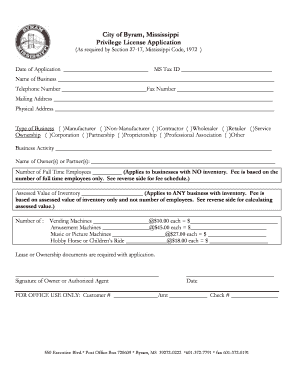
Get City Of Byram Mississippi Privilege License Application - Byram-ms
How it works
-

Open form follow the instructions
-

Easily sign the form with your finger
-

Send filled & signed form or save
How to fill out the City Of Byram Mississippi Privilege License Application - Byram-ms online
Filling out the City of Byram Mississippi Privilege License Application is essential for anyone planning to operate a business in the city. This guide provides clear, step-by-step instructions to help users of all experience levels complete the application accurately and confidently.
Follow the steps to complete the application effectively.
- Press the ‘Get Form’ button to access the application and open it in your preferred online editor.
- Enter the date of your application in the provided field.
- Input your Mississippi Tax ID number. This number is crucial for tax purposes.
- Fill in the name of your business in the designated area.
- Provide a contact telephone number and a fax number, if applicable, ensuring they are current and accurate.
- Complete the mailing address and physical address fields. Ensure that both addresses are clearly stated and complete.
- Indicate the type of business you are operating by selecting the appropriate option: Manufacturer, Non-Manufacturer, Contractor, Wholesaler, Retailer, or Service.
- Select your ownership type: Corporation, Partnership, Proprietorship, Professional Association, or Other.
- Describe your business activity in detail in the specified section.
- List the name(s) of the owner(s) or partner(s) involved in the business.
- For businesses with no inventory, enter the number of full-time employees in the corresponding field.
- If your business has inventory, input the assessed value of your inventory. This value will be used for calculating fees.
- If applicable, list the number of various machines (vending machines, amusement machines, music or picture machines, and hobby horse or children's rides) along with payment for each.
- Upload any required lease or ownership documents as specified in the application instructions.
- Review all entries for accuracy, then sign as the owner or authorized agent in the space provided.
- Indicate the date of your signature and finalize the form.
- Once completed, save your changes, and consider downloading, printing, or sharing the application as needed.
Complete your application online today to ensure the smooth operation of your business in Byram.
An application for a business license or renewal of an existing license can be submitted at https://jacksonms.viewpointcloud.com or call 601-960-1148 for more information.
Industry-leading security and compliance
US Legal Forms protects your data by complying with industry-specific security standards.
-
In businnes since 199725+ years providing professional legal documents.
-
Accredited businessGuarantees that a business meets BBB accreditation standards in the US and Canada.
-
Secured by BraintreeValidated Level 1 PCI DSS compliant payment gateway that accepts most major credit and debit card brands from across the globe.