Loading
Get Lesotho Revenue Authority E Services
How it works
-

Open form follow the instructions
-

Easily sign the form with your finger
-

Send filled & signed form or save
How to fill out the Lesotho Revenue Authority E Services online
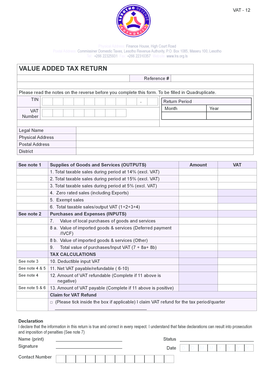
This guide provides a comprehensive overview of how to complete the Lesotho Revenue Authority E Services online for submitting a Value Added Tax return. Users will find clear instructions tailored to assist both new and experienced users in navigating the form effectively.
Follow the steps to submit your VAT return online.
- Click ‘Get Form’ button to obtain the form and open it in the editor.
- Start by filling in your reference number, TIN, and VAT number in the designated fields. Ensure accuracy to avoid any future complications.
- Indicate the return period by selecting the month and year. This ensures that the submission aligns with the appropriate tax period.
- Provide your legal name, physical address, postal address, and district. This information is vital for identifying your business.
- In the ‘Supplies of Goods and Services (Outputs)’ section, enter the total amounts of taxable sales during the period under the appropriate VAT rates (14%, 15%, 5%, and including zero-rated sales). Ensure that you sum your total taxable sales correctly.
- Fill in the ‘Purchases and Expenses (Inputs)’ section by entering the value of local purchases and both categories of imported goods and services. Calculate the total value of purchases.
- Proceed to the ‘Tax Calculations’ area where you need to calculate the deductible input VAT and determine the net VAT payable or refundable by subtracting deductible VAT from total taxable sales. Ensure that this calculation reflects accurate financial data.
- If applicable, mark the box to claim a VAT refund and provide the relevant details of your refund claim.
- In the declaration section, print your name, sign to confirm the accuracy of the information, provide your contact number, and state your status (for example, director, owner).
- Finally, save your changes, and choose to download, print, or share the form as needed to retain a copy for your records.
Ensure your VAT return is submitted accurately by completing the form online today.
Related links form
The first step in registering an individual or a partnership is to complete individual or business registration form online by visiting RSL website .rsl.org.ls/e-services/e-registration or https://eservices.lra.org.ls/ereg/public/ or a form may be obtained from any of the RSL Digital Service Centres.