UC, call the UC Service Center listed on the determination. If you would like to ask a question before you decide whether to appeal, call promptly because an appeal must be filed within 15 days after the determination is issued. What happens if I file an appeal? After your appeal is received and processed, the front of this form will be completed and returned to you as notification that it has been processed. You may also receive a copy of this appeal if the aggrieved party has filed an appeal.
Open form follow the instructions
Easily sign the form with your finger
Send filled & signed form or save
How to fill out the PA UC-46B online
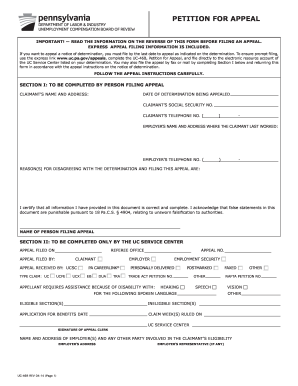
This guide provides comprehensive instructions for completing the PA UC-46B, the Petition for Appeal form. Whether you are a claimant or employer, this step-by-step approach will help ensure you fill out the form accurately and effectively.
Follow the steps to complete your PA UC-46B online.
- Click ‘Get Form’ button to access the form and open it in the editor.
- In Section I, enter the claimant’s name and address, ensuring all contact details are accurate. Include the date of the determination being appealed and the claimant’s social security number.
- Provide the employer’s name and address where the claimant last worked, along with the employer’s telephone number.
- In the field provided, clearly explain the reason(s) for disagreeing with the determination. This section is crucial as it outlines the basis of your appeal.
- Verify your information before certifying that all provided details are correct and complete. Understand that submitting false information can have legal repercussions.
- After filling out the form, you may choose to save changes, download a copy for your records, or print the form to submit it in accordance with the filing instructions on the determination notice.
Complete your PA UC-46B online to ensure a smooth appeal process.
Experience a faster way to fill out and sign forms on the web. Access the most extensive library of templates available.
Related content
Simply log on to uc.pa.gov to access your claim and click on Unemployment Services >...
2005 — This August is brought to you for free and open access by the Pennsylvania...
It has been type tested and tound to comply wlth limits tor a Class B computlng devlce In...
Get answers to your most pressing questions about US Legal Forms API.
Who can help me with PA unemployment?
If you are looking for help with PA unemployment, consider reaching out to local unemployment offices or legal assistance organizations. Additionally, you can use platforms like uslegalforms to access the PA UC-46B form and obtain guidance tailored to your situation.
How to win an unemployment appeal in Pennsylvania?
To win an unemployment appeal in Pennsylvania, prepare a comprehensive case that outlines your reasons for eligibility. Present all relevant documents, and if necessary, utilize the PA UC-46B form for clarity. Engaging with a knowledgeable resource, like uslegalforms, can enhance your chances.
How do I speak to someone at PA unemployment?
To speak to someone at PA unemployment, call the customer service number provided on their website. Make sure you have your claim information ready to streamline the process. Additionally, the PA UC-46B resource can be beneficial, guiding you on how to address specific inquiries more effectively.
Why is the PA unemployment line always busy?
The PA unemployment line often experiences high call volumes, especially during challenging economic periods. Many individuals seek assistance for their claims. To avoid long wait times, try calling during non-peak hours or utilize online resources such as the PA UC-46B form to find information quickly.
What is the best way to get through PA unemployment?
The best way to navigate PA unemployment is to be proactive and organized. Start by gathering your documents and understanding the claims process. Utilizing resources like the PA UC-46B form can simplify your efforts and provide you with the necessary steps to follow.
How to win an unemployment appeal for quitting?
Winning an unemployment appeal in Pennsylvania after quitting requires you to provide a valid reason for your departure. Document your circumstances, such as health issues or unsafe work conditions. The PA UC-46B can guide you through the appeal process, helping you present your case effectively.
What to put for credit weeks in PA unemployment?
When filling out your PA unemployment application, you need to report your credit weeks accurately. These weeks are determined based on your previous employment history and earnings. The PA UC-46B form can help clarify how to compute your credit weeks, ensuring you receive the benefits you deserve.
How do you resolve an issue with unemployment in PA?
To resolve an issue with unemployment in Pennsylvania, start by contacting the PA Department of Labor & Industry. Gather all necessary documentation related to your claim. If your issue persists, consider filing a formal appeal or utilizing the PA UC-46B form to ensure your concerns are addressed promptly.
How do I get a PA unemployment number?
You can obtain a Pennsylvania unemployment number by applying for unemployment benefits online or by phone. After your application is approved, you will be assigned a unique unemployment number. This number, tied to the PA UC-46B guidelines, helps track your claim and manage your benefits.
How to get a PA employer account number?
Employers in Pennsylvania can obtain an employer account number by registering online through the Pennsylvania Department of Labor and Industry's website. This account number is essential for managing unemployment taxes and claims. Utilize the PA UC-46B resources to help guide you through the registration process.
Use professional pre-built templates to fill in and sign documents online faster. Get access to thousands of forms.
If you believe that this page should be taken down, please follow our DMCA take down process here.